8 mins read
SpeedyGo PRO: The Ultimate WordPress Optimization Solution
Share Article :


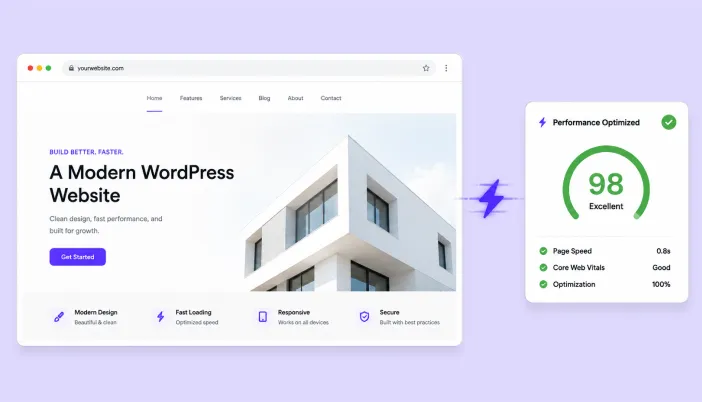
In this blog, you’ll learn how SpeedyGo PRO helps speed up WordPress websites through caching, image optimization, CSS and JavaScript optimization, compression, and CDN delivery. We’ll also cover its key features, setup process, Pro plan benefits, limitations, and whether it’s the right choice for a high-traffic business or WooCommerce website.
The average WordPress site loads in 8.6 seconds on mobile. SpeedyGo PRO exists to close that gap with caching, image optimization, and CDN delivery built for sites that can’t afford to lose visitors to a spinning loader.
WordPress powers a huge share of the web, but that flexibility comes at a cost: every theme, page builder, and plugin you add tends to bolt on more CSS, more JavaScript, and more database queries. Left unchecked, a site that started snappy slows down page by page until visitors are staring at a blank screen for seconds at a time.
SpeedyGo PRO is a WordPress performance plugin built specifically to reverse that drift not by asking you to rebuild your site, but by sitting on top of it and doing the optimization work automatically.
At its core, SpeedyGo PRO combines four categories of optimization that are usually spread across three or four separate plugins: page caching (serving a pre-built version of a page instead of rebuilding it from scratch on every visit), asset optimization (shrinking and combining your CSS and JavaScript files), image optimization (converting and compressing images into the lighter WebP format), and content delivery (serving your files from a CDN edge node close to each visitor instead of a single origin server).
The Pro tier adds the headroom bandwidth, storage, and unlimited image conversion that busier sites need once they outgrow entry-level plans.
The pitch isn’t that SpeedyGo PRO is the only way to speed up a WordPress site; it’s that it packages the handful of optimizations that reliably move the needle into one dashboard, with sane defaults, so you don’t need to become a performance engineer to benefit from them.
A slow WordPress site is a leaking bucket
Speed isn’t a vanity metric; it’s directly tied to bounce rate, search rankings, and revenue. Here’s what the data says about the cost of a slow-loading WordPress site.
| 53% of mobile visitors abandon a page that takes longer than 3 seconds to load | 8.6s average mobile page load time across the web today | ~20% drop in conversions for every extra second of load time | 10% of visitors the BBC loses for every additional second its pages take to load |
Everything a WordPress site needs to load faster
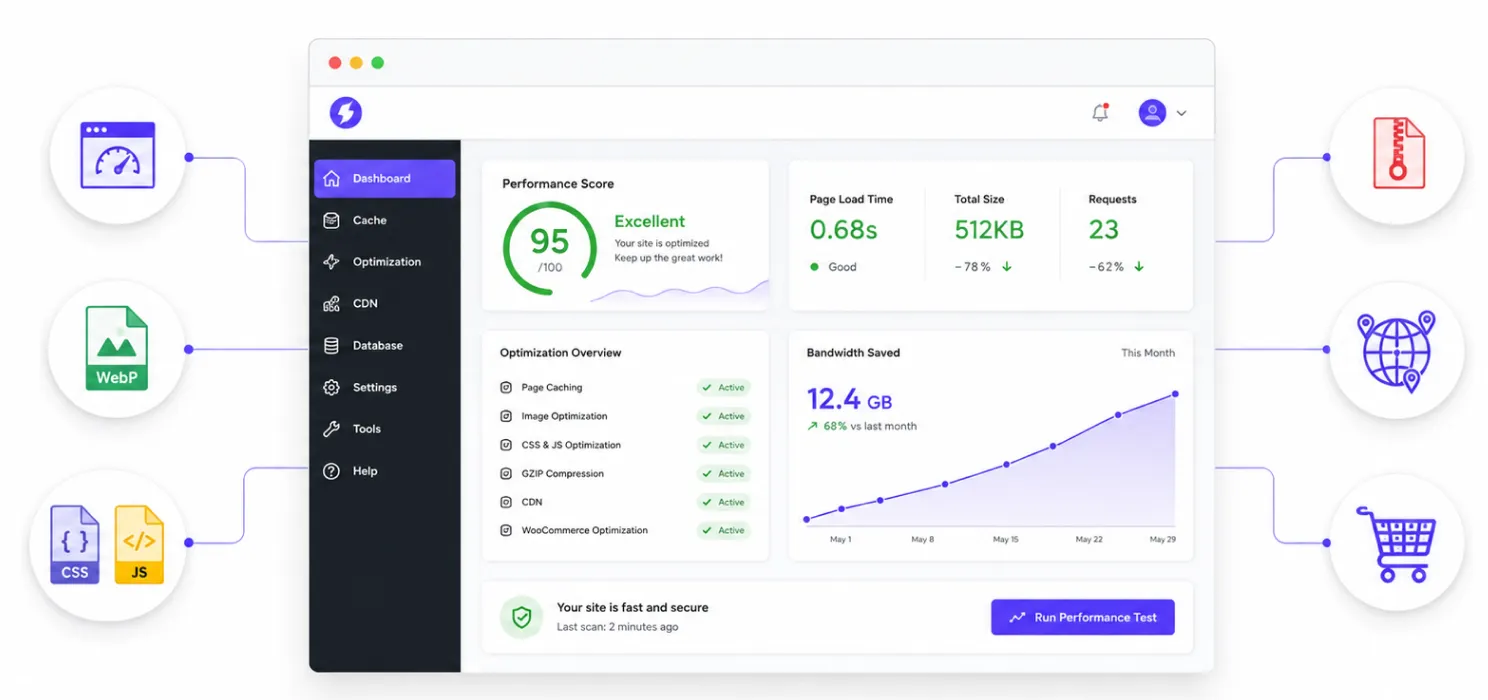
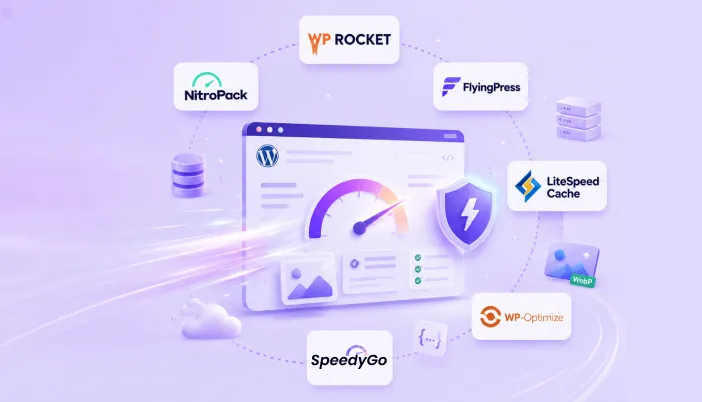
SpeedyGo PRO bundles the optimizations that usually require three or four separate plugins into one dashboard.
- Full-Page Caching + Preloading: Pages are cached and preloaded automatically so they’re ready to serve instantly, instead of being rebuilt on every visit.
- WebP Image Optimization: Images are converted to WebP and compressed on the fly. Pro plans include unlimited conversions under fair use.
- CSS & JS Optimization: Minification, combination, and JS interaction delay cut render-blocking resources without breaking layouts.
- Gzip & Brotli Compression: Smaller file transfers mean faster delivery, especially over mobile connections.
- BunnyCDN Integration: Content is served from edge locations near each visitor, cutting latency for a global audience.
- WooCommerce-Ready: Optimization runs without interfering with cart, checkout, or dynamic store pages.
Caching & preloading: the biggest single lever
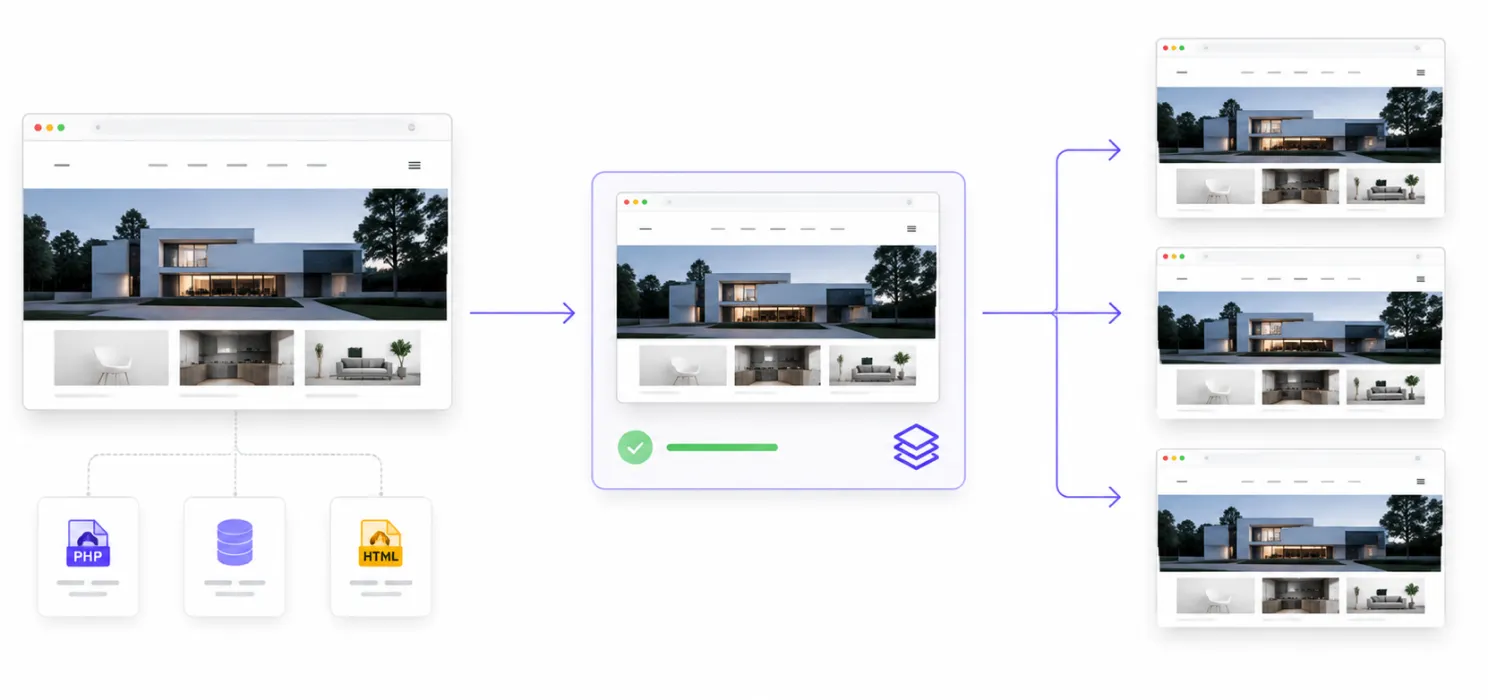
Every time WordPress serves a page, it normally has to run PHP, query the database, and assemble the HTML from scratch. Full-page caching skips that entire process for repeat visitors by storing a ready-to-serve copy of the page and handing it out directly. SpeedyGo layers cache preloading on top: instead of waiting for the first real visitor to “warm” a page’s cache, it proactively builds the cache in the background so even someone’s very first visit hits a cached version. It also runs separate mobile caching, since a page built for a 6-inch screen shouldn’t be identical to the desktop version, and includes scheduled expiration and auto-purge so cached pages don’t go stale after you publish new content.
Asset optimization: smaller CSS and JavaScript
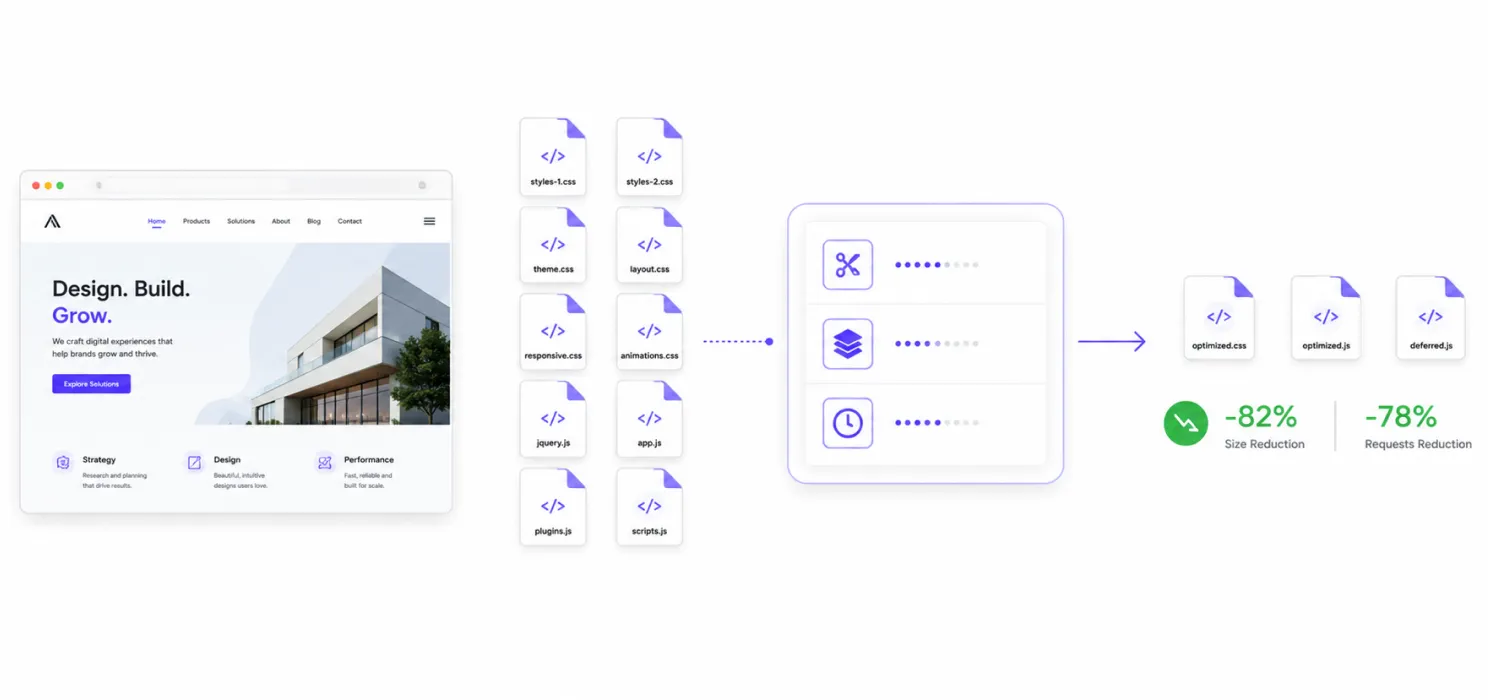
Modern WordPress themes and page builders often load a dozen or more separate CSS and JS files per page, many of them larger than they need to be. SpeedyGo minifies these files (stripping whitespace and comments), combines multiple files into fewer requests, and offers JS interaction delay deferring non-critical scripts (chat widgets, analytics, tracking pixels) until the visitor actually scrolls or clicks, so they don’t compete with the content itself for bandwidth on first load.
Image optimization: WebP conversion at scale
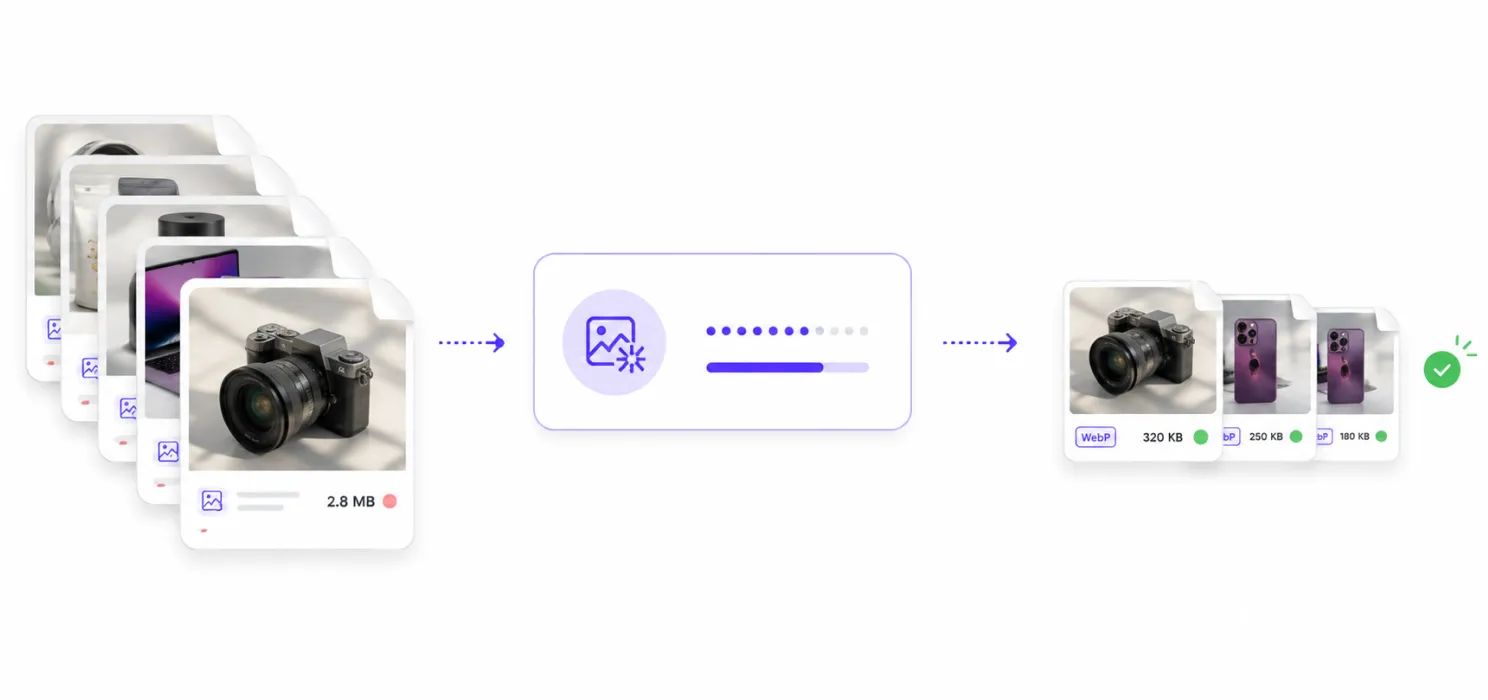
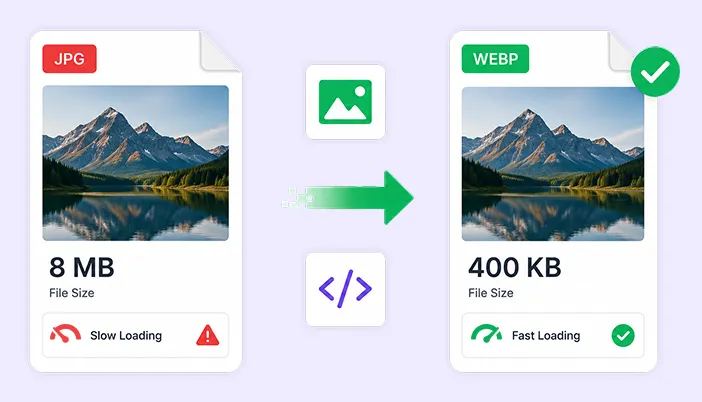
Images are usually the single heaviest part of a web page. SpeedyGo automatically converts uploaded JPEGs and PNGs into WebP, a format that typically produces smaller files at comparable visual quality, and applies lazy loading so images below the fold don’t load until a visitor scrolls near them. Pro-tier accounts get quality-control settings and conversion scope rules, so you can decide exactly which image types and sizes get converted, plus a server compatibility check that flags it immediately if your host doesn’t support WebP.
Compression: Gzip and Brotli
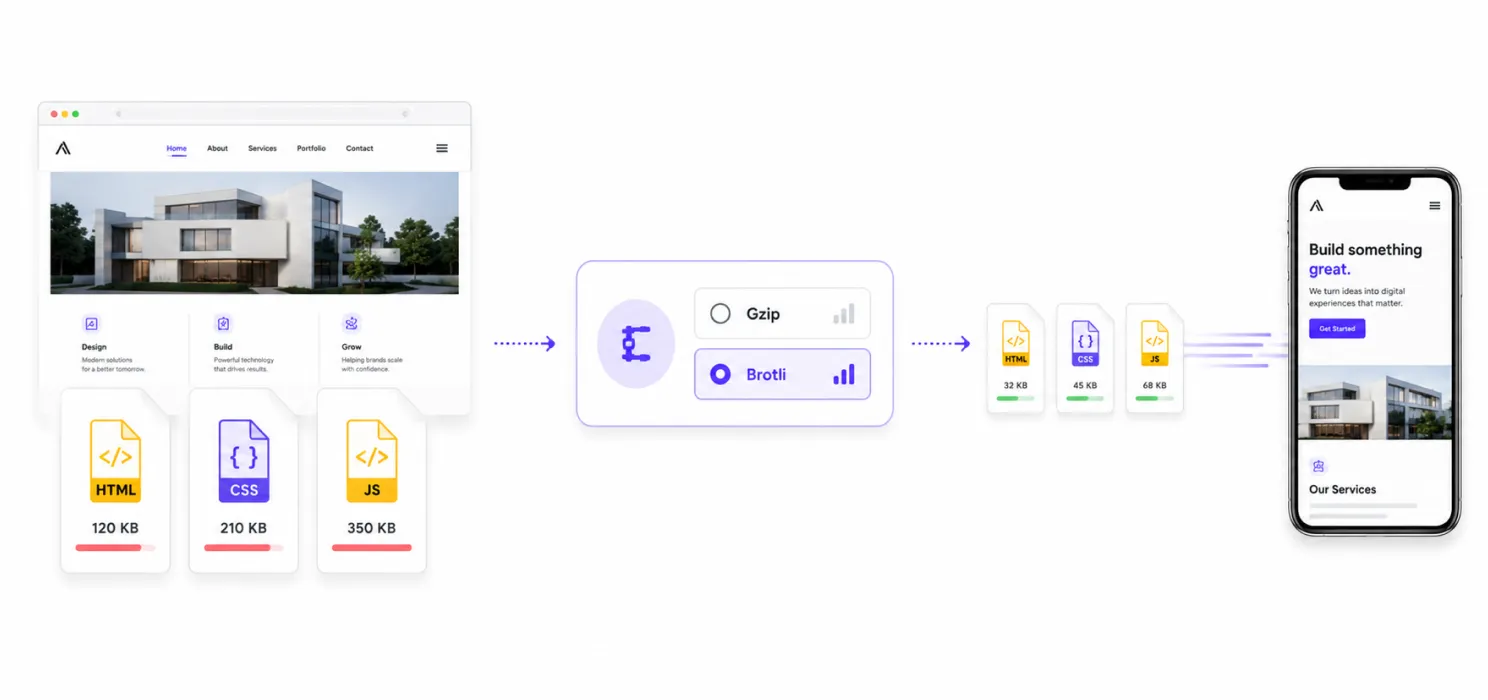
Beyond shrinking individual files, SpeedyGo compresses the data actually sent over the wire using Gzip or the newer, generally more efficient Brotli algorithm. This reduces transfer size for HTML, CSS, and JS on every request, which matters most for visitors on slower or higher-latency mobile connections.
CDN delivery via BunnyCDN
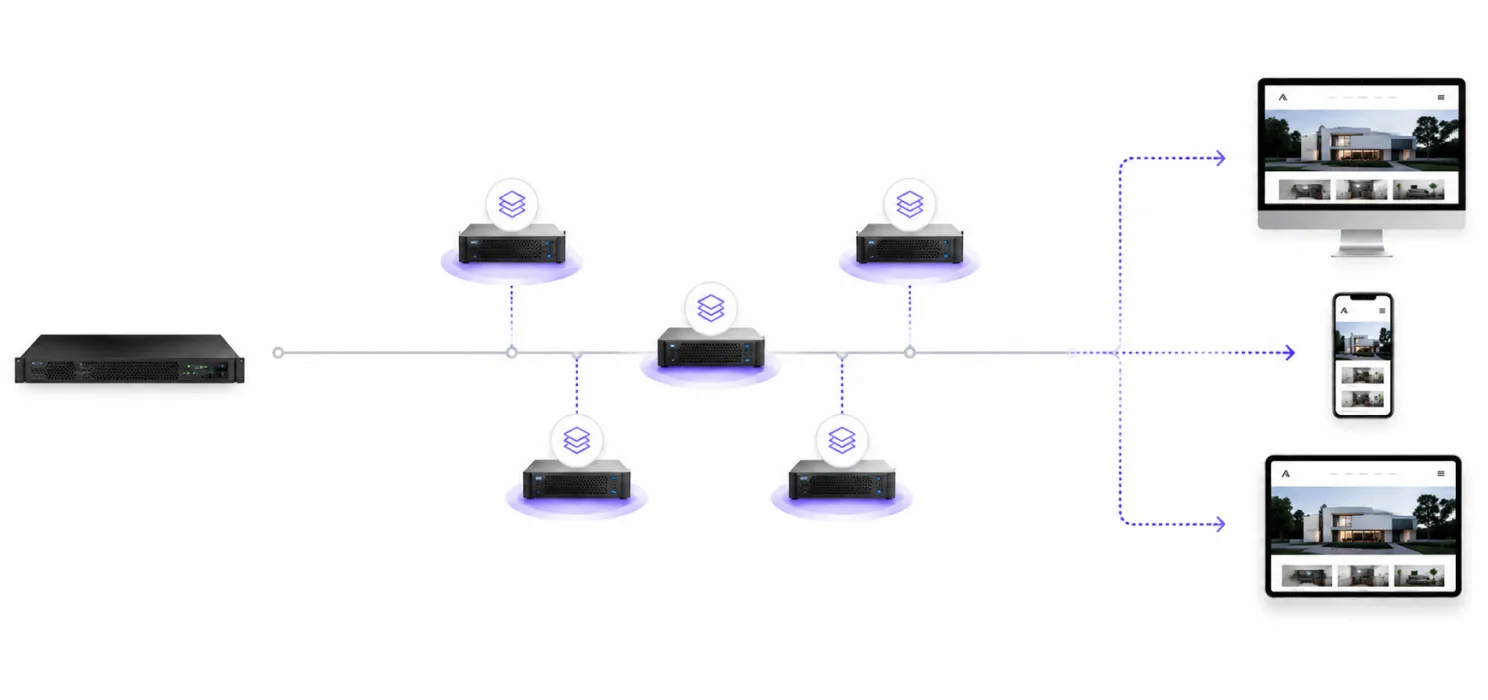
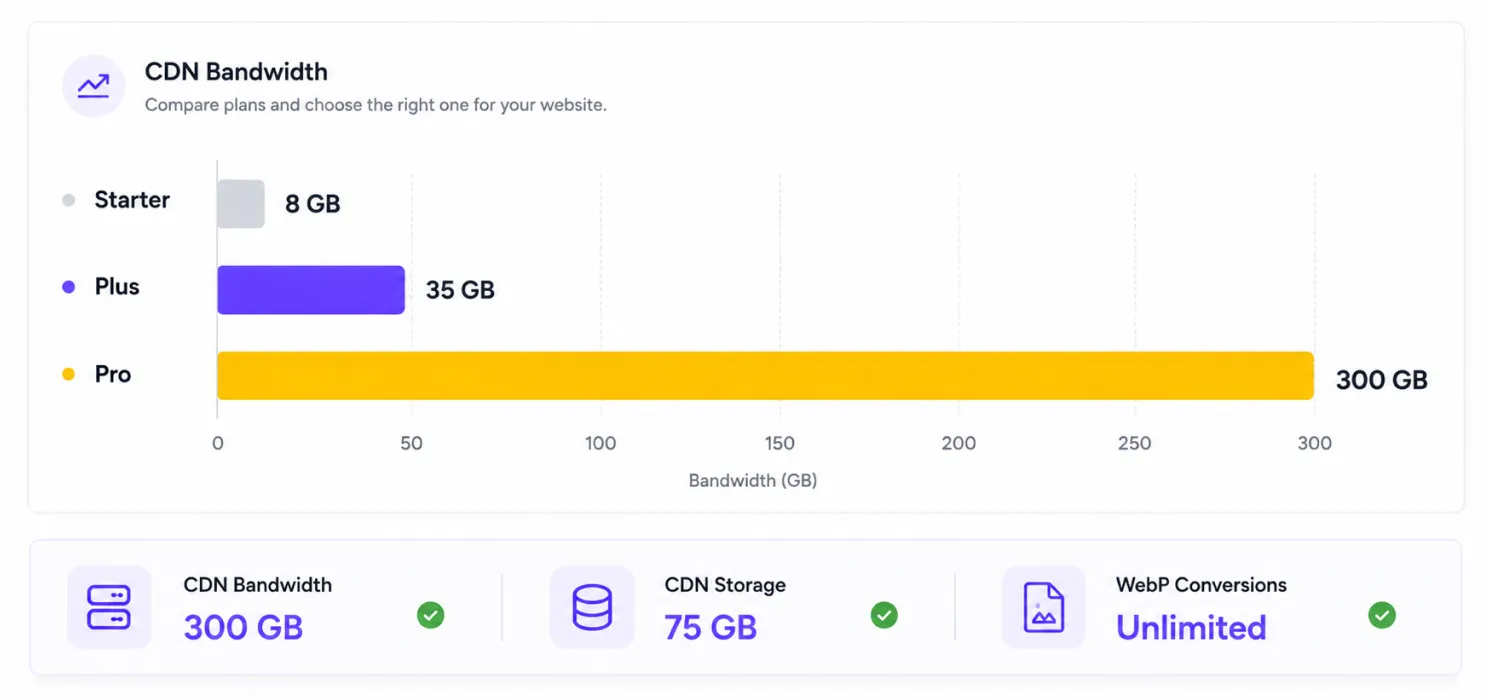
Without a CDN, every visitor’s request has to travel all the way to your origin server, wherever it’s hosted. SpeedyGo’s BunnyCDN integration caches your static assets images, CSS, JS, and fonts on edge servers positioned around the world, so a visitor in Singapore isn’t waiting on a round trip to a server in Virginia. This is where the CDN bandwidth and storage limits in each plan come into play: more traffic and more media means you need more headroom, which is exactly what the Pro plan’s 300 GB of bandwidth and 75 GB of storage are sized for.
Analytics and ongoing monitoring (Pro)
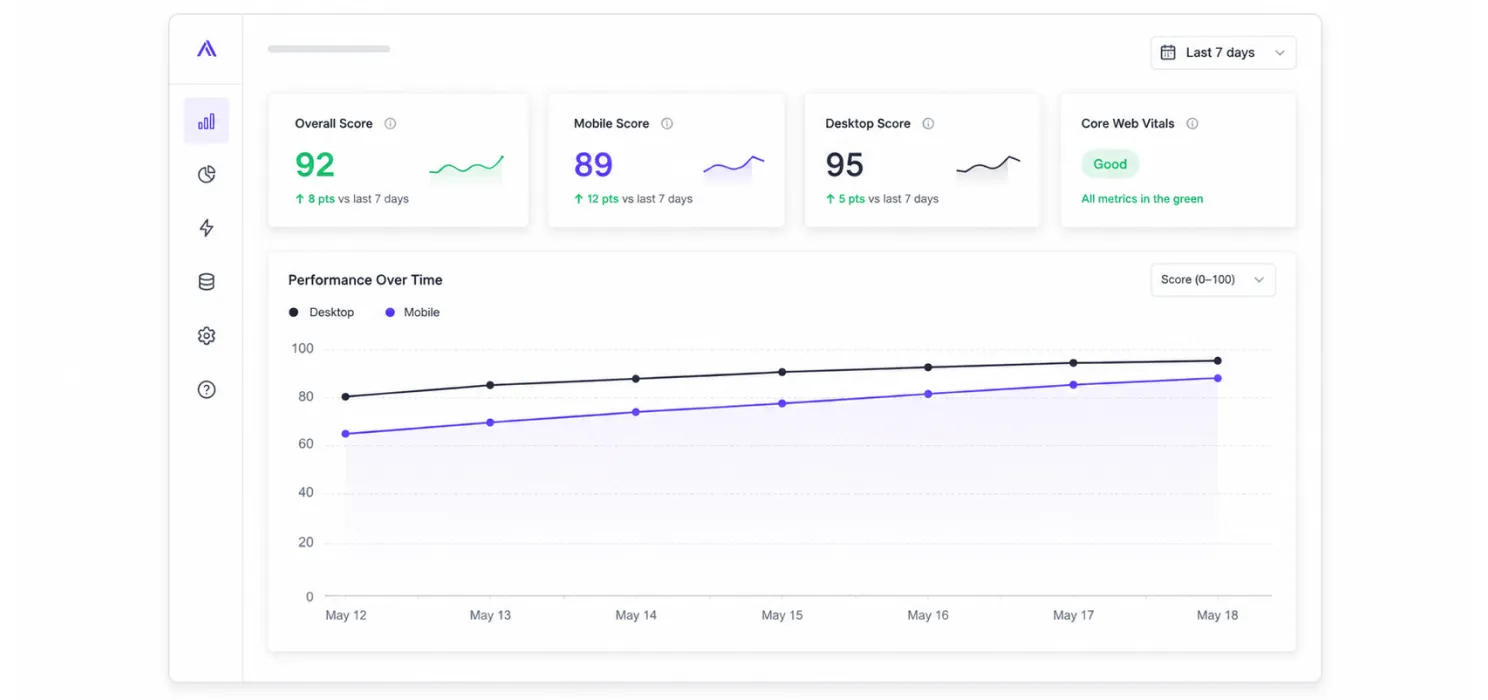
Optimizing a site once isn’t enough; new plugins, theme updates, and content changes can quietly undo your gains. Pro-tier accounts include PageSpeed analytics with mobile-versus-desktop tracking, powered by the Google PageSpeed API, so you can see how your real-world scores trend over time instead of guessing.
Setup: Getting started with SpeedyGo PRO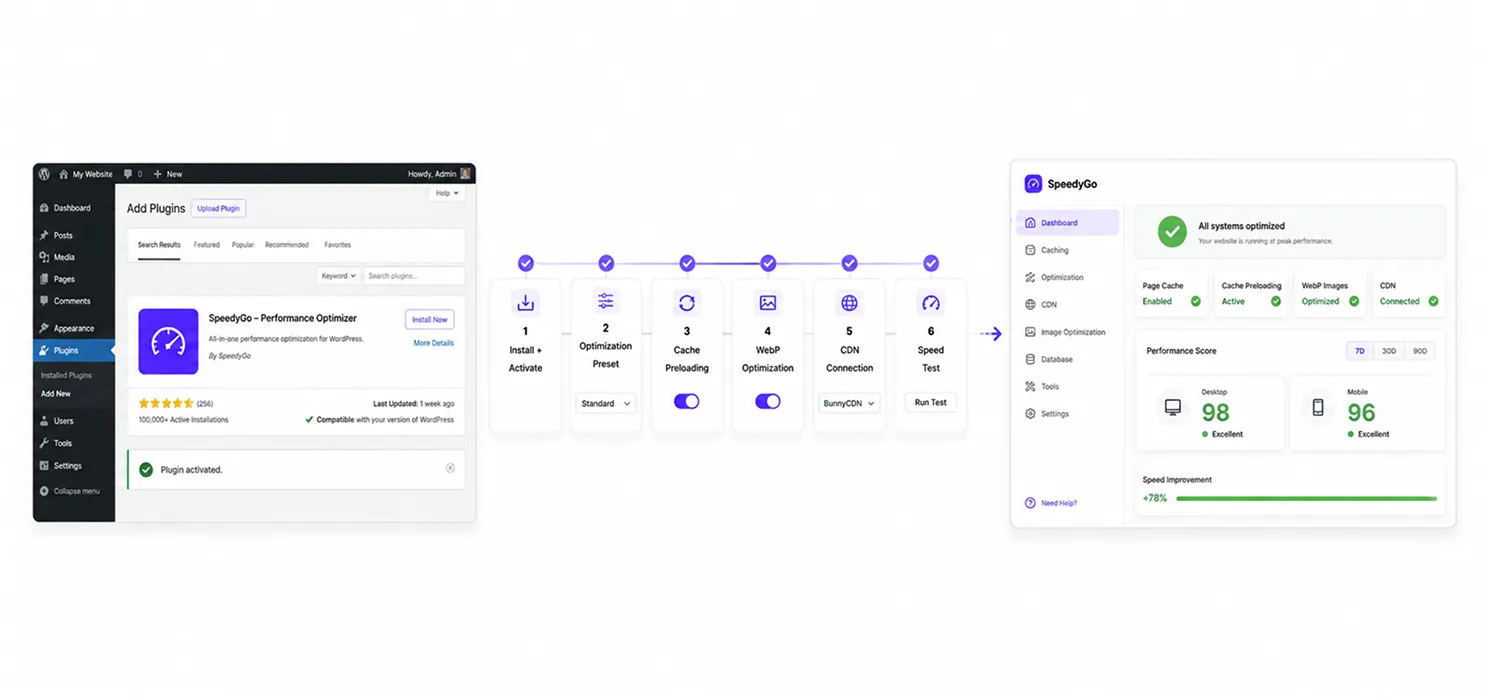
Most WordPress speed plugins are hard to configure correctly. SpeedyGo is built around sensible defaults, so the setup path is short.
- Install and activate the plugin: Upload SpeedyGo from your WordPress dashboard, activate it, and connect your license key to unlock Pro features.
- Apply an optimization preset: Choose one of SpeedyGo’s built-in presets to enable a sane combination of caching, minification, and lazy loading in one click, rather than toggling dozens of settings individually.
- Turn on cache preloading and warm-up: Let SpeedyGo build your cache proactively so first-time visitors and search engine crawlers aren’t the ones “paying” for a cold cache.
- Enable WebP conversion and set quality rules: Turn on image optimization, set your preferred WebP quality level, and define which image sizes should be converted.
- Connect BunnyCDN: Link your CDN integration so static assets are served from edge locations rather than your origin server alone.
- Run a speed test and compare: Use SpeedyGo’s built-in speed analyzer (powered by the Google PageSpeed Insights API) to check your before-and-after Core Web Vitals on both mobile and desktop.
Honest Take
No plugin is the right fit for every site. Here’s a balanced look before you commit.
What Pro does well
One-click presets mean you don’t need caching expertise to get a real improvement. Bundling caching, image optimization, compression, and CDN into a single dashboard removes the plugin-conflict risk you get from stacking three or four separate tools. The 20 hours of human support and included technical fixes are genuinely useful if a theme or page builder ever conflicts with an optimization setting. Unlimited WebP conversion (fair use) removes a cap that trips up media-heavy sites on cheaper plans.
Where to be careful
It’s a subscription, not a one-time purchase; there’s no lifetime license, so ongoing cost is a real factor for the life of your site. The 300 GB bandwidth and 75 GB storage are generous but not literally unlimited, so a site with a sudden viral traffic spike should watch usage. Like any caching plugin, aggressive settings can occasionally clash with certain themes or page builders, which is where the included technical support becomes worth using rather than optional. And Pro is priced for one website; agencies managing several client sites will want the separate agency/multi-site pricing rather than buying Pro per site.

Common questions about SpeedyGo PRO
Get answers to common questions about SpeedyGo PRO, including WooCommerce support, CDN bandwidth, WebP image conversion, plugin compatibility, upgrades, cancellations, and more.
Is the Pro plan enough for a live business or WooCommerce site?
Yes, Pro is specifically positioned for high-traffic business sites and includes WooCommerce support, so cart and checkout behavior aren’t affected by caching or asset optimization.
What happens if I go over my CDN bandwidth?
Each plan includes a monthly bandwidth allowance sized to typical usage at that tier (8 GB on Starter up to 300 GB on Pro). Sites that consistently exceed their plan’s allowance should move up a tier or, for multi-site agencies, look at custom CDN pricing.
Is image conversion really unlimited on Pro?
Pro includes unlimited WebP conversions under a fair-usage policy, which covers essentially all normal image libraries, the cap exists mainly to prevent abuse, not to limit typical business site usage.
Do you offer a lifetime license?
No. SpeedyGo is subscription-only, which keeps you on the latest updates, security patches, and feature releases rather than freezing you on one version.
Will SpeedyGo work with my theme, page builder, or plugins?
SpeedyGo is tested against leading WordPress themes and page builders like Elementor, Divi, and Astra. If a specific combination ever causes an issue, Pro’s included technical fixes and human support hours are there to resolve it.
Can I switch from another caching plugin?
Yes, deactivate the previous caching plugin first to avoid the two tools competing over the same cache files, then install and configure SpeedyGo using one of its presets.
Can I upgrade or cancel anytime?
Plans can be changed at any time, and every tier is backed by a 14-day money-back guarantee if it turns out not to be the right fit.