9 mins read
Why Do Critical Request Chains Slow Down WordPress?
Share Article :


| Quick summary This guide explains WordPress critical request chains in plain words. You’ll learn what a chain is, why themes and plugins make them longer, how to spot them in a PageSpeed report, and a simple three-part rule for shortening them. The guide includes diagrams, a causes table, and a checklist. The short answer: make the files your page needs first fewer, smaller, and earlier. |
Picture a relay race where each runner refuses to start until the one before has finished. Even if every runner is fast, the team still crawls.
That’s how many WordPress pages load. The browser asks for one file. Only after reading it, the browser learns it needs a second file. Then a third. Nothing can draw on screen until the whole line has finished.
Speed tests have a name for this: critical request chains. In PageSpeed reports, you’ll see it listed under “PageSpeed critical requests.” It’s really a story about WordPress resource loading: which file is asked for, when, and what it makes the browser ask for next.
If you’ve seen that warning in a PageSpeed report and wondered what to do about it, you’re in the right place. Let’s make WordPress critical request chains simple.
What is a critical request chain?
It’s a series of dependent requests that your page needs in order to appear. Lighthouse defines it as a “series of dependent network requests important for page rendering.”
The key word is “dependent.” The browser can’t ask for file B until it has downloaded and read file A. Each link in the chain is another trip across the network, and each trip has to wait for the last one.
Think of ordering at a counter where the cashier only tells you about the next item after you’ve finished the last. You’d be there a long time.
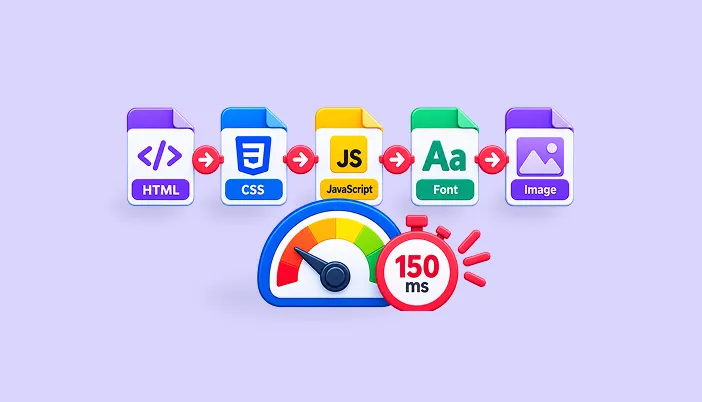
Here are two chains that are common on WordPress sites:

Read each row left to right. Every arrow is a wait. Notice how the visitor sees nothing useful until the very last box. That’s the heart of the problem. It isn’t that any single file is huge. It’s that they all queue up behind each other.
| A chain is only as strong as its weakest link. ~ Thomas Reid, 1786 |
In page loading, the “weakest link” is the slowest hop. One slow file at the front holds up everything behind it.
Why is WordPress so prone to long request chains?
Because a WordPress page is built from many parts, and each part can add its own files.
Your theme loads stylesheets and scripts. Each plugin may add more. A page builder adds its own. A slider, a form, a chat bubble and a font service all pile on. Many of them load further files themselves, and that’s how chains grow.
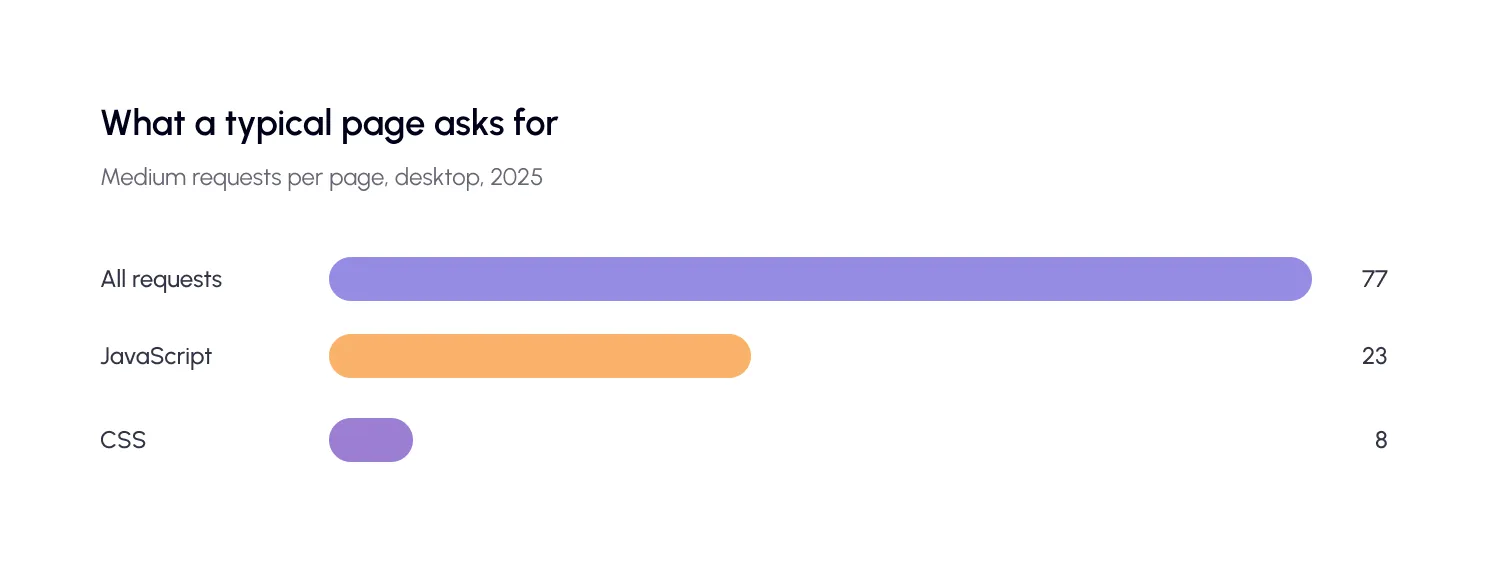
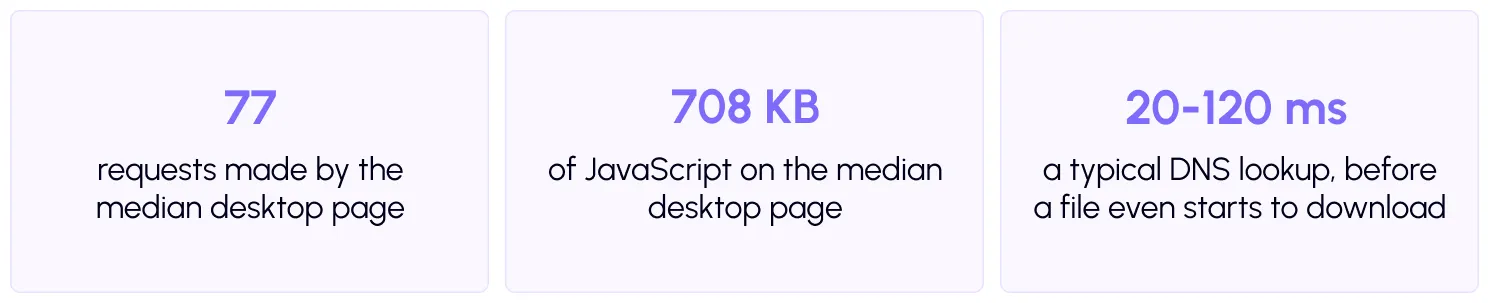
The HTTP Archive’s Web Almanac 2025 shows how busy a typical page is. The median page makes 77 requests on desktop and 72 on mobile. That includes 23 JavaScript requests and 8 CSS requests on desktop.
Good WordPress resource loading means the browser gets what it needs for the first screen quickly, and everything else waits its turn. Poor resource loading does the opposite.
Not all of those requests are in a chain. Many load side by side. But the ones that block the first screen matter most, and WordPress’s habit of stacking plugin files makes those blocking ones easy to multiply.
| Did you know? By default, CSS is render-blocking. Web.dev explains that the browser needs both the HTML and the CSS to build the page, so it won’t draw anything until the CSS is ready. Every stylesheet your plugins add in the page head sits on that critical path. |
How much do critical request chains actually slow a page?
Each hop adds a round trip, and the delays add up. Lighthouse puts it simply: the longer the chains and the larger the download sizes, the bigger the impact on page load performance.
Even before a file downloads, the browser may need to find the server. Web.dev says a DNS lookup usually takes about 20–120 ms, and setting up a secure connection can involve up to three round trips. A new third-party domain in the chain pays that cost again.
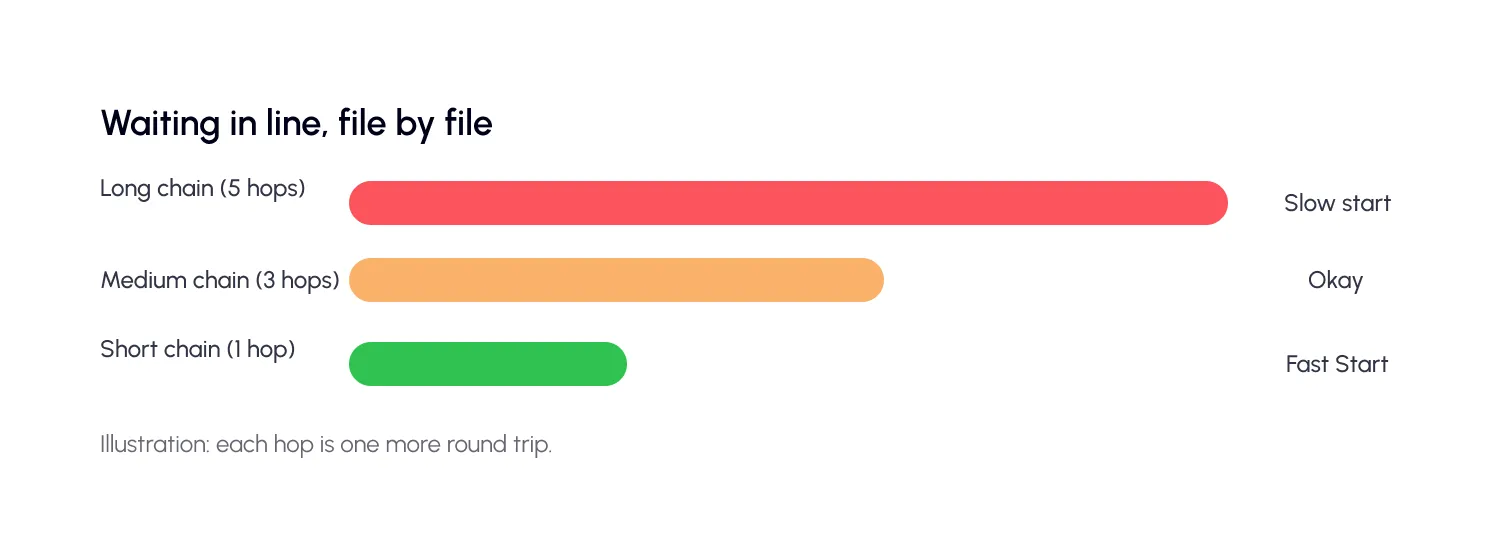
Here’s a simple illustration. Imagine each hop costs one 150 ms round trip. Watch what a longer chain does.
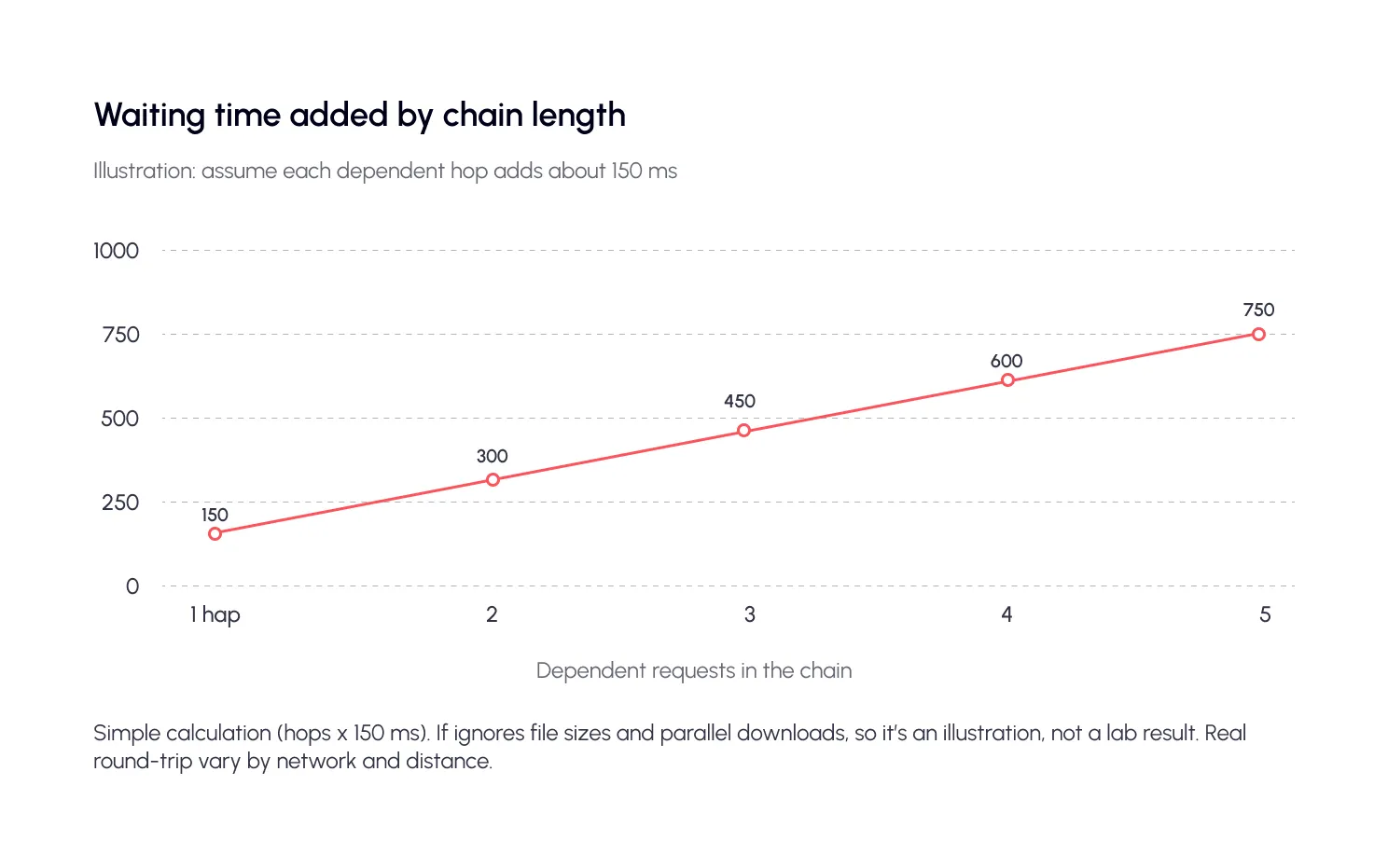
Think about what that means for a shopper on a phone. They tap your link, and the screen stays blank while the chain works through its list. Many will not wait. A five-hop chain would add three-quarters of a second before the page can start drawing, even if every file is tiny. On a slow mobile network, round trips cost more, so the same chain hurts even more.
How can you spot critical request chains in PageSpeed?
Run your page through PageSpeed Insights and look at the diagnostics. The PageSpeed critical requests section is the place to start. Lighthouse reports critical requests by checking network priority as a proxy for render-blocking resources.
You may know the audit as “Avoid chaining critical requests.” As of Lighthouse 13, this audit moved into the Network dependency tree insight, so the label can vary by version. The idea is the same: it shows a tree of the files your page waits on, and how deep it goes.

| Tip Don’t chase the whole list. Pick the longest chain, fix one file in it, and test again. One removed link can shorten several branches at once. |
What causes request chains in WordPress, and how do you fix them?
Most chains come from a handful of habits. If your PageSpeed critical requests list looks long, one of these is usually the reason. Here’s the cheat sheet.
| Cause | What the chain looks like | The fix |
| CSS that imports other CSS | HTML → style.css → imported.css | Link files directly, or combine them |
| Web fonts | HTML → CSS → font file | Preload the key font, or defer font loading |
| Render-blocking CSS | The page waits for every stylesheet in the head | Trim unused CSS; load non-critical CSS later |
| Scripts that load scripts | HTML → theme.js → plugin.js → more | Defer, delay or combine scripts |
| Third-party tags | HTML → tag manager → pixel → another pixel | Remove extras; preconnect to the essential few |
| Hero image set in CSS | HTML → CSS → background image | Use an image tag, or preload the image |
| Plugin files on every page | Assets load even where unused | Load them only on pages that need them |
Here’s a classic one in code. A stylesheet that imports another forces the browser to wait. The second file isn’t even discovered until the first has been downloaded and read.
A CHAIN HIDDEN INSIDE CSS
/* style.css */
@import url(“fonts.css”); /* discovered late */
The fix is to load both files straight from the page, side by side, or combine them into one. Then neither has to wait for the other.
What’s the simplest way to shorten critical request chains?
You don’t need to be a developer to follow this. Better WordPress resource loading comes down to one idea, and it applies to every file in a PageSpeed critical requests list.
Use Lighthouse’s own three-part rule: fewer, smaller, earlier.
Fewer critical resources
Remove what you don’t need on the first screen. Lighthouse suggests eliminating critical resources, deferring their download, or marking scripts as async. In WordPress, that means deactivating plugins you don’t use and delaying scripts that aren’t needed until a visitor interacts.
Smaller critical files
Shrink what’s left. Smaller files download faster and need fewer round trips. Minify your CSS and JavaScript, turn on compression, and convert images to lighter formats.
Earlier loading
Order the remaining files so they start as soon as possible. Two tools help here.
- Preload a few late-discovered files, like your main font. Web.dev notes fonts need the crossorigin attribute, and warns that too many preloads mean none of them are really prioritized.
- Preconnect to the one or two third-party domains your page truly needs. Web.dev says early connections to important origins can speed up load time by 100–500 ms. But the browser closes unused connections after about 10 seconds, so keep the list short.
Simplicity is a prerequisite for reliability.
— Edsger W. Dijkstra
That’s the whole approach in a sentence. A simpler page has fewer links to break and fewer places to wait.
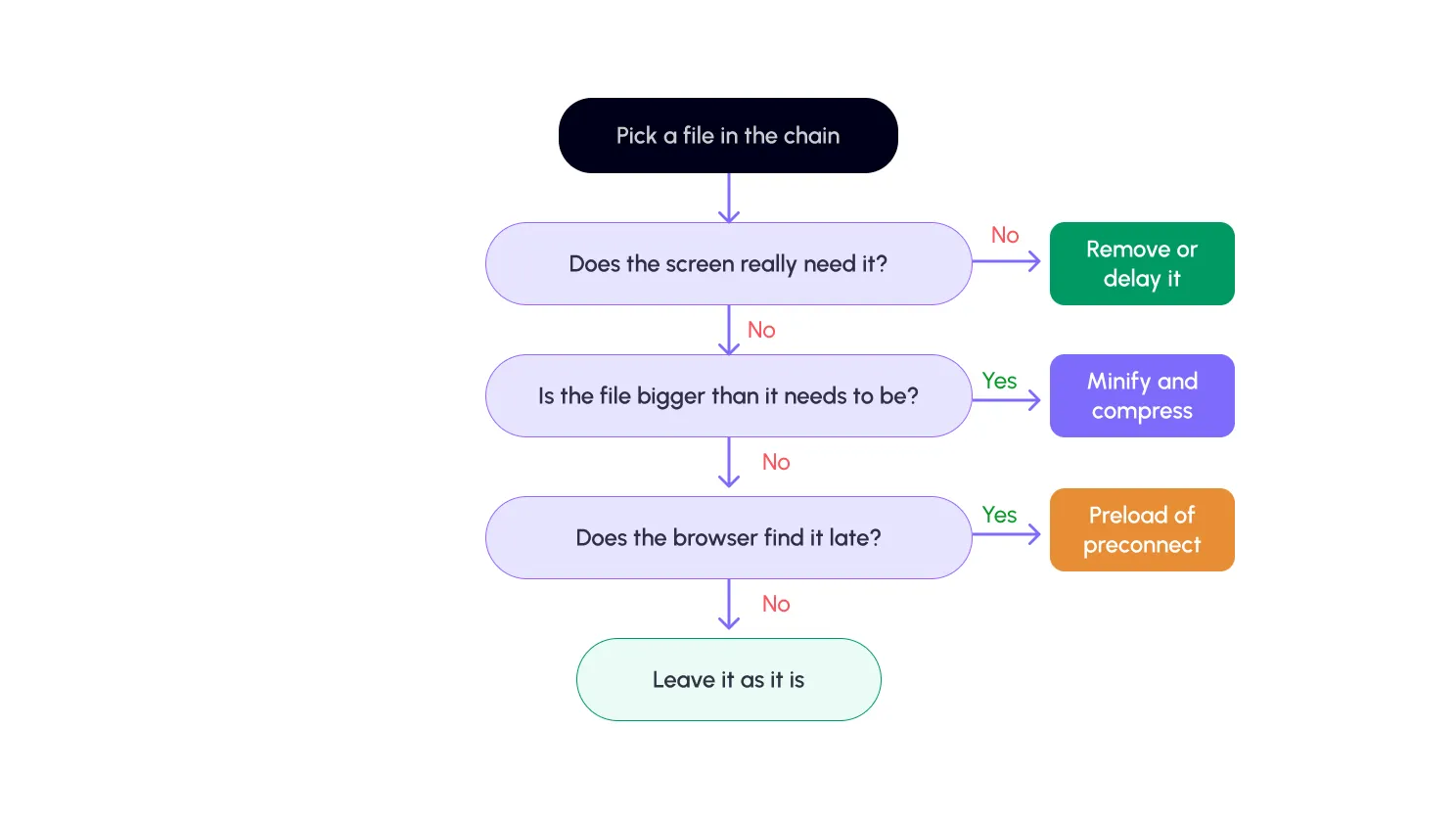
Not sure where to start? Follow this flow for each file you find in the chain. Ask the questions in order, and stop at the first “yes” that applies:
| ⚠️ Watch out Change one thing at a time, then test. Combining, delaying or deferring files can sometimes break menus, sliders or checkout buttons. A small, checked step beats a big, risky one. |
What does this look like on real sites?
These examples are simplified, but the patterns are very common. See if one looks like your site.
A blog with a custom font
Chain: page, stylesheet, font file. Fix: preload the one font used in headings, and don’t load fonts you never display.
A WooCommerce store with many plugins
Chain: page, theme script, several plugin scripts, each loading more. Fix: delay scripts until a visitor interacts, and keep plugin files off pages that don’t use them.
A page-builder site with a slider
Chain: page, builder script, slider script, slide data. Fix: consider a lighter hero than a slider, or at least load the first slide directly.
A site with a tag manager
Chain: page, tag manager, one pixel, another pixel. Fix: remove tags nobody uses, and preconnect to the one or two that matter.
What’s the critical request chain checklist?
- Run a test. Try the free SpeedyGo speed test and note the critical request or dependency item.
- Find the longest chain. Write down the files in it, in order.
- Remove what you don’t need. Unused plugins, extra fonts, forgotten tags.
- Delay or defer scripts. Anything not needed for the first screen.
- Shrink what’s left. Minify, compress and use lighter images.
- Preload or preconnect, sparingly. One key font, one or two key domains.
- Test again and click around. Check menus, forms and checkout still work.
The bottom line
Critical request chains slow WordPress because files wait in line behind each other, and every plugin and font can add another link. Nothing draws until the line is done.
The good news is that you rarely need to rebuild anything. You only need to find the longest chain and cut its first link. The cure is a short, three-step habit: make the first-screen files fewer, smaller and earlier. Do that, and your WordPress critical request chains shrink, your page starts drawing sooner, and your visitors stop waiting.