7 mins read
Best WordPress Caching Plugin in 2026: What Should You Actually Choose?
Share Article :


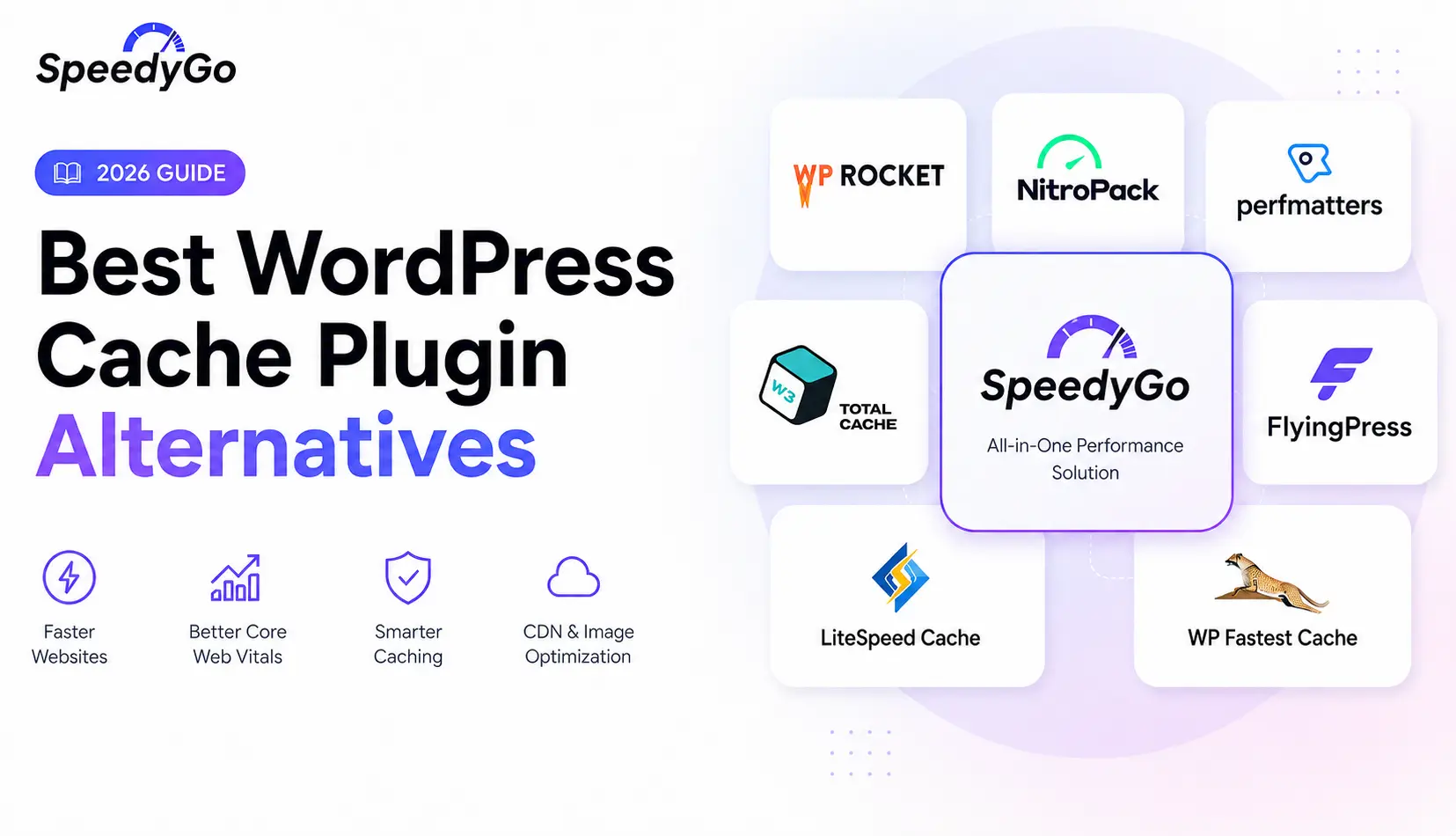
This blog compares the WordPress caching plugins that actually matter in 2026, including WP Rocket, LiteSpeed Cache, W3 Total Cache, FlyingPress, and WP Super Cache. You’ll get a real WordPress caching plugin comparison based on hosting stack, skill level, and site type, plus the setup mistakes that quietly break caching on most sites.
There’s a comparison table, a practical example, and an FAQ section answering exactly what people ask before installing one.
What does a WordPress caching plugin actually do?
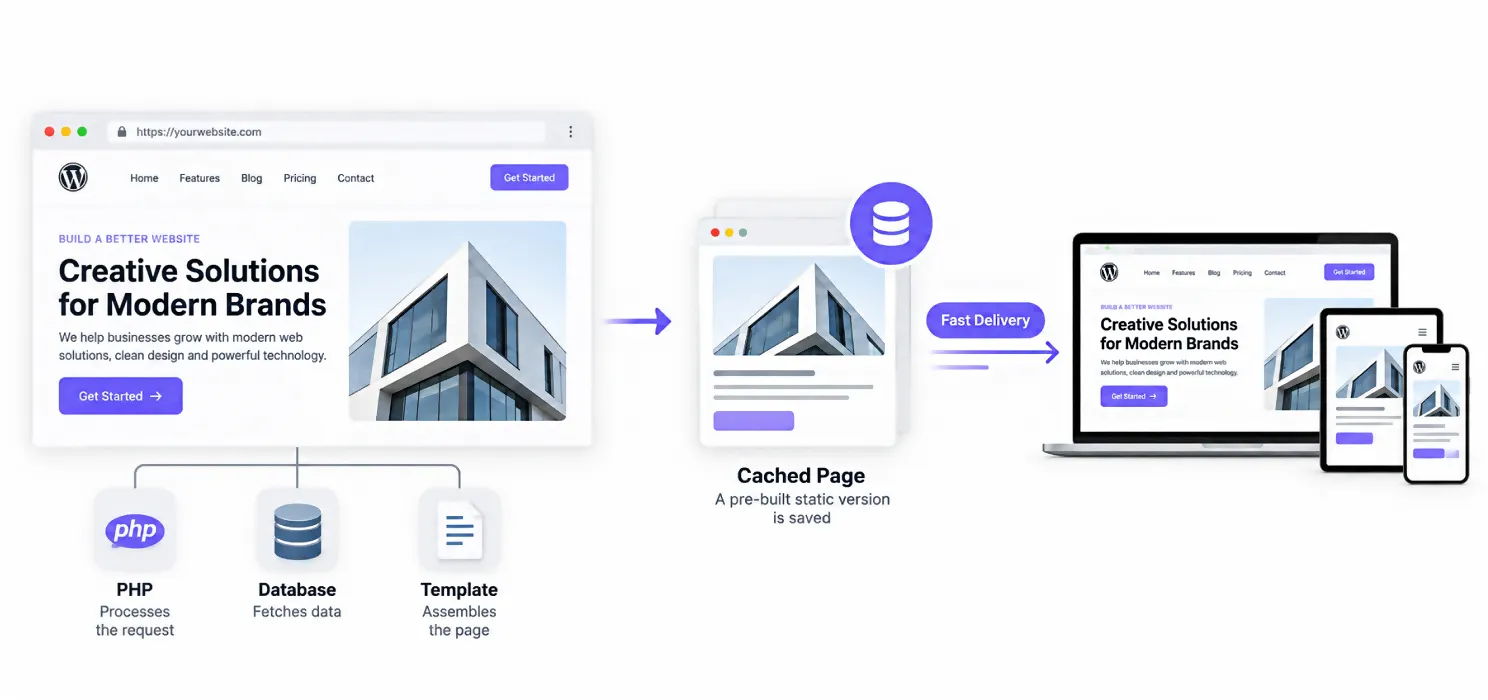
A caching plugin saves a static, pre-built version of your page so WordPress doesn’t have to rebuild it from scratch on every visit. Without caching, each request triggers PHP execution, a database query, and template assembly before the page ever reaches a visitor’s browser.
A good caching plugin can cut your server response time from 800 milliseconds down to under 100 to 200 milliseconds, without touching a line of code. That single change often pushes your PageSpeed Insights score from the 60s into the 90s, since server response time feeds directly into your Largest Contentful Paint. If you haven’t already, our guide on how to fix LCP, INP, and CLS covers exactly how caching fits into the bigger Core Web Vitals picture.
The catch is that “install a caching plugin” isn’t a single action. Which plugin fits your site depends heavily on your hosting environment, your technical comfort level, and what kind of site you’re running.
What is the best WordPress caching plugin in 2026?
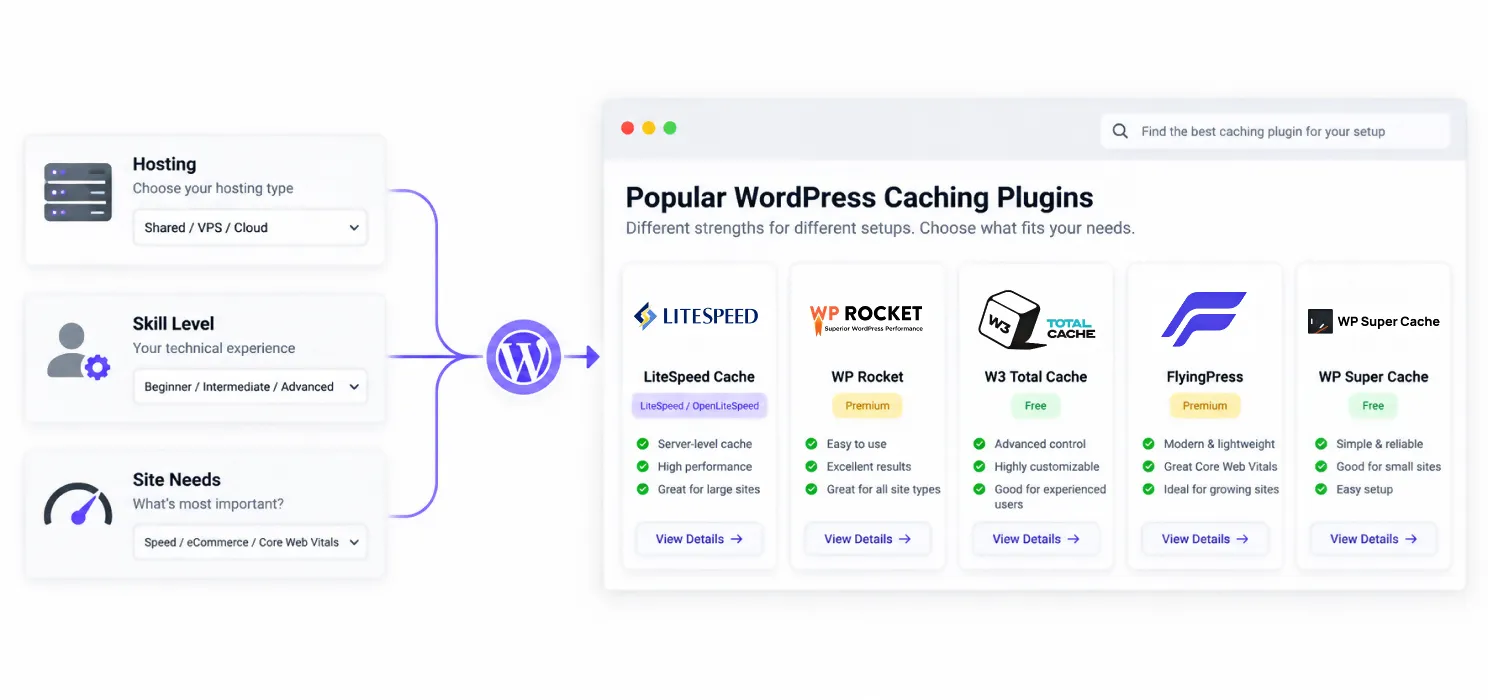
There isn’t one universal answer, and any guide claiming there is hasn’t accounted for how differently these plugins perform depending on your hosting stack.
LiteSpeed Cache is the strongest free option, but only if your host actually runs on LiteSpeed or OpenLiteSpeed servers (common with Cloudways LiteSpeed stacks, Hostinger, and NameHero). On compatible hosting, it delivers server-level caching plus a full image optimization suite at no cost, and testing has shown it hitting LCP scores around 0.9 seconds, while other plugins with default settings sit closer to 2 seconds.
WP Rocket is the most popular premium plugin, used on more than 3.5 million sites. At $59 per year, it applies page caching, compression, and database cleanup automatically the moment it’s activated, and most users see a measurable improvement within minutes. Its JavaScript delay feature specifically helps Interaction to Next Paint, which makes it a strong pick if INP is your weakest metric.
W3 Total Cache remains the most configurable free plugin, supporting disk caching, object caching through Redis or Memcached, and database query caching. That depth is also its downside. Default settings tend to underperform, and getting real results requires expert-level tuning, something worth knowing before you install it expecting instant gains.
FlyingPress shows up repeatedly in 2026 comparisons as the strongest option specifically for Core Web Vitals, thanks to features like delaying non-critical HTML elements until interaction. It’s a paid plugin, but it’s built for site owners who want to optimize past what page caching alone achieves.
WP Super Cache is the safest free minimum if you can’t install anything paid and don’t want to touch complex settings. It won’t outperform the plugins above, but it reliably does the core job without much risk of misconfiguration.
WordPress caching plugin comparison: which one fits your setup?
Rather than picking by brand recognition, match the plugin to your actual hosting and skill level:
| Plugin | Cost | Best For | Watch Out For |
| LiteSpeed Cache | Free | Sites on LiteSpeed or OpenLiteSpeed hosting | Falls back to basic PHP caching on Apache or Nginx |
| WP Rocket | $59/year | Anyone wanting fast results with minimal setup | Premium only, no free tier |
| W3 Total Cache | Free | Developers who want granular, low-level control | Overwhelming for beginners, needs tuning to perform |
| FlyingPress | Paid | Site owners specifically optimizing Core Web Vitals | Smaller user base than WP Rocket, less documentation |
| WP Super Cache | Free | Simple sites needing safe, no frills caching | Fewer advanced features, less impact on INP |
If you already know your hosting provider runs on LiteSpeed, that answers most of the decision for you. If you’re on generic shared or Apache hosting and want something reliable without learning a settings panel, WP Rocket is the practical default most 2026 comparisons converge on.
What is the best cache plugin for WordPress if you’re using WooCommerce or a page builder?
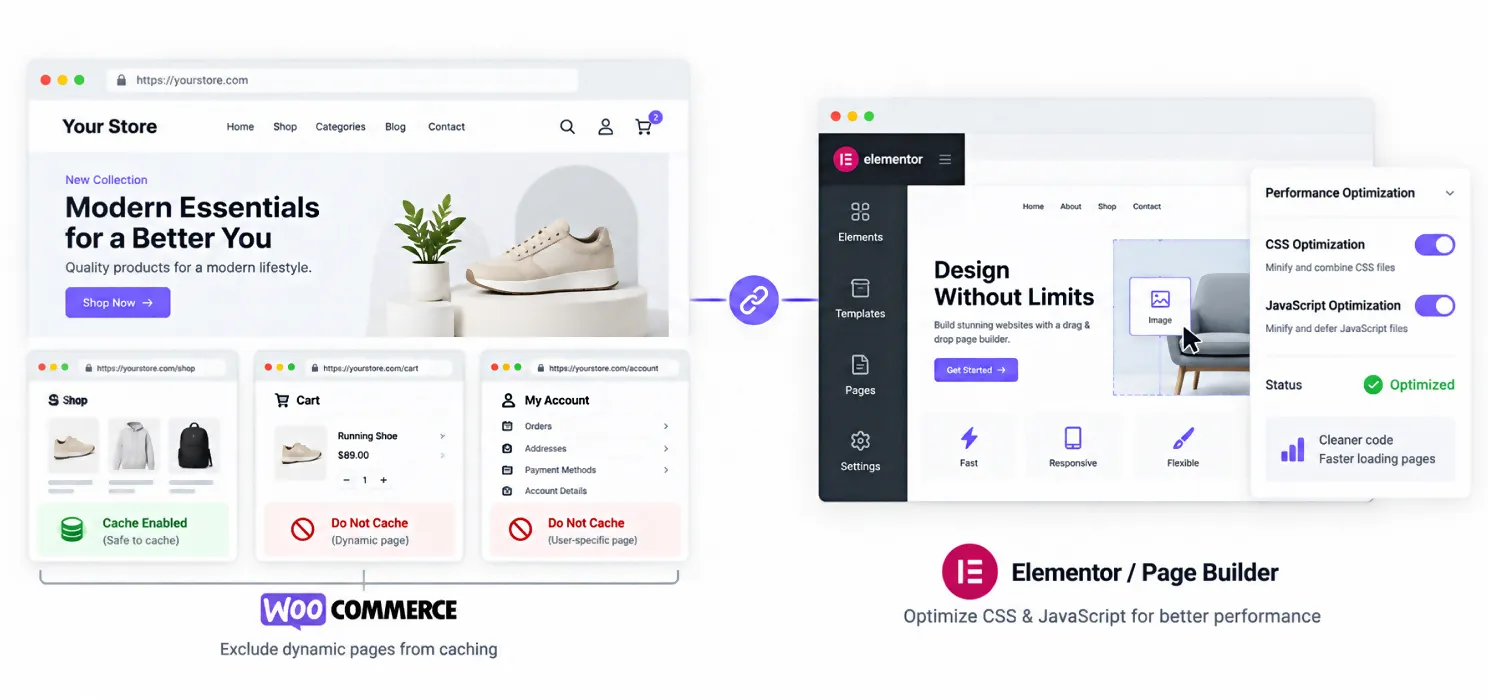
E-commerce and page builder sites have specific needs that a generic caching plugin doesn’t automatically solve.
For WooCommerce specifically, cart, checkout, and account pages must be excluded from caching, regardless of which plugin you choose. A cached checkout page causes broken carts and failed orders, a mistake that’s caused real businesses to lose sales before anyone noticed the pattern.
For page builder sites (Elementor, Divi, and similar), the heavier code these tools generate benefits from CSS and JavaScript optimization more than from page caching alone. WP Rocket and FlyingPress both handle this well, with FlyingPress’s element delay feature performing particularly well on complex builder pages.
Is a WordPress performance plugin different from a caching plugin?
Yes, and the distinction matters more than most buyers realize before comparing options.
A caching plugin’s core job is serving a static version of your page instead of rebuilding it each time. A broader WordPress performance plugin often bundles caching with image optimization, minification, database cleanup, and CDN integration into one tool. WP Rocket, LiteSpeed Cache, and FlyingPress all fall into this second, broader category. W3 Total Cache and WP Super Cache lean closer to pure caching, with fewer bundled extras.
If you’re already running separate tools for image compression or a CDN, a pure caching plugin avoids redundant overlap. If you’d rather consolidate into one tool, the bundled performance plugins reduce the number of settings panels you need to manage.
What setup mistakes quietly break WordPress caching?
Most caching problems aren’t about which plugin you picked. They’re about how it was configured.
Running two page caches at once. If your host already provides a built-in page cache (common with managed hosts like Kinsta, WP Engine, or Pressable), installing a second plugin’s page cache on top of it usually causes conflicts rather than double the benefit. In that scenario, use a frontend-only optimizer instead of a full caching plugin.
Skipping WooCommerce exclusions. As mentioned above, failing to exclude cart, checkout, and account pages is one of the most common and costly configuration errors.
Never verifying the cache is actually working. It’s worth checking response headers or HTML comments in your page source to confirm the cache is serving pages as expected, rather than assuming activation alone means it’s functioning.
Over-aggressive minification. Particularly with W3 Total Cache, minifying CSS and JavaScript too aggressively can break scripts or create rendering conflicts, sometimes making a site slower rather than faster.
A practical example
A WooCommerce store running Elementor had been on a free caching plugin for years, installed by a previous developer and never revisited. Checkout failures were happening intermittently, and the owner assumed it was a payment gateway issue.
The actual cause was configuration conflicts between the caching plugin and the checkout flow, since cart and account pages hadn’t been excluded from the cache. Switching to WP Rocket and properly excluding those pages resolved the checkout issue within minutes of activation, and the site’s LCP dropped from over 3 seconds to under 1.5 seconds as a side effect of the switch.
Nothing about the store’s design or products changed. The only variable was choosing a plugin suited to the setup and configuring the exclusions that should have been there from the start.
Frequently Asked Questions About Core Web Vitals
What is the best WordPress caching plugin overall in 2026?
It depends on your hosting. LiteSpeed Cache is the strongest free option on LiteSpeed servers. WP Rocket is the most practical premium choice for generic shared or Apache hosting, since it works with minimal configuration. There’s no single plugin that’s best across every hosting environment.
What's the difference between WP Rocket and LiteSpeed Cache?
WP Rocket works on any host and requires almost no setup, applying caching, compression, and cleanup automatically. LiteSpeed Cache is free and matches or beats WP Rocket’s performance, but only on LiteSpeed or OpenLiteSpeed servers. On Apache or Nginx hosting, LiteSpeed Cache loses its main advantage and falls back to basic PHP caching.
Is W3 Total Cache still worth using in 2026?
Yes, for developers who want granular control and are comfortable with detailed configuration. It supports more caching methods than most competitors, including Redis and Memcached object caching. It’s not the best choice for beginners, since default settings often underperform compared to properly tuned alternatives.
Which WordPress caching plugin is best for Core Web Vitals specifically?
FlyingPress is frequently cited as the strongest option for improving Core Web Vitals specifically, due to features that delay non-critical elements until user interaction. WP Rocket’s JavaScript delay feature also targets Interaction to Next Paint directly, making it a strong second option.
Can I use two caching plugins at once for better results?
No. Running two page caching plugins simultaneously, or a plugin’s page cache alongside a host’s built-in cache, typically causes conflicts rather than added benefit. Use one page cache at a time, and layer in a CDN or object cache separately if needed.
Do free WordPress caching plugins work as well as paid ones?
On the right hosting, yes. LiteSpeed Cache, when running on LiteSpeed servers, matches or beats paid alternatives at no cost. On generic hosting, free options like WP Super Cache still handle the core job reliably, though paid plugins like WP Rocket typically offer more automatic optimization and require less manual tuning.