5 mins read
WordPress Speed Optimization ROI: Is Paying for Performance Worth It?
Share Article :


Quick summary
Speed work costs money, so it is fair to ask what you get back. This guide breaks down WordPress speed optimization cost, shows a simple formula to calculate your return, compares the main options from free to agency, and explains when paying for performance is not worth it. You will finish with a clear way to decide.
You have a slow site, and three different people have given you three different answers. Install a free plugin. Hire an expert. Upgrade your hosting. Each option has a different price. And none of them comes with a guarantee that your sales will go up. So the real question is not “what is the best speed fix?” It is “what will I get back for what I spend?” Let’s answer that with numbers.
Does website speed really affect money?
Yes, and there is research to prove it. A well-known study by Google and Deloitte looked at 37 brands. It found that making a mobile site just 0.1 seconds fasterlifted retail conversions by 8.4%.
Google has also reported that 53% of mobile visits are abandoned when a page takes more than 3 seconds to load. People do not wait.
Speed also touches your marketing. Faster pages helpCore Web Vitals, which are part of Google’s page experience signals. They help paid ads, too, since a visitor who clicks an ad and leaves before the page loads is money wasted.

What does SpeedyGo cost?
Here are the current yearly prices on the SpeedyGo pricing page, which list a limited-time 50% yearly discount.
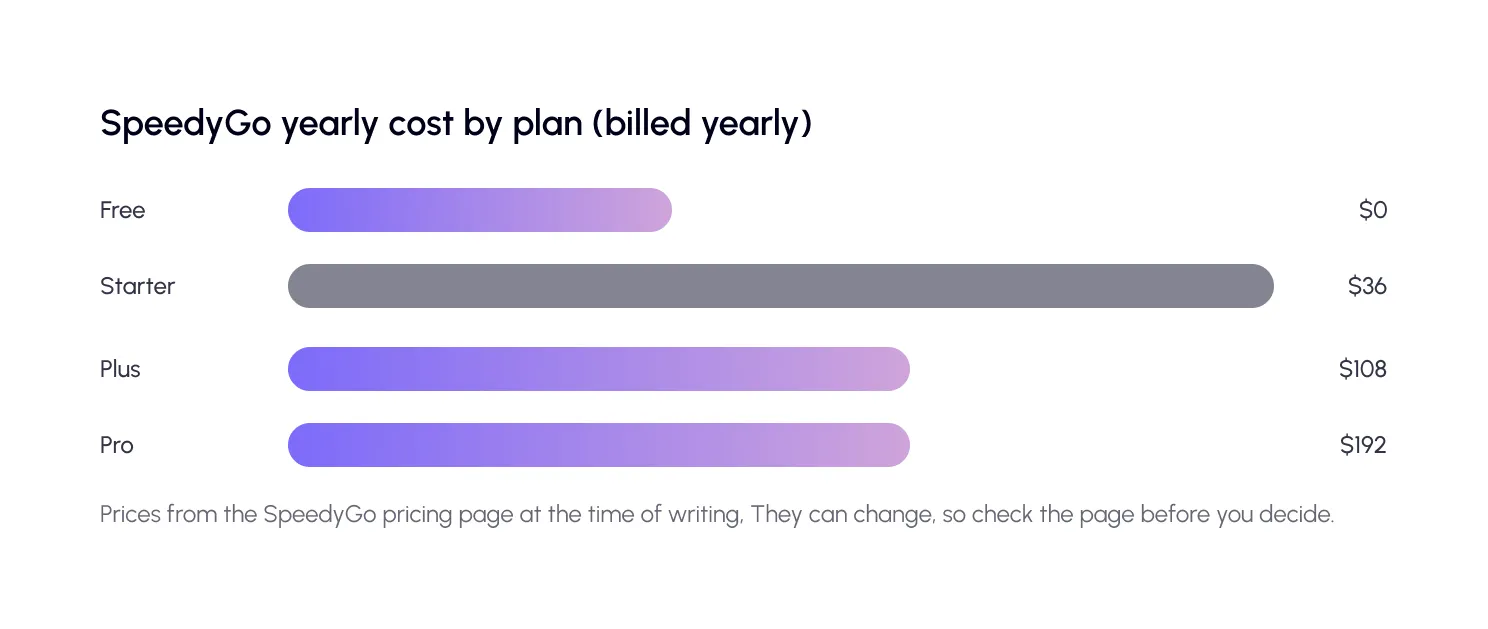
Starter fits small business sites. Plus is for growing businesses and WooCommerce websites. Pro is for high-traffic sites. Agencies with many sites can contact sales for custom pricing. You can also try the free plan first, with no credit card.
| Did you know? You can measure the problem for free before you pay for anything. Run the SpeedyGo speed testand note your mobile scores. If your site is already fast, you may not need to spend at all. |
How do you calculate speed optimization ROI?
The formula is simple: ROI = (extra profit − cost) ÷ cost × 100
The hard part is guessing the extra profit. Start with your current numbers, then assume a small, careful improvement.
A worked example
Imagine an online store with these numbers:
20,000 visits a month, a 2% conversion rate, and an average order of $60. That gives 400 orders and $24,000 in monthly revenue.
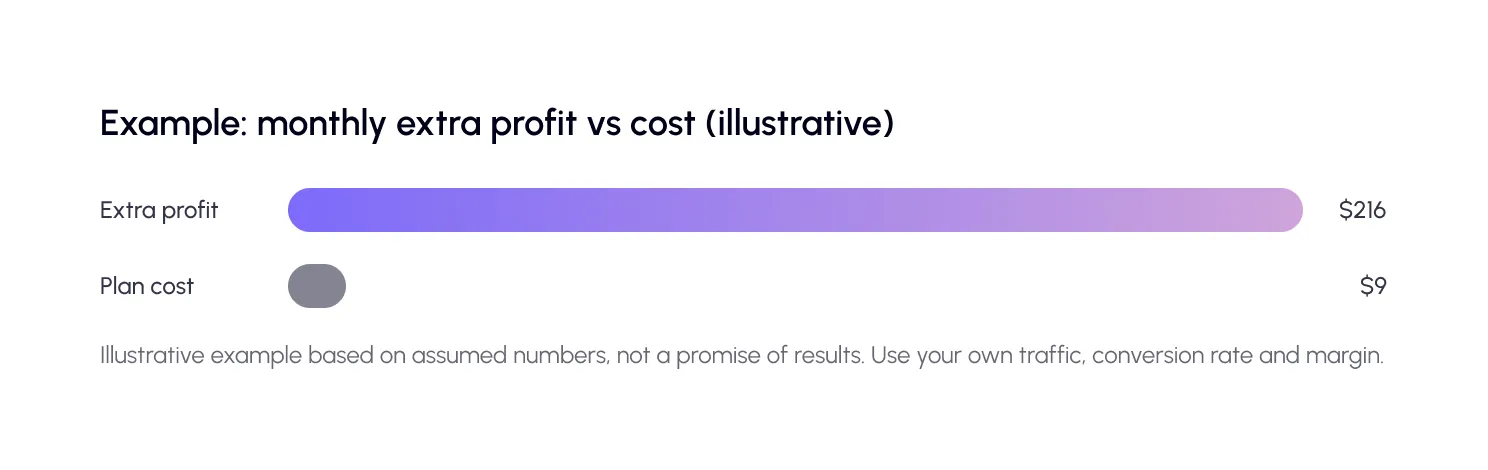
Now suppose faster pages lift conversions by a modest 3%, from 2% to about 2.06%. That is about 12 extra orders, or $720 more revenue a month. With a 30% profit margin, that is about $216 in extra profit.
If the cost is the SpeedyGo Plus plan at $9 a month (billed yearly at 108), the ROI is about (216 − $9) ÷ $9, or roughly 2,300%.
What if you do not sell online?
You can still calculate it. Replace orders with leads. If 500 visitors a month fill your contact form, and each lead is worth $200 in expected sales, a small lift in form submissions has a clear value. For a content site, think about ad revenue, newsletter sign-ups or the pages that bring in new readers.
What are the hidden gains beyond sales?
Not every benefit shows up in one number. Faster sites also bring:
- Better search potential. Pages that passCore Web Vitals have a better experience, which supports your SEO work.
- Lower ad waste. Fewer people leave before your landing page loads.
- Fewer support issues. Visitors complain less when pages open quickly.
- Lower server strain. Caching reduces the work your host has to do.
When is paying for speed not worth it?
Honesty matters here. Speed is not always the answer.
If your site already passes Core Web Vitals and loads in under two seconds on mobile, more spending will give small returns. If your traffic is very low, the gains may be too small to measure. And if your real problem is a weak offer or unclear content, a faster page will simply deliver that message faster.
In those cases, spend your money elsewhere first. Use a free test to check, and let the data decide.
Step three matters most. A slow server needs hosting, heavy images need compression and WebP, and heavy scripts need deferring. Matching cost to cause is how you avoid overspending. SpeedyGo Pro also includes PageSpeed analytics to track scores over time, and you can watch real-user data in Search Console’s Core Web Vitals report.
A real-life example
A small business owner sells handmade furniture online. Her site takes over four seconds to load on phones, and she gets 8,000 visits a month. Quotes from agencies feel too high for her size.
She starts with a free speed test, then tries the Starter plan. She turns on caching, WebP conversion and script control, and uses the included support hours to check her checkout. Her mobile load time drops to around two seconds.
Over three months, her orders rise slightly and her ad clicks waste less money. She does the maths, and the plan has paid for itself several times. She did not need a big project. She needed the right-sized fix.
Common mistakes to avoid
The first mistake is paying for the biggest fix first. Always match the fix to the cause.
The second is chasing a perfect score. Money spent on the last few points rarely pays back.
The third is not measuring after. Without before and after numbers, you cannot know if the spend worked.

Frequently Asked Questions
Learn about WordPress speed optimization costs, how to calculate ROI, whether paid optimization is worth it, and when to choose a plugin or agency.
How much does WordPress speed optimization cost?
It ranges from free to thousands of dollars. Free plugins cost nothing but time; premium plugins like SpeedyGo run from about $36 to $192 a year; and freelancers and agencies quote by project.
Is paying for website speed optimization worth it?
Often, yes, if slow pages are costing you sales or leads. Calculate your own ROI using your traffic, conversion rate, and margin before you decide.
How do I calculate the ROI of speed optimization?
Estimate the extra profit from a small conversion lift, subtract the cost, and divide by the cost. Use conservative numbers.
Is a plugin enough, or do I need an agency?
For most small and medium sites, a good plugin with some human help is enough. Large or complex sites may need an agency or developer.
Can I try before paying?
Yes. SpeedyGo has a free plan with no credit card, and its paid plans come with a 14-day money-back guarantee.
What if my site is already fast?
Then extra spending may bring little return. Test first, and spend on content, offers or marketing instead if speed is not the problem.