6 mins read
Is Slow Site Speed Secretly Killing Your Google Rankings? Here’s How to Check
Share Article :


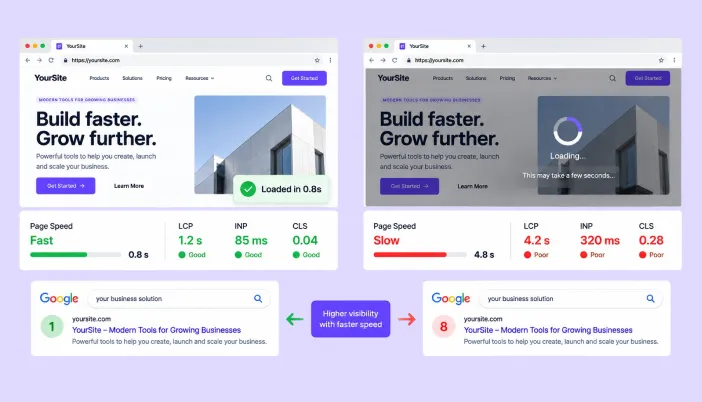
This blog explains the real relationship between slow site speed and Google rankings, where speed acts as a direct ranking signal and where it works quietly in the background through visitor behavior.
You’ll learn exactly how to check if slow site speed is hurting your SEO, what the data says about page speed as a Google ranking factor, and what to actually fix first. There’s a simple comparison table, real benchmarks, and an FAQ section built to answer the questions people ask most.
Does site speed affect SEO ranking?
Yes, but not in the simple way most people assume. Google doesn’t rank a page purely because it loads fast. It ranks it because it’s relevant, useful, and trustworthy; speed is one signal among many.
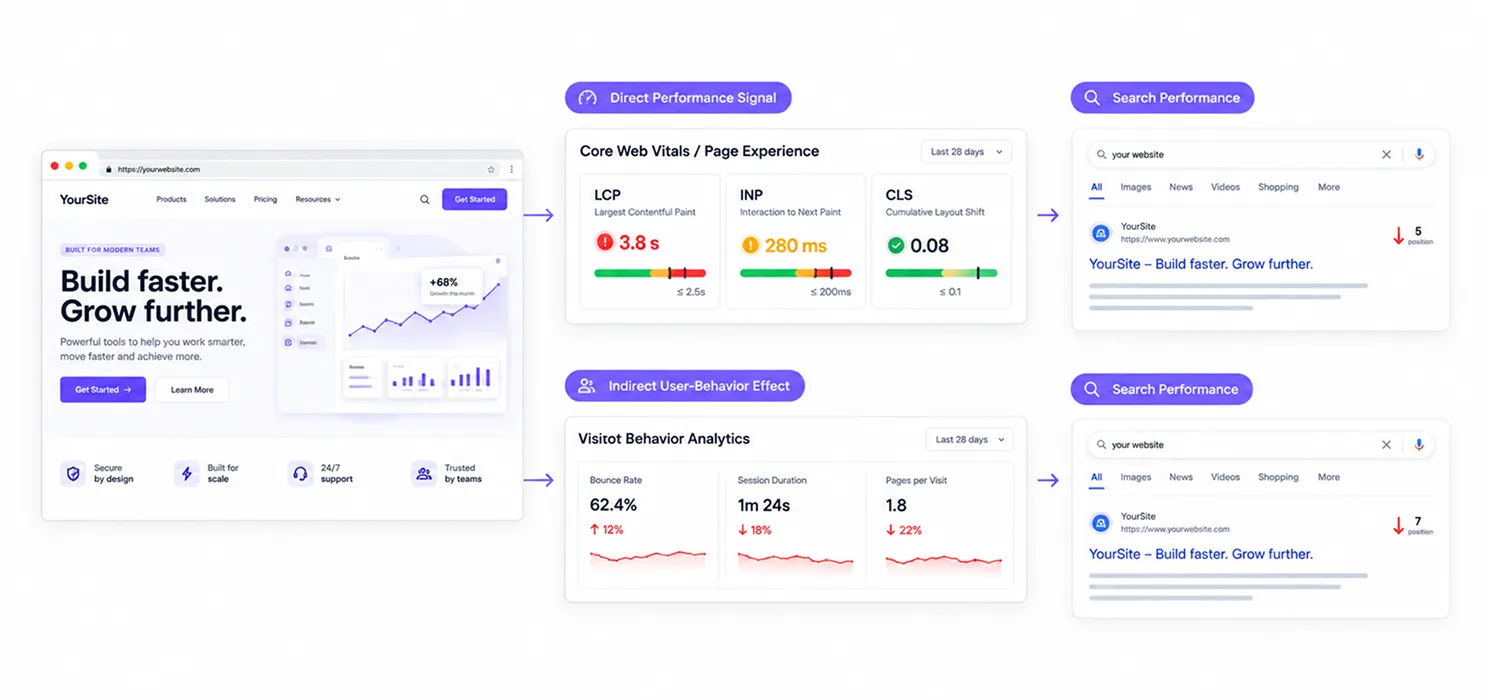
That said, speed’s influence runs deeper than a single ranking factor. It works on two levels at once, and most site owners only ever notice one of them.
The direct signal: Google formally evaluates Core Web Vitals as part of its page experience signals. A page that passes all three metrics has a measurable advantage over an otherwise similar page that fails them.
The indirect signal: Slow pages produce worse behavior. Higher bounce rates, shorter sessions, fewer pages per visit. These behavioral patterns feed back into how Google’s systems judge content quality and, in practice, this channel often matters more than the direct one.
So when people ask “does slow site speed affect Google rankings,” the honest answer is: it rarely tanks a great page on its own, but it consistently drags down a page that was already competing on the margins.
Why is my site slow, and is it actually hurting my SEO?
This is the question worth answering before you spend a single hour on fixes. Not every slow site is losing rankings because of speed, but the data suggests most are, more than owners realize.
A few numbers put this in perspective:
- Only about 47% of sites worldwide currently meet Google’s “good” Core Web Vitals thresholds, meaning the other half are giving up some amount of traffic and revenue by default.
- Sites that pass all three Core Web Vitals thresholds see meaningfully lower bounce rates than sites that don’t.
- For every second of delay beyond the 2.5-second LCP threshold, bounce rates climb by roughly 32%.
Here’s the part that surprises people: after a Google core update earlier this year, sites with INP scores above 500 milliseconds saw ranking drops of two to four positions on competitive search terms. That’s not a rounding error. That’s the difference between page one and page two.
How do I check if slow site speed is hurting my SEO?
You don’t need to guess. There are a few concrete ways to check if slow site speed is genuinely affecting your SEO performance, rather than assuming it is.
1. Check Google Search Console’s Core Web Vitals report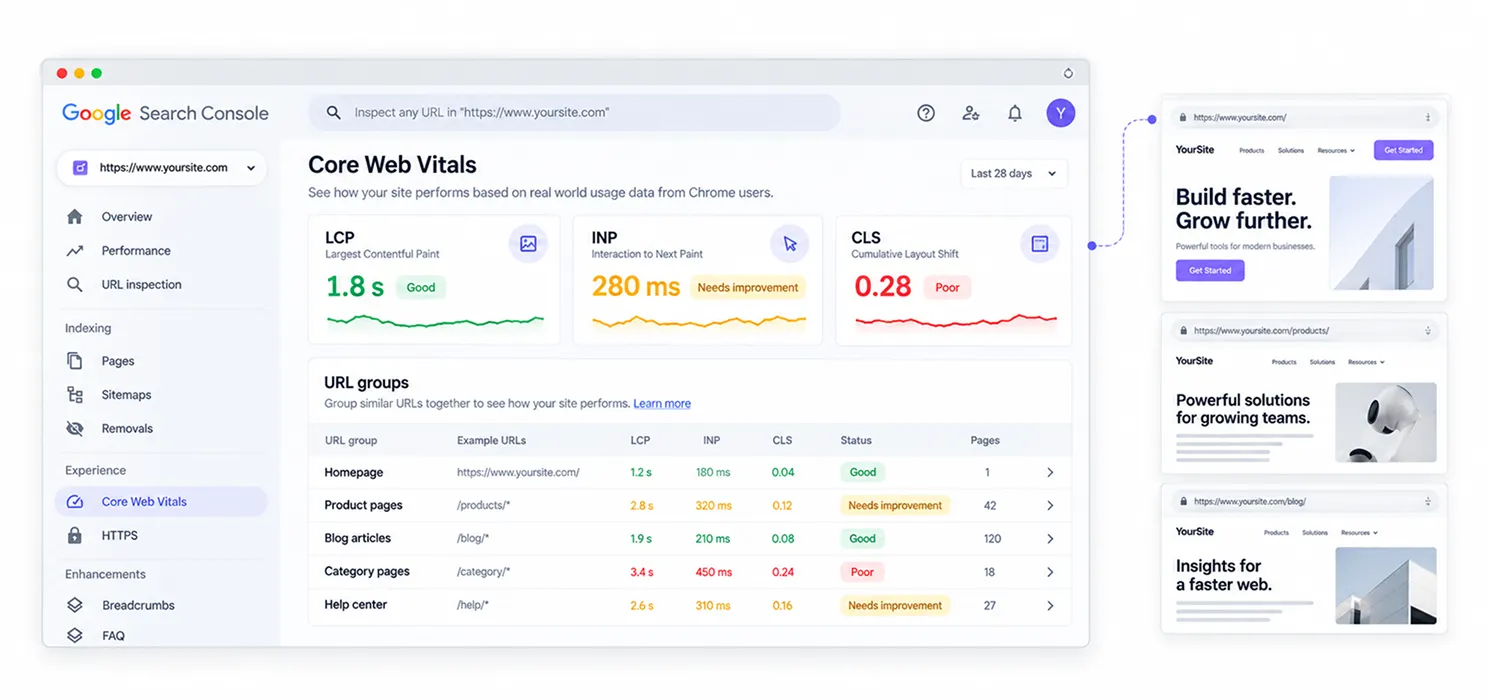
This is the closest thing to Google’s own opinion on your site’s speed. It shows you real visitor data, grouped by URL, flagged as Good, Needs Improvement, or Poor. If a chunk of your pages sit in the red or amber zone, that’s your starting point.
2. Compare rankings against load time by page
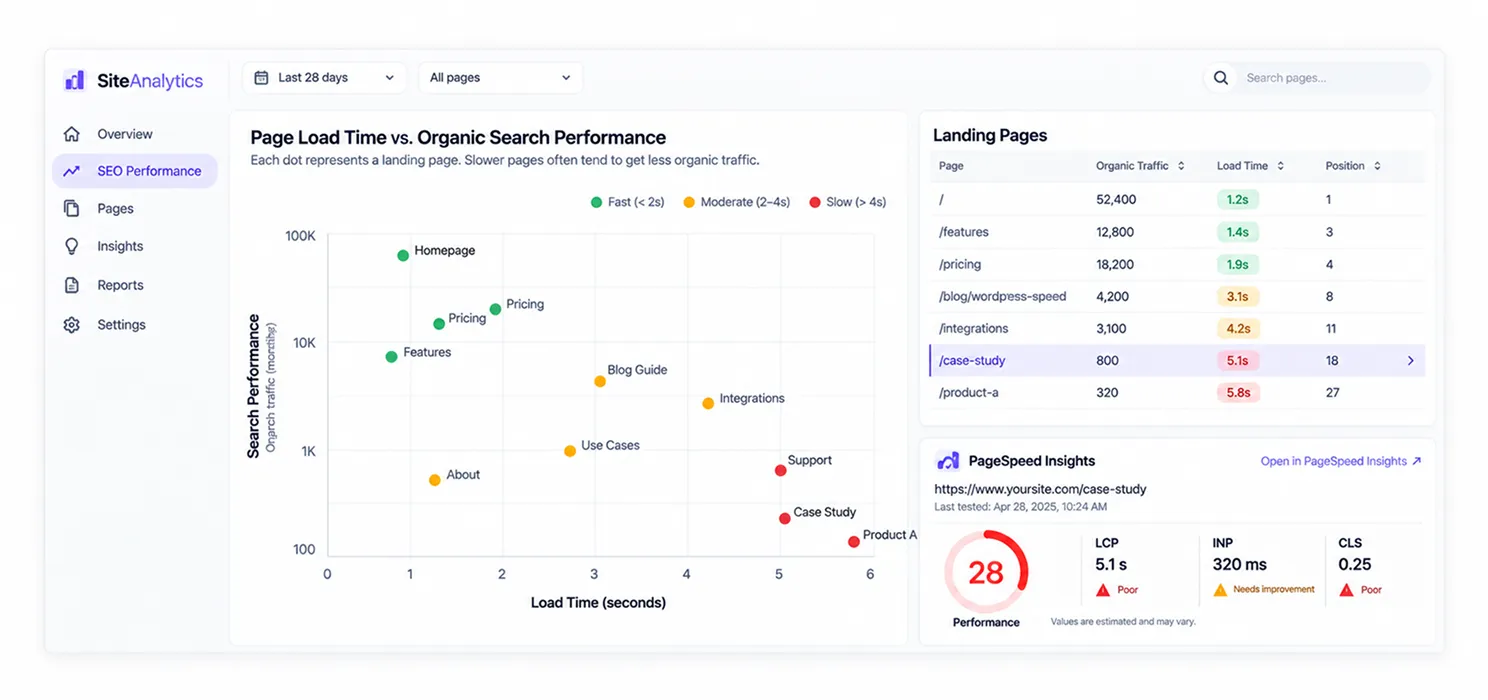
Pull your top 20 landing pages by organic traffic. Run each through PageSpeed Insights. If your slowest pages also happen to be your weakest performers relative to their content quality, that’s a strong signal speed is playing a role not proof on its own, but a pattern worth investigating further.
3. Look at behavior metrics alongside speed
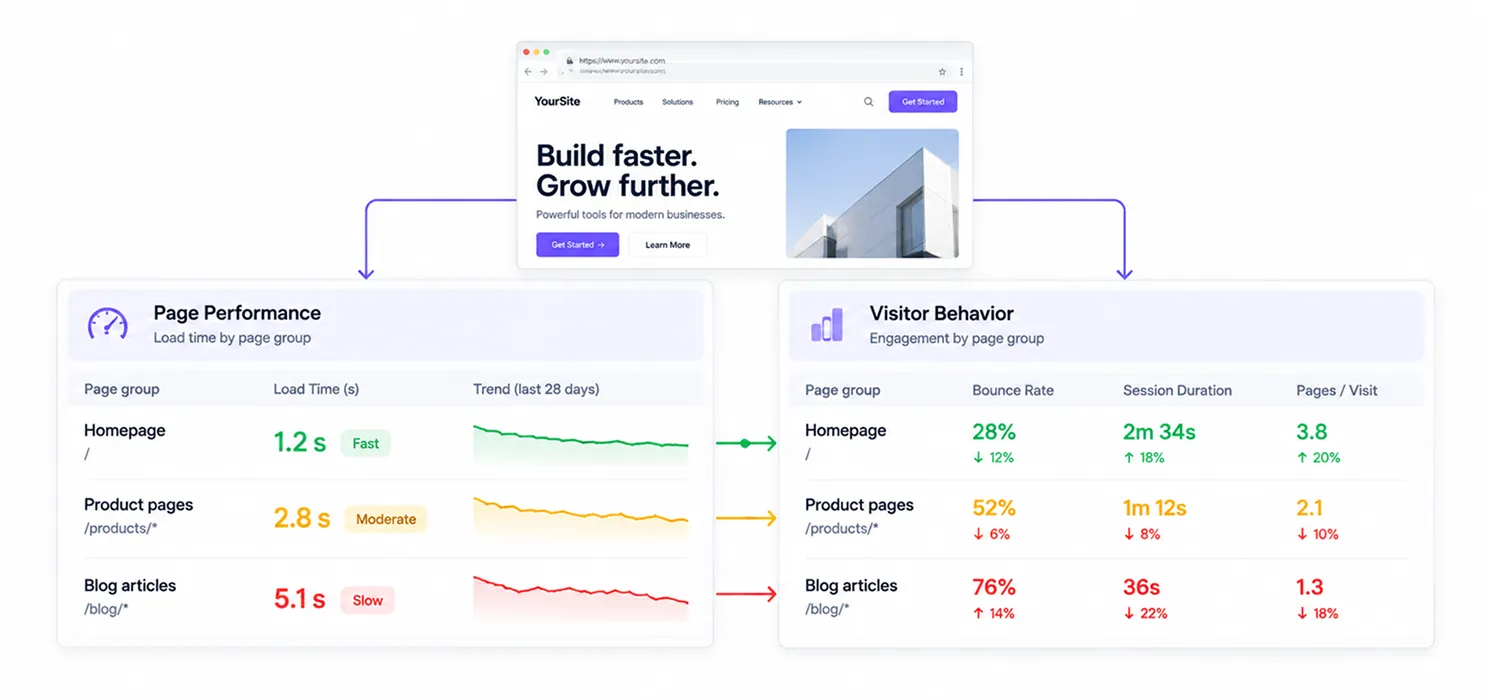
Google has said publicly that bounce rate itself isn’t a direct ranking factor. But a high bounce rate combined with a slow load time and short session duration paints a picture that Google’s systems do pick up on indirectly, through engagement and relevance signals.
4. Test on mobile, not just desktop
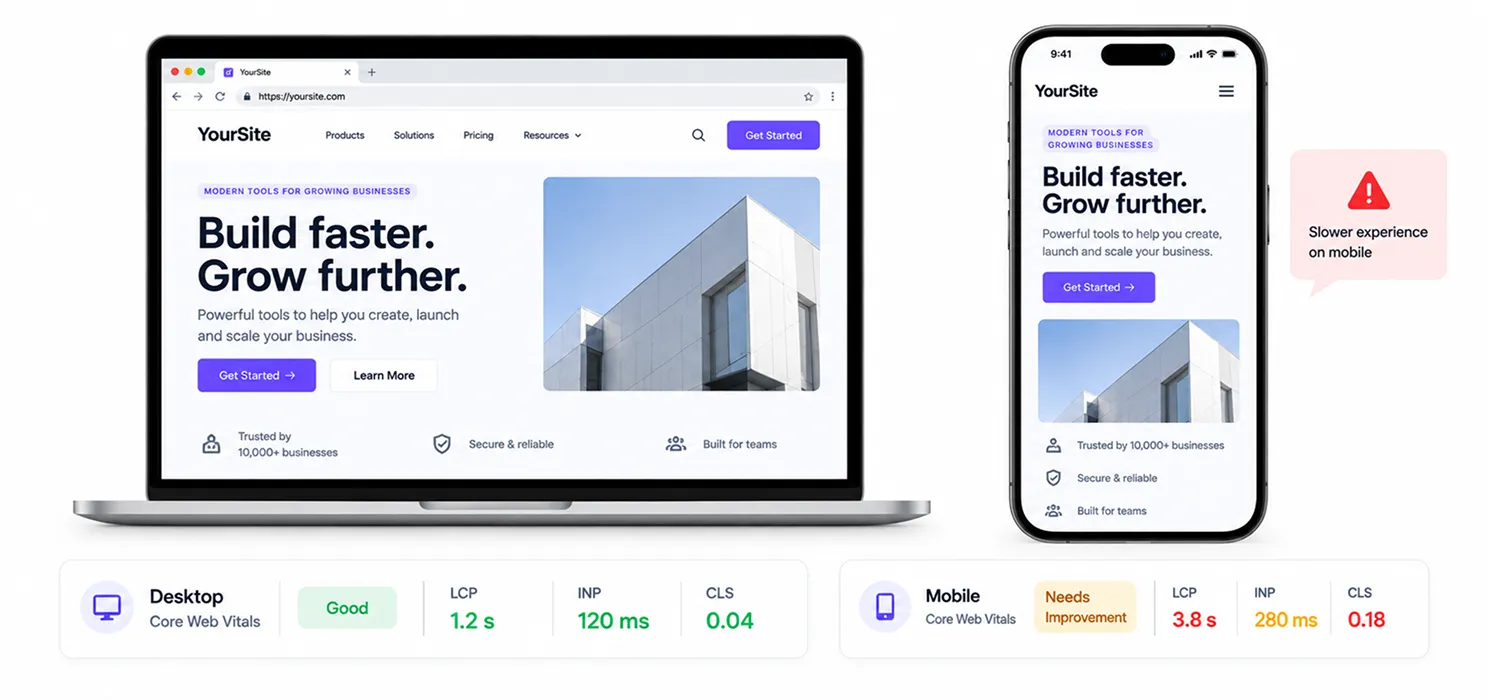
Desktop pass rates for Core Web Vitals tend to run notably higher than mobile. Since mobile traffic now makes up the majority of web visits in most industries, testing only on desktop hides the problem that’s actually costing you rankings and conversions.
How much does page speed actually affect Google rankings?
Enough that ignoring it has a real cost, even if it’s rarely the single biggest lever you can pull.
Here’s a quick comparison of what typically happens at different load-time bands, based on aggregated industry data from Google, HTTP Archive, and independent research:
| Load Time | Typical Bounce Rate Impact | SEO/Business Consequence |
| Under 1 second | ~7% bounce rate | Best-in-class engagement, higher conversion rates |
| 1–3 seconds | Moderate increase | Still competitive, but margin narrows |
| 3–6 seconds | ~49% bounce rate | Noticeable ranking and traffic drag |
| Over 6 seconds | ~67% bounce rate | Significant loss of both visitors and rankings |
The pattern holds across nearly every study on this topic: the drop-off isn’t gradual; it’s steep. A site crawling from 2 seconds to 5 seconds doesn’t lose a little engagement; it loses a lot.
What actually fixes slow site speed?
Once you’ve confirmed speed is a real issue, the fix usually comes down to a short list of high-impact changes rather than a hundred small tweaks.
- Compress and properly size images: this remains the single most common cause of slow load times across the web.
- Reduce third-party scripts: every chat widget, tracking pixel, and marketing tag adds weight your visitors have to download, and your browser has to execute.
- Upgrade hosting or add a CDN: if your server takes over a second just to respond, no front-end optimization will fully compensate.
- Eliminate render-blocking resources: CSS and JavaScript that load before your main content delays everything behind it.
If you’ve tried the obvious fixes already and speed still isn’t moving the needle, that’s usually the sign you need a proper Core Web Vitals audit service rather than another round of guesswork. The deeper causes tend to hide in hosting configuration, database queries, or scripts nobody remembers adding.
A real-world example
Vodafone Italy ran an A/B test on two otherwise identical landing pages. The only change was a 31% improvement in LCP. The faster version drove 8% more sales. Nothing about the offer, the design, or the copy changed- only the time it took the page to become usable.
That’s the pattern worth internalizing: speed isn’t just an SEO checkbox. It’s one of the few technical changes that shows up directly in revenue, independent of everything else you’re doing right.
When should you bring in help?
If your Search Console report shows widespread Core Web Vitals failures, if your competitors are consistently outranking you despite thinner content, or if you’ve already tried the standard fixes without improvement, it’s worth treating this as a dedicated project rather than a side task for whoever’s available.
A focused technical audit one that looks at real field data, not just a single PageSpeed score will usually surface the two or three root causes actually holding your rankings back, rather than sending you chasing symptoms one plugin update at a time.
Frequently asked questions about site speed and SEO
Find answers to common questions about how website speed, Core Web Vitals, and page performance can affect Google rankings, user experience, and SEO performance.
Does site speed affect SEO ranking directly?
Yes, but only as one signal among many. Google evaluates Core Web Vitals as part of its page experience signals, and pages that pass all three metrics have a measurable advantage. Speed alone won’t outrank irrelevant or low-quality content, but among comparable pages, the faster one tends to win.
How do I check if slow site speed is hurting my SEO?
Start with Google Search Console’s Core Web Vitals report to see real visitor data by URL. Then compare your slowest pages against their organic rankings and engagement metrics. If your weakest-performing pages are also your slowest, that’s a strong signal worth investigating further.
Is page speed a Google ranking factor in 2026?
Yes. Page speed has been a confirmed Google ranking factor since 2010, and Core Web Vitals introduced specifically to measure real-world speed and usability remain part of Google’s page experience signals today. Recent core updates have made responsiveness (INP) in particular a stronger differentiator between competing pages.
What page load time is considered "good" for SEO?
Generally, a Largest Contentful Paint under 2.5 seconds is considered good. Pages loading in under 1 second see the lowest bounce rates and strongest engagement. Anything past 3 seconds starts showing a measurable increase in visitors leaving before they engage with your content.
Can a slow site still rank well on Google?
Occasionally, yes, if the content is exceptionally relevant and there’s little competition. But it’s rarely sustainable. As competitors improve their own speed and user experience, a slow site becomes an easier target to outrank, even with weaker content.
Does bounce rate directly affect my Google rankings?
No. Google has confirmed bounce rate itself is not a direct ranking factor. However, bounce rate is often a symptom of slow speed, and the underlying causes of high bounce rates poor performance, bad mobile experience, unclear content do feed into signals Google’s systems evaluate indirectly.
How much can fixing site speed improve my rankings?
It varies by site and competition level, but real-world cases show meaningful gains: businesses have reported traffic increases in the 20 to 30% range after significant Core Web Vitals improvements, plus measurable conversion lifts. The bigger the current gap between your speed and the “good” thresholds, the more room there typically is to gain.