5 mins read
What Is Cache Warming and Does It Speed Up WordPress?
Share Article :


| Quick summary Cache warming sounds like a magic speed trick, but what does it actually do? This guide explains WordPress cache warming honestly: it does not make your site faster all the time, it removes slow first visits. You will learn which caches can be warmed, when it matters, when it does not, and how to measure the benefit on your own site. |
You clear your cache, run a speed test, and get a poor score. You run it again a minute later, and the score is great. Which one is the truth?
Both are. The first test hit a cold cache. The second hit a warm one. And your real visitors experience both, every day.
Cache warming is about shrinking the number of visitors who get the cold, slow version. Let’s see how much it really matters.
What is cache warming?
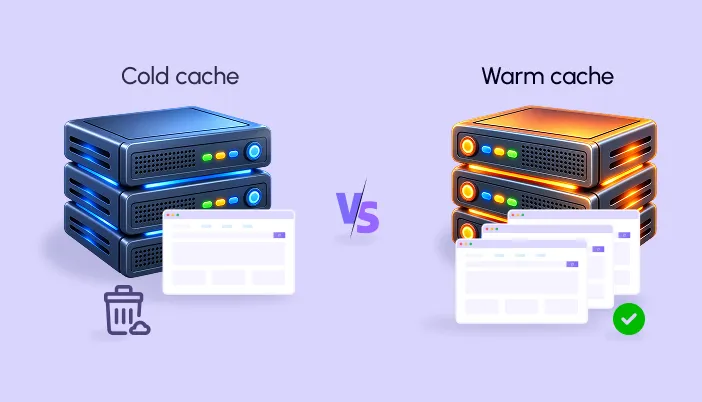
Cache warming means filling a cache with saved copies before real visitors ask for them. The cache is “warm” when pages are already saved, and “cold” when they are not.
On WordPress, the most common case is page caching. When a page is not saved, WordPress builds it from scratch with PHP and database queries, which is slow. Warming makes your plugin visit your pages first, so they are saved and ready.
If this sounds like cache preloading, that is because the two terms are closely related, and many people use them for the same idea. This article looks at a different question: does it really make a difference, and where?

Does cache warming speed up WordPress?
Here is the honest answer. Cache warming does not speed up a page that is already cached. A warm page is just as fast with or without warming.
What it does is reduce the number of visitors who get the slow, uncached version. Think of it as removing the “first visitor penalty.” Google’s guide to Time to First Byte says a good TTFB is about 0.8 seconds or less. A cold page can miss that by a wide margin, while a warm page is usually well inside it.
Which caches can you actually warm?
WordPress sites usually have several layers of caching. Not all of them can be warmed the same way.
A few notes on this. WordPress has a built-in object cache that normally forgets data after each request, unless your host adds a persistent store. PHP’s OPcache keeps compiled code in memory. And a CDN stores copies of your files in many locations, so a visitor in a new region may trigger a fresh fetch from your server the first time. Check your CDN’s settings to see whether it offers a way to prefetch files.
When does cache warming matter, and when does it not?
- It matters when you have many pages with few visits each, your cache expires quickly, you clear the cache often, you are about to send a burst of traffic, or your visitors are spread across the world and your CDN caches are cold in some regions.
- It matters less when your site is small, your busiest pages are visited every minute and stay warm on their own, or your pages are mostly personal and cannot be cached anyway. For a logged-in dashboard or a shopping cart, warming does nothing, because those pages should not be cached.
| Note Warming has a cost. Each warmed page makes your server do real work. On weak hosting, warming thousands of pages at once can slow down real visitors. Warm your key pages first, and spread the rest over time. |
Use the free SpeedyGo speed test and compare TTFB or server response for the two runs. The gap is the “first visitor penalty” on your site. If it is small, warming has little to offer. If it is a second or more, warming is worth setting up.
Then check how many of your visits are likely to be cold. If most of your traffic goes to a handful of pages that stay warm, the benefit is small. If you have thousands of pages with scattered visits, it is bigger.
How do you warm your cache with SpeedyGo?
Start with full-page caching, because warming needs a cache to fill. Then look at cache warm-up and cache preloading in the docs, which cover how pages are prepared in advance. Pair them with scheduled expiration and auto purge to keep content fresh, and object caching to speed up database work. For global visitors, see CDN integration.
Your cache warming checklist
- Turn on full-page caching first
- Test one page cold and warm to measure the gap
- Warm your most important pages first
- Expand to other pages in stages
- Warm after clearing the cache, not before
- Do not warm cart, checkout, account or logged-in pages
- Use auto purge so changed pages refresh
- Check your CDN for prefetch options if visitors are global
- Watch server load during big warm-ups
- Re-test and compare with your baseline
Common mistakes to avoid
The first mistake is expecting warming to speed up pages that are already cached. It only removes the cold-start penalty.
The second is warming everything at once on a weak server. Stage it.
The third is judging by one lab test. Cold and warm results differ, so always test both.


Frequently Asked Questions
Here are answers to some common questions about how cache warming works, when it makes a difference, how it affects server response time, whether it can increase server load, and how to check if your website really needs it.
What is cache warming in WordPress?
It is the process of filling your cache with saved pages before visitors arrive, so no one has to wait for a slow first visit.
Does cache warming speed up WordPress?
It does not make cached pages faster. It reduces the number of visitors who hit slow, uncached pages, which improves their experience and your real-user scores.
What is the difference between cache warming and a cold cache?
A cold cache has nothing saved, so the first visit to each page is slow. A warm cache already has saved pages. Warming turns a cold cache into a warm one.
Do I need cache warming on a small site?
Often not. If your pages are visited often and stay warm on their own, the benefit is small. It helps most on sites with many rarely visited pages.
Can cache warming hurt my site?
It can add load to your server if you warm too many pages at once. Warm key pages first and spread the rest over time.
Does SpeedyGo have cache warm-up?
Yes. SpeedyGo’s documentation includes cache warm-up and cache preloading, along with full-page caching and scheduled expiration and auto purge.