5 mins read
WordPress Speed Optimization for Agencies: Managing Performance Across Client Sites
Share Article :


Quick summary
Speeding up one WordPress site is a project. Speeding up thirty is an operation. This guide shows agencies how to manage performance across client sites: build a standard stack, onboard each site the same way, monitor at scale, report in plain English and turn speed into a care plan clients happily pay for.
It is Monday morning. Three clients have emailed about slow pages. One site runs a caching plugin you did not install. Another has two. A third has settings that nobody wrote down.
Every site is a little different, so every fix takes a little longer than it should. Multiply that by thirty clients, and your margins disappear.
The way out is not working harder on each site. It is working the same way on every site. Here is how agencies do that.
Why does per-site speed work hurt agency margins?
When every site gets a custom approach, you pay for it three times. You spend hours rediscovering what works. You risk breaking something because you forgot an old setting. And you cannot explain your work in a simple, repeatable way, so clients struggle to see its value.
Yet the value is real. The Google and Deloitte study found that a 0.1-second mobile speed gain lifted retail conversions by 8.4%. Clients care about results like that. Your job is to deliver it reliably, without reinventing the process every time.

What is a standard speed stack?
A standard stack is the same set of tools and settings you start every site with. Think of it as your default recipe. You tweak it for each client, but you never start from a blank page.
A good stack covers the basics: page and browser caching, image conversion to WebP, lazy loading, CSS and JavaScript optimization, defer and delay for scripts, and a CDN. It should also come with human support, so you are not stuck when a tricky site fights back.
Step 1: Standardize
Write down your default stack and settings in one internal document. Include which features you turn on, which you leave off, and why. SpeedyGo’s optimization presets give your team a safe starting point on every site, and you can export and import settings so a tested setup can be reused instead of rebuilt.
Step 2: Onboard each site the same way
For every new client site, run the same short audit. Test a few key pages on mobile, save screenshots, note the Core Web Vitals and list what is slow. Our full audit guide covers this in detail on the SpeedyGo blog. The baseline is your proof later.
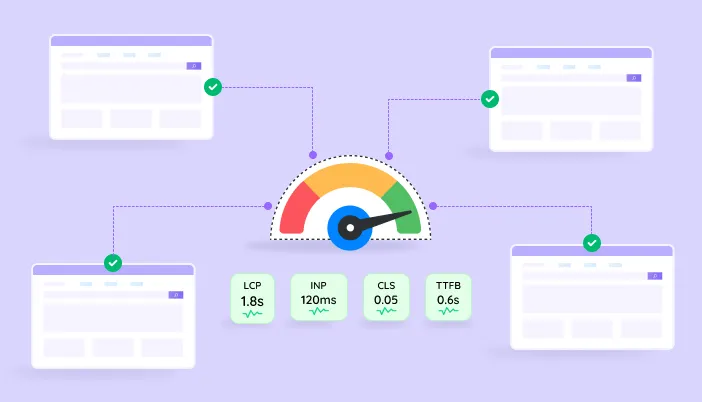
Use the free SpeedyGo speed test for the first look. Aim for the Core Web Vitals targets: LCP of 2.5 seconds, INP of 200 milliseconds and CLS of 0.1.
Step 3: Stage, then apply
Never experiment on a live client site. Take a full backup, apply your standard settings on a staging copy, and test. Set a performance budget for the site, for example, “mobile LCP under 2.5 seconds”. You can then check any future change, such as a new plugin or page design, against it.
Step 4: Launch and test the journeys that earn money
After going live, test what matters to the client’s business. For a store, that is browsing, adding to cart and checking out on a phone. For a service site, it is the contact form. Clear every cache, including the CDN, and use cache warm-up so the first visitors get fast pages.
Step 5: Monitor on a schedule
Sites slow down over time as plugins, images and tags change. Pick a cadence, such as a quick monthly check on each client’s three key pages. Compare with the baseline, and note any changes made that month.
Search Console’s Core Web Vitals report shows real-user data for each client’s property. SpeedyGo Pro adds PageSpeed analytics, mobile vs desktop tracking, and Google PageSpeed API integration to follow scores inside WordPress.
Step 6: Report in plain English
Clients do not want a wall of metrics. Send a one-page monthly note: your key pages’ speed, what changed since last month, what you fixed and what comes next. Use sentences like “Your mobile home page now loads in 2.1 seconds, down from 4.3.” And tie it to results the client cares about, such as enquiries or orders.
How can you package speed as a care plan?
Speed work is easiest to sell as an ongoing service, not a one-off fix. Because sites slow down over time, clients have a real reason to keep paying for monitoring and care.
A simple structure has three tiers. An Essential tier covers setup, a baseline and a monthly check. A Growth tier adds regular fixes, script reviews and a monthly report. A Performance tier suits stores and high-traffic sites, with priority response, hosting review and conversion-focused reporting.
Set your own prices based on your costs and market. Our blog covers what agencies charge for speed work, and the cost of a tool like SpeedyGo should be a small part of what you bill. Always agree what is in scope, so a one-off request does not become unpaid work.
How do you manage a team across many sites?
As the number of sites grows, access and billing get messy. A tool built for agencies helps. SpeedyGo’s Agency plan offers seat-based access for your team, priority human support and one bill for all your sites, instead of a separate license per client. Contact thesales team to see how it fits your setup.
Inside your agency, keep a shared sheet with each client’s site, stack, last check date, baseline and notes. When someone is out sick, anyone should be able to pick up any site.
Common mistakes to avoid
The first mistake is a different tool for every client. It multiplies learning, support and billing.
The second is optimizing and then disappearing. Sites drift, so plan monitoring from day one.
The third is sending scores with no story. Clients buy outcomes, not numbers.

Frequently Asked Questions
Managing website speed for multiple clients can bring up a lot of questions, especially when every WordPress site has different plugins, themes, and performance issues. Here are answers to some common questions about optimizing client websites, choosing the right tools, monitoring performance, pricing speed optimization services, and handling issues after making changes.
How do agencies manage WordPress speed across many client sites?
They use one standard stack, onboard each site with the same audit, apply changes on staging, monitor monthly and report in plain English.
What tools do agencies need to optimize client websites?
A speed plugin with caching, images and script control, free testing tools like PageSpeed Insights and Search Console, backup and staging, and a shared tracking sheet.
How should agencies price speed optimization?
Many sell it as a monthly care plan with clear tiers and scope, rather than a one-time fix, since sites slow down over time and need ongoing checks.
How often should agencies check client sites?
A quick monthly check works for most sites, with extra checks after big changes such as plugin updates, redesigns or new tracking tools.
Does SpeedyGo have an agency plan?
Yes. It bundles multiple sites, seat-based access and priority human support under one bill. Contact sales for details and custom pricing.
What if a client site breaks after optimization?
Undo the last setting, clear all caches and test again. Always work from a backup and a staging copy, and keep notes of every change.