8 mins read
Why Your Site Is Failing Core Web Vitals (And Who You Should Actually Call to Fix It)
Share Article :


If Google Search Console is flagging Core Web Vitals issues on your site, you’re not alone. Recent CrUX field data shows fewer than half of mobile sites pass all three metrics.
This blog breaks down exactly why sites fail LCP, INP, and CLS, what’s usually causing it behind the scenes, and how to decide whether you need a developer, an SEO, or a dedicated Core Web Vitals audit service to fix it. You’ll also find a practical comparison table and answers to the questions people ask most before they hire help.
What are Core Web Vitals?
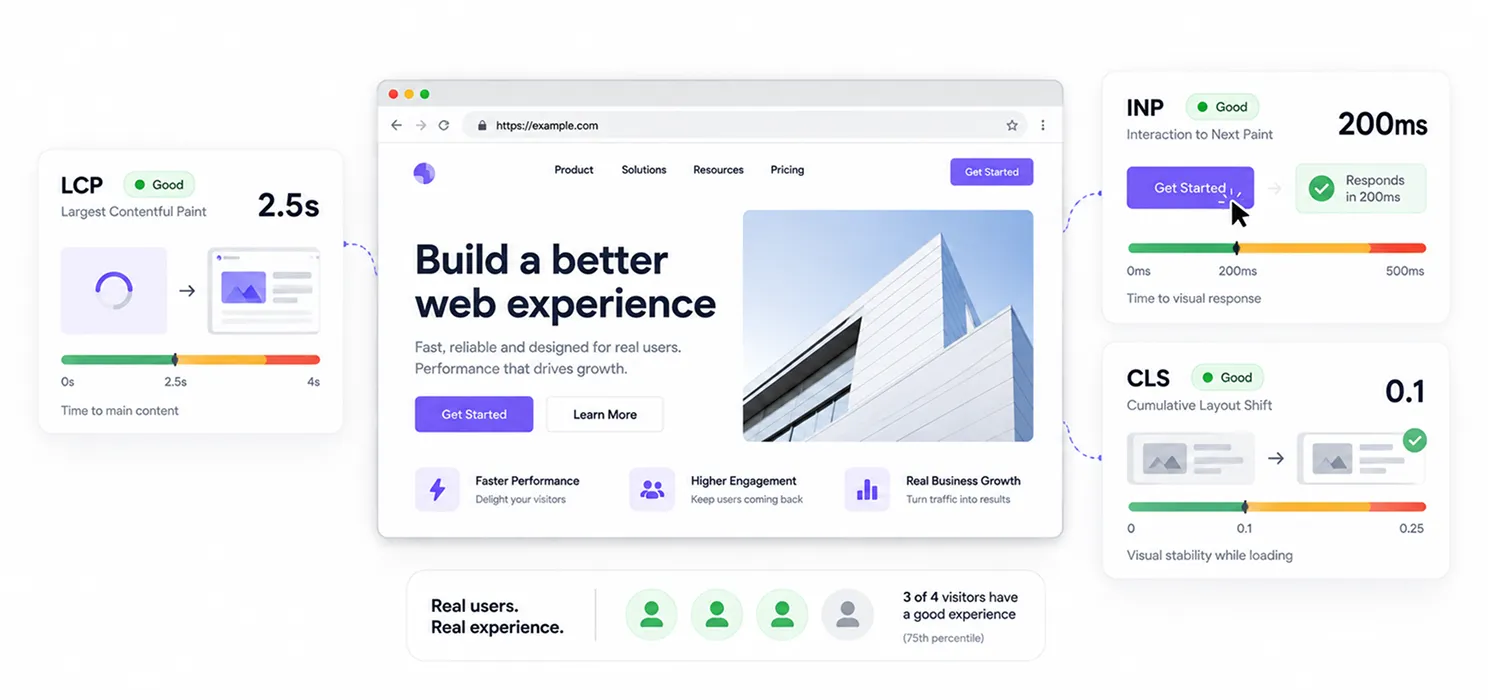
Core Web Vitals are the three metrics Google uses to judge how a real visitor experiences your page.
They are:
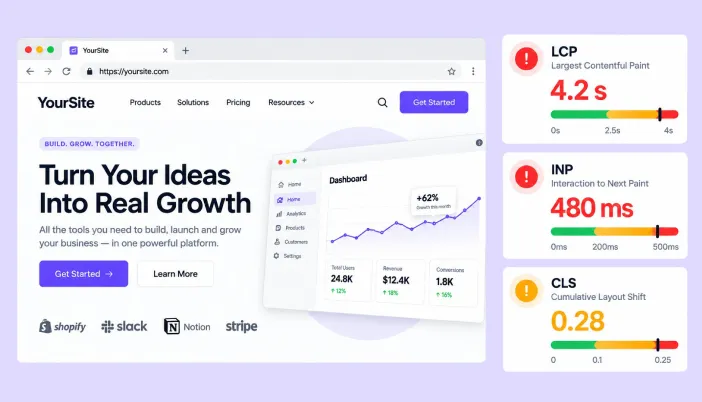
- Largest Contentful Paint (LCP): how long it takes for the main content to appear. Good is under 2.5 seconds.
- Interaction to Next Paint (INP): how quickly your page responds when someone taps or clicks. Good is under 200 milliseconds.
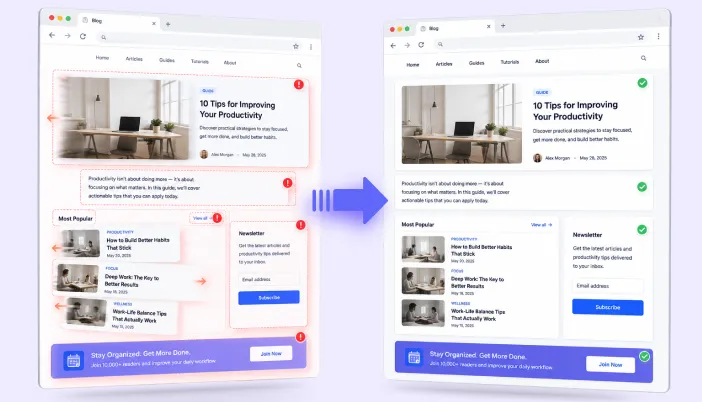
- Cumulative Layout Shift (CLS): how much your page jumps around while it loads. Good is under 0.1.
Google doesn’t average these across all your visitors. It looks at the 75th percentile, meaning three out of four real visits need to hit “good” for a page to actually pass. That’s a much higher bar than most site owners assume.
If your goal is to fix Core Web Vitals for good, understanding this scoring model matters more than chasing a single high number in a lab test.
Why is my site failing Core Web Vitals?
This is the question most people type into Google right before they start panicking about their rankings. The honest answer: it’s rarely one thing. It’s usually a small pile of decisions that quietly stacked up over time.
1. Your theme or page builder is doing too much
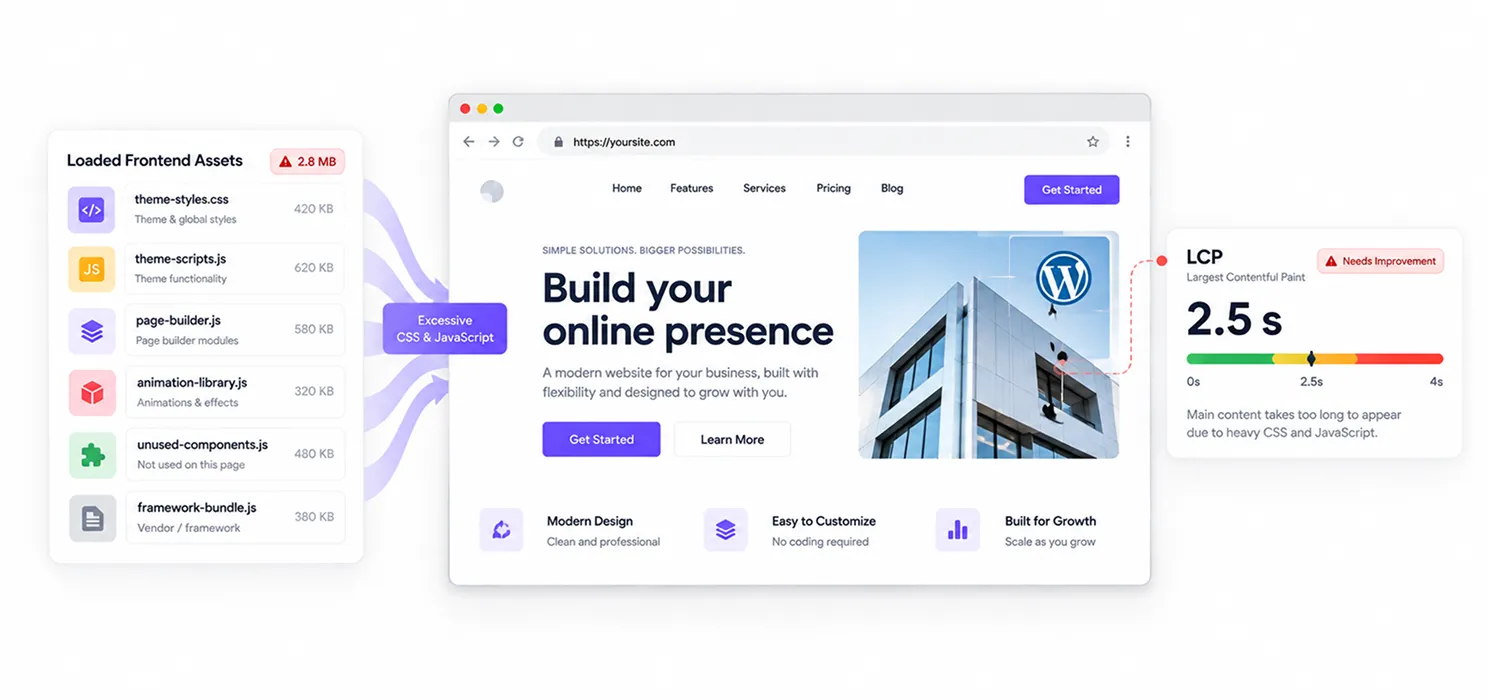
Drag-and-drop builders and heavy WordPress themes often load far more CSS and JavaScript than a page actually needs. Every unused animation library, every bloated framework, adds to the time it takes your main content to render, which tanks your LCP.
2. Third-party scripts are blocking the main thread
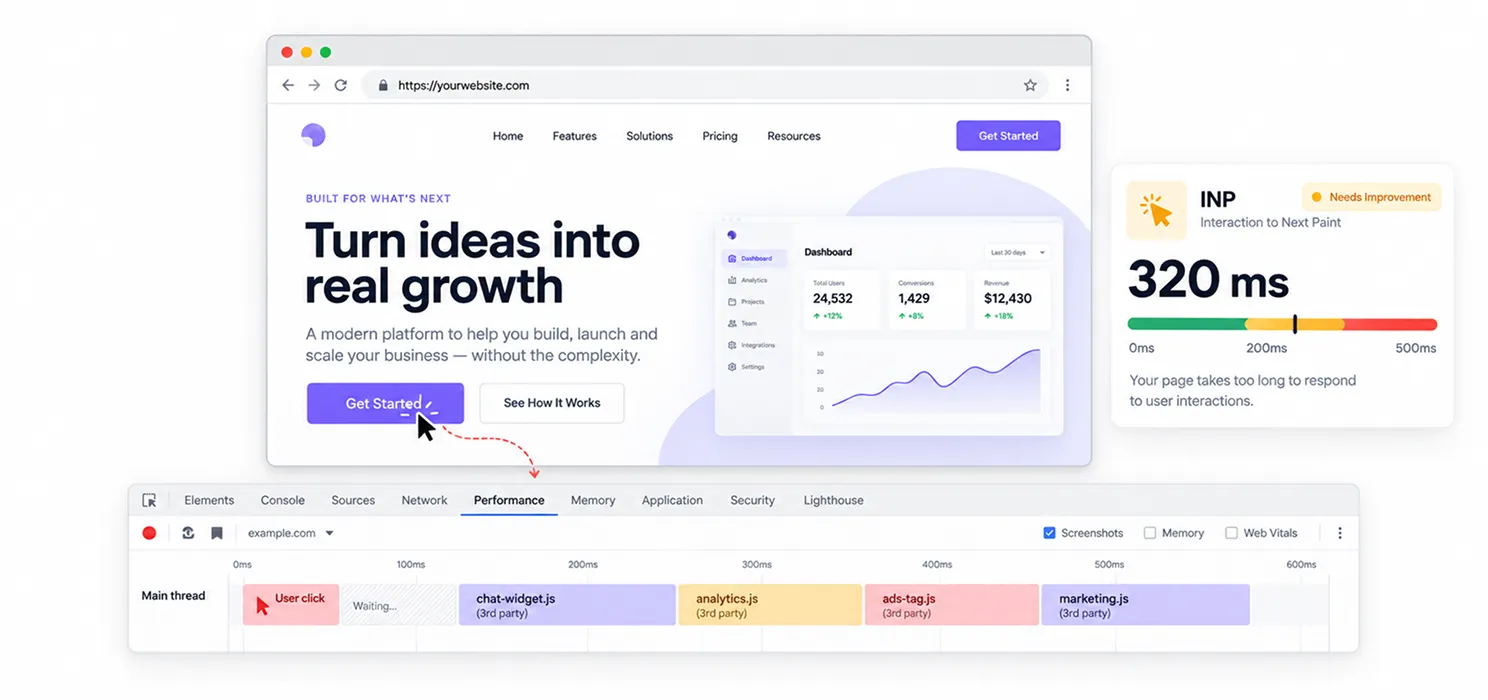
Chat widgets, ad tags, tracking pixels, and marketing tools all run JavaScript. Each one competes for the browser’s attention. When a visitor clicks a button and nothing happens for half a second, that’s INP failing in real time, and it’s almost always caused by scripts you didn’t write yourself.
3. Images without dimensions
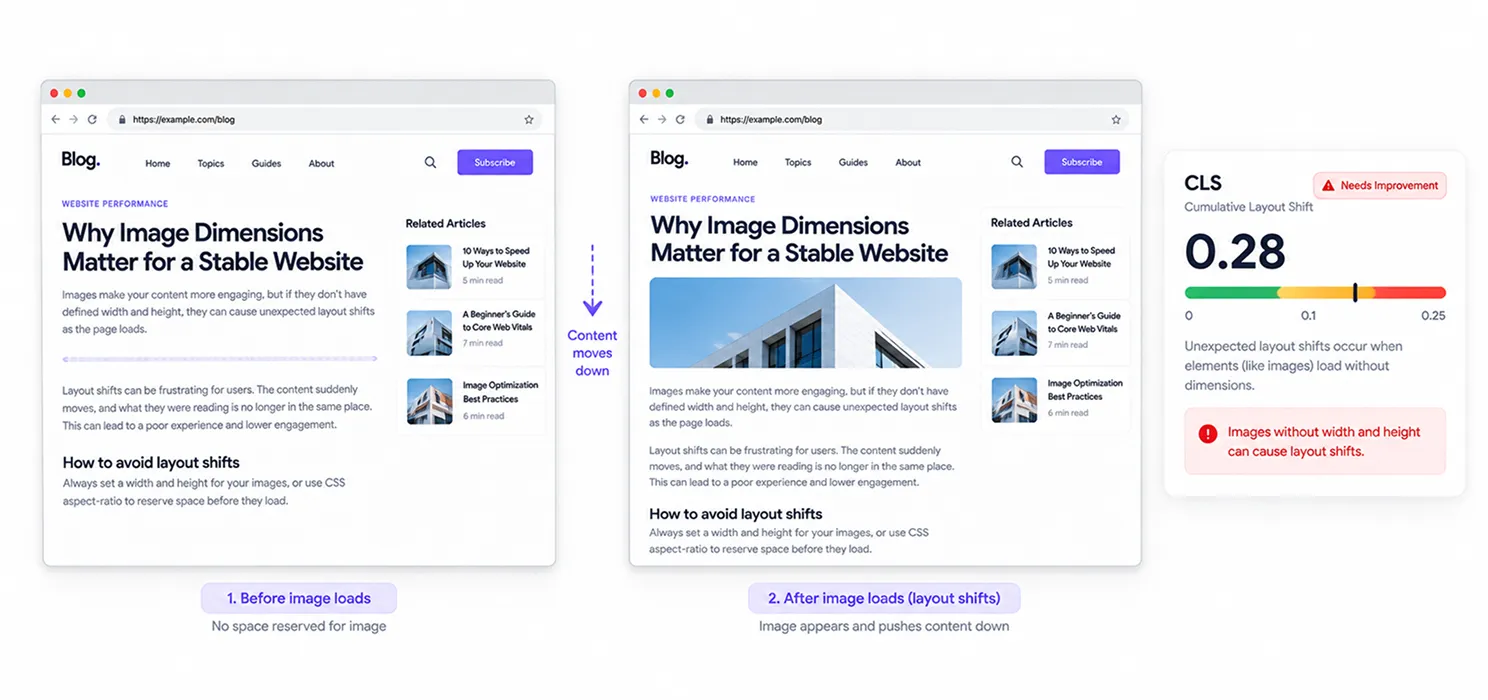
If an image loads without a defined width and height, the browser doesn’t know how much space to reserve. The text jumps down the moment the image appears. That jump is exactly what CLS measures, and it’s one of the most common and most fixable issues on the web.
4. Slow, shared, or poorly configured hosting
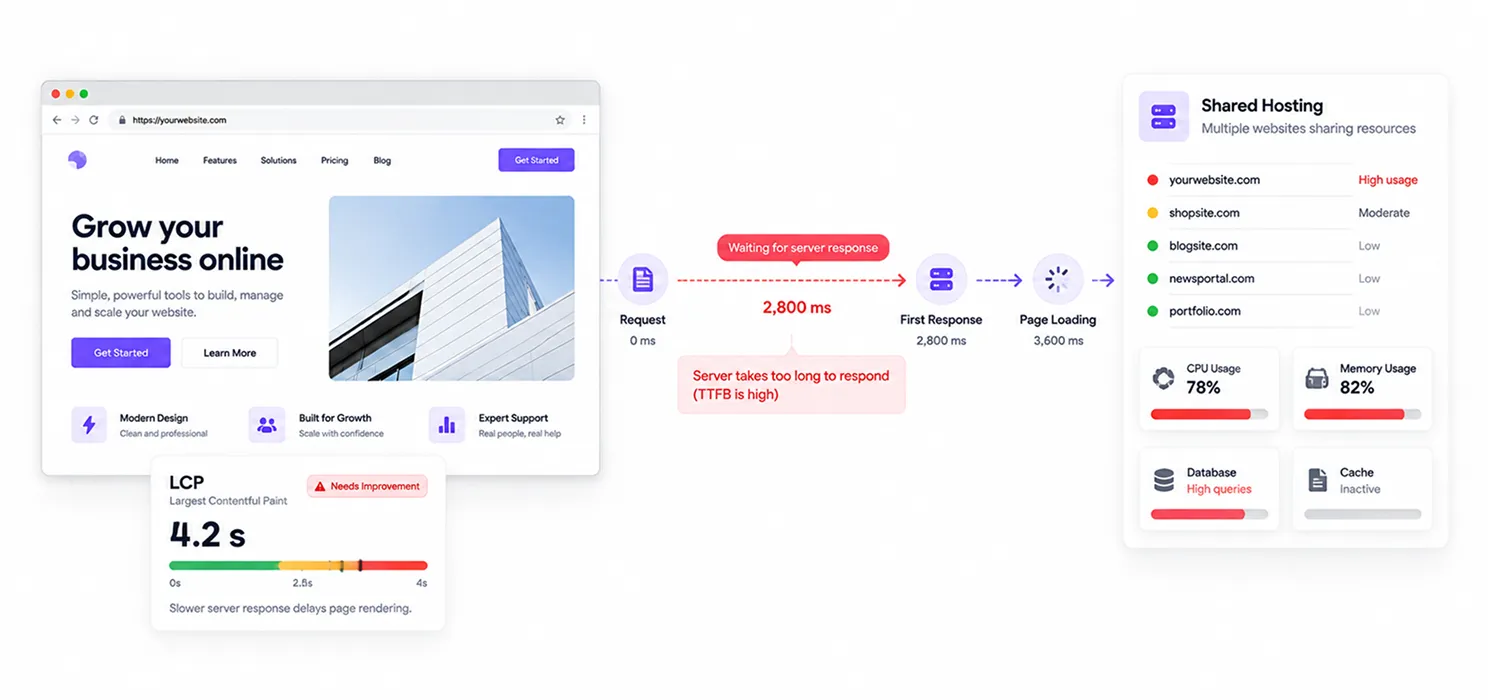
No amount of code optimization saves you if your server takes two seconds just to respond to the first request. Cheap shared hosting, no caching layer, and unoptimized databases are a major hidden cause of failing LCP scores.
5. Fonts loading late (or badly)
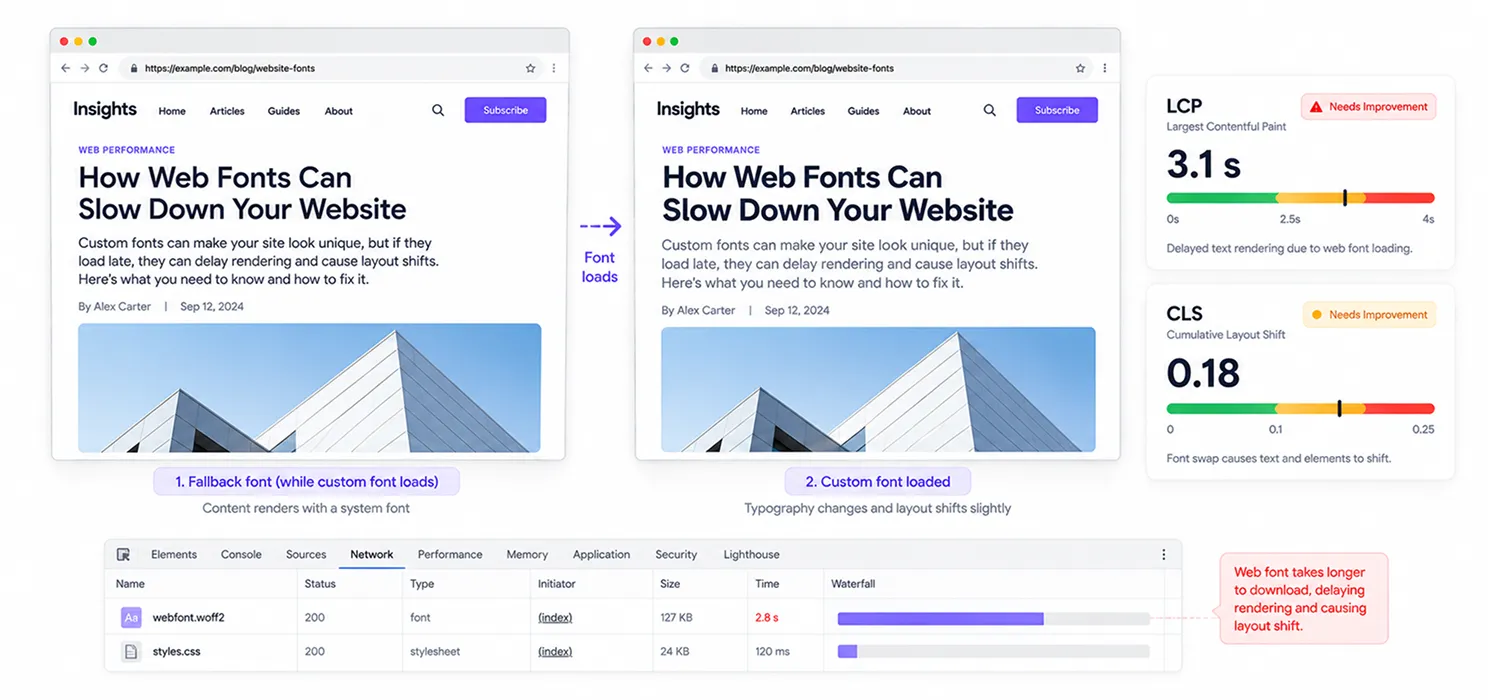
Custom web fonts that block rendering, or that swap in without font-display: swap, can delay both LCP and cause layout shifts when the fallback font resizes text on arrival.
6. Nobody is actually monitoring it
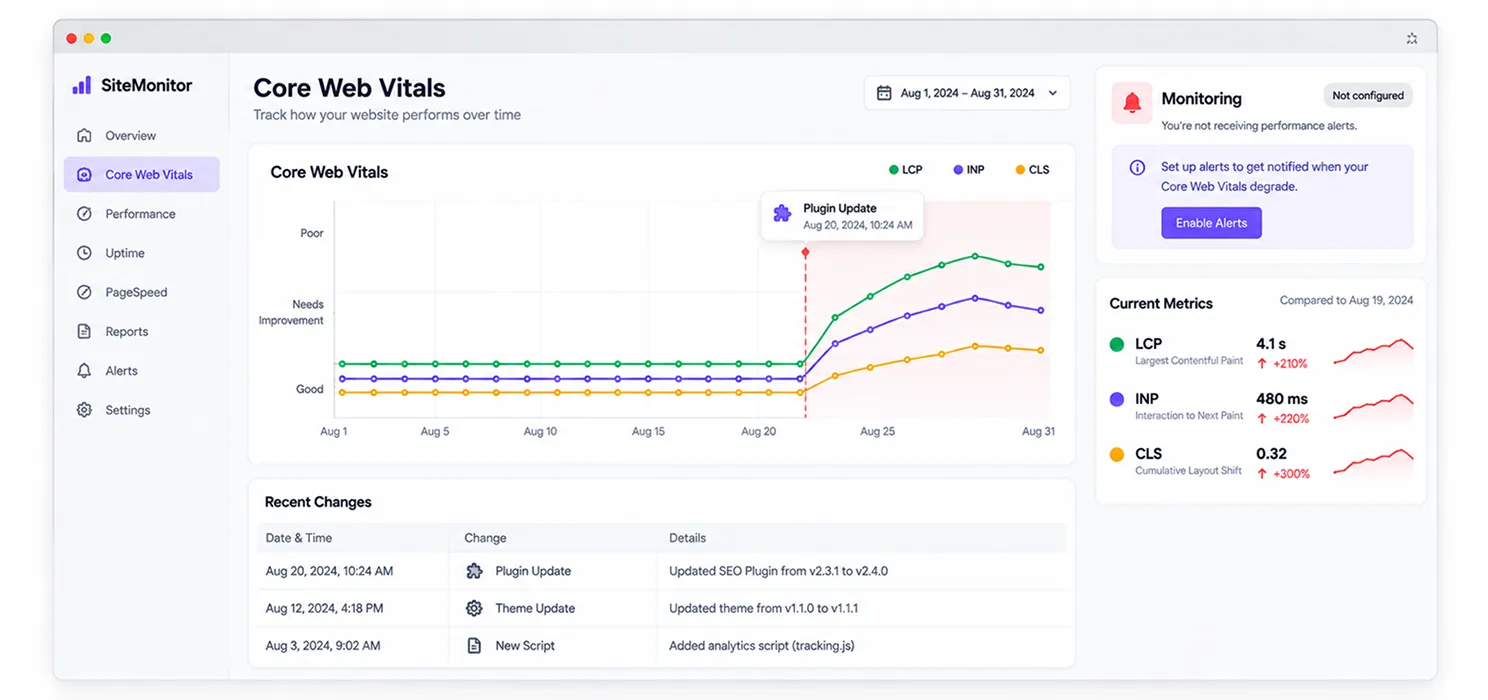
A lot of site owners only find out they’re failing Core Web Vitals when a client, an agency, or Search Console flags it sometimes months after a plugin update or new script quietly broke performance. Without ongoing monitoring, small regressions turn into serious ranking problems.
Do Core Web Vitals actually affect rankings?
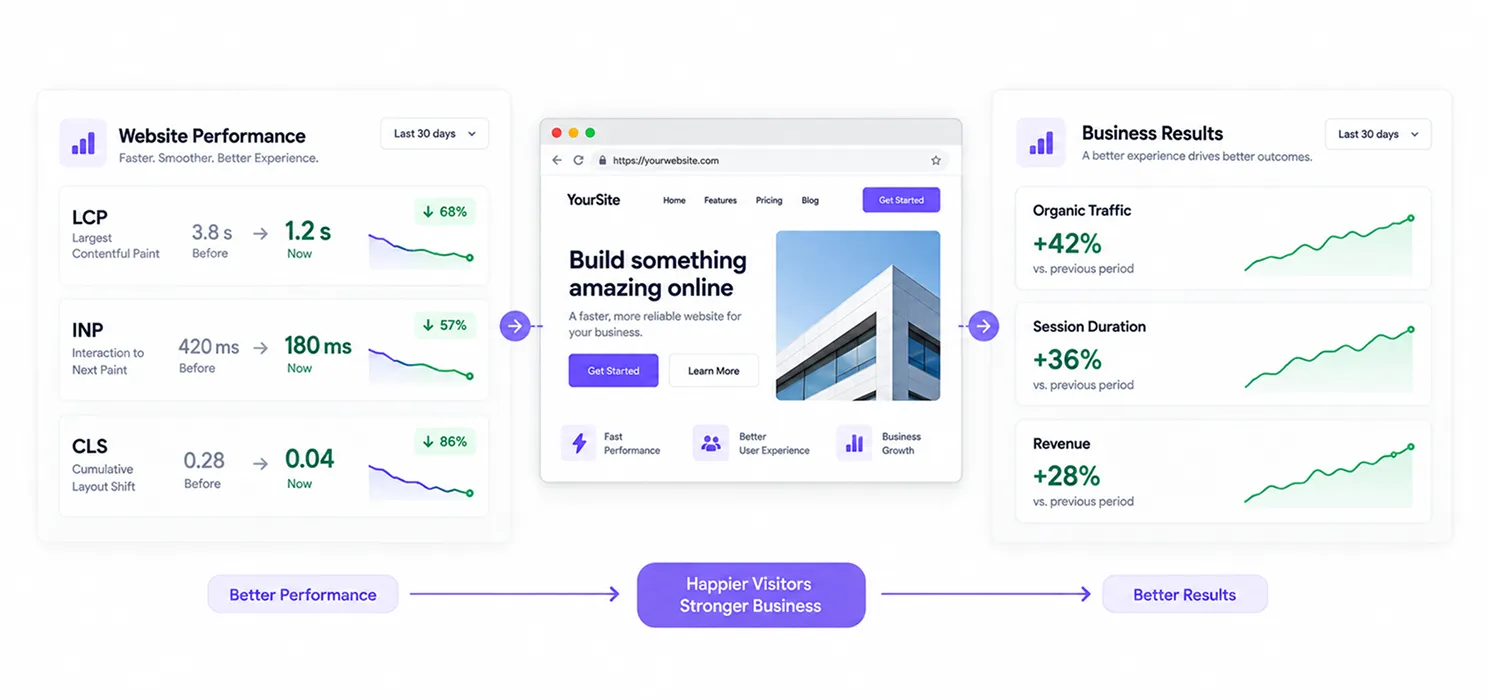
Yes, with a caveat. Google has confirmed Core Web Vitals are part of its page experience signals, and they factor into ranking as a tiebreaker between pages of similar relevance and quality. Content and relevance still carry more weight overall, but when two pages are otherwise comparable, the faster, more stable one tends to win.
More importantly, the business case is stronger than the SEO case. Google’s own published case studies are worth knowing:
- An e-commerce brand grew organic traffic by 28% after cutting LCP by 40%.
- A media platform saw a 23% increase in session duration after reducing LCP by more than half.
- A publisher increased ad revenue by 10% simply by improving CLS by 15%.
In other words, this isn’t just about pleasing an algorithm. A page that loads fast and doesn’t jump around converts better, keeps people around longer, and frustrates fewer visitors into leaving.
Who should you actually call to fix it?
This is where most site owners get stuck. Core Web Vitals problems sit at the intersection of development, hosting, and SEO, and depending on the cause, you might need one of these, or all three.
| Who You Might Call | Best For | What They Typically Fix |
| A front-end developer | Custom-coded sites, complex JavaScript issues | Long tasks blocking INP, render-blocking scripts, code splitting |
| A performance/hosting specialist | Slow server response, poor caching | Server response time, CDN setup, database optimization |
| An SEO agency with technical depth | Sites where CWV issues are tangled with broader SEO problems | Image optimization, Core Web Vitals audit service, prioritized fix roadmaps |
| A dedicated Core Web Vitals consultant | Sites that have tried DIY fixes without lasting results | Full field-data diagnosis, template-level fixes, ongoing monitoring |
If your issue is isolated, say, one bloated plugin, a developer alone might solve it in an afternoon. But if the problem is spread across templates, hosting, and third-party scripts, that’s usually when it makes sense to hire a Core Web Vitals expert who can diagnose the whole system rather than patch one symptom at a time.
What does a Core Web Vitals audit service actually do?
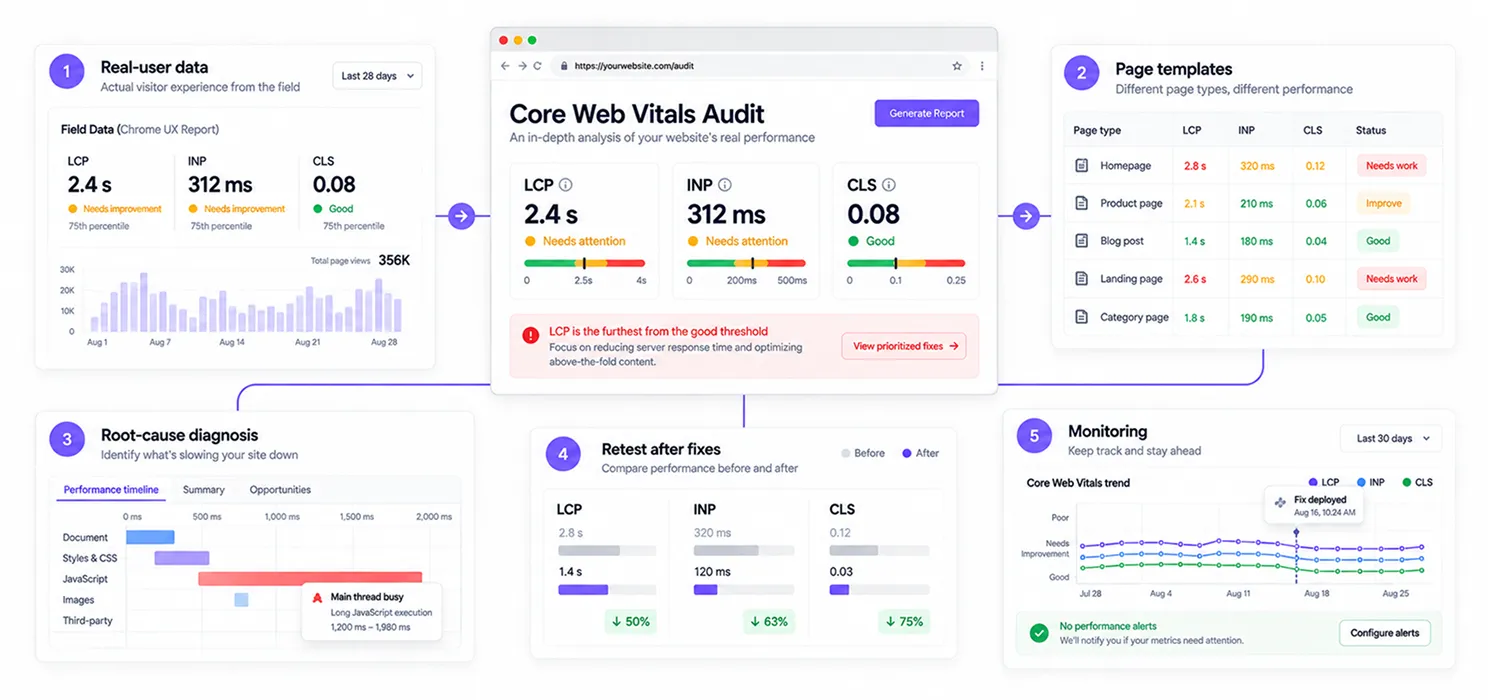
A proper Core Web Vitals audit service doesn’t just run your homepage through PageSpeed Insights and hand you a screenshot. It typically includes:
- Pulling real-user field data from Search Console and CrUX, not just lab scores
- Identifying which specific templates or page types are failing (product pages often differ wildly from blog pages)
- Diagnosing root causes using tools like Chrome DevTools’ Performance panel
- Prioritizing fixes by impact, starting with whichever metric is furthest from “good”
- Re-testing after each change, since CrUX data takes roughly 28 days to fully update
- Setting up ongoing monitoring so a future plugin update or ad script doesn’t silently undo the work
That last point matters more than people expect. Core Web Vitals aren’t a one-time fix; they’re a moving target that shifts every time you add new content, scripts, or plugins.
A quick example
Picture a mid-sized blog with a 3.9-second LCP and a CLS score of 0.3, both solidly in “poor” territory. After a focused round of fixes (image preloading, reserved ad space, critical CSS inlining), LCP dropped to 1.9 seconds, and CLS fell to 0.08. Within three months, organic traffic rose by 22%.
Nothing about the content changed. The only difference was that visitors could actually use the page without waiting or fighting a shifting layout. That’s the real lesson here: Core Web Vitals fixes are rarely glamorous, but they compound.
How to decide if you need help
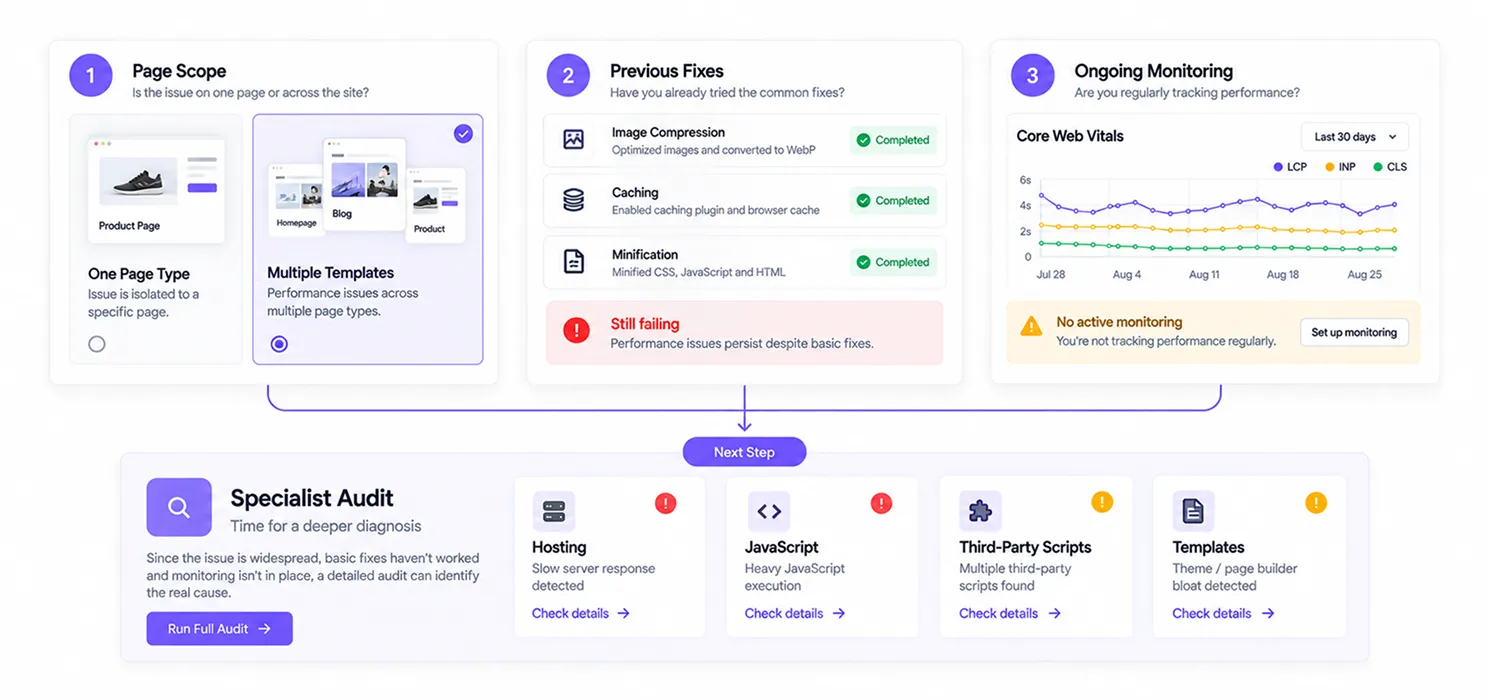
Ask yourself these three questions before hiring anyone:
- Is the issue isolated to one page type, or spread across the whole site? Widespread issues usually need a systemic audit, not a one-off fix.
- Have you already tried obvious fixes (image compression, caching plugins) without improvement? If yes, the cause is likely deeper; hosting, JavaScript, or third-party scripts.
- Do you have someone monitoring this monthly? If not, even a successful fix will likely regress within a year.
If your honest answers point to “this is bigger than a quick plugin fix,” that’s your sign to bring in a specialist rather than continuing to guess.
Can SpeedyGo help improve Core Web Vitals?
If you’re running a WordPress website, SpeedyGo can help address several of the common performance issues that affect Core Web Vitals. It combines caching, cache preloading, WebP image optimization, lazy rendering, CSS and JavaScript optimization, GZIP/Brotli compression, and other performance settings in one plugin. This can help reduce page load time, improve how quickly content appears, and reduce unnecessary work for the browser. For more complex issues involving custom code, third-party scripts, or hosting, you may still need a developer or performance specialist, but SpeedyGo can handle many of the common WordPress optimization tasks without requiring a custom development project.
Frequently Asked Questions About Core Web Vitals
Get answers to common questions about Core Web Vitals, including LCP, INP, CLS, Google Search Console errors, audits, WordPress optimization, and how to fix website performance issues.
How long does it take to fix Core Web Vitals?
Initial fixes can often be implemented within one to two weeks, but confirming the results takes longer. Google’s CrUX field data reflects a rolling 28-day window, so you won’t see your official score update immediately after deploying changes.
Can I fix Core Web Vitals myself without a developer?
Some issues, like compressing images or enabling a caching plugin, are manageable without code. But INP issues involving JavaScript execution and LCP issues tied to server response time usually require developer-level changes.
Why is my site still failing Core Web Vitals after using a speed plugin?
Speed plugins mostly address surface-level issues like caching and minification. They rarely fix the deeper causes: unoptimized JavaScript execution, poor hosting infrastructure, or third-party scripts, which is why sites often plateau despite installing every plugin available.
Is INP harder to pass than LCP and CLS?
Yes, for most sites. INP replaced First Input Delay in March 2024 and measures the full responsiveness of every interaction, not just the first one. It’s currently the metric site owners struggle with most, since fixing it often requires restructuring how JavaScript runs rather than just tweaking settings.
Do Core Web Vitals matter for mobile and desktop equally?
The thresholds are identical, but mobile is significantly harder to pass due to slower processors and network conditions. If you’re only checking desktop performance, you’re likely missing where most of your failures are actually happening.
Should I hire an SEO agency or a developer to fix Core Web Vitals?
It depends on the root cause. If the problem is code-level (unused JavaScript, poor script loading), a developer is the right call. If it’s tangled with broader technical SEO issues crawl budget, template structure, image strategy a technical SEO or a dedicated Core Web Vitals audit service is usually more efficient, since they can diagnose across both areas at once.