8 mins read
What is a CDN? Why is a CDN important for your website? The impact of using a CDN.
Share Article :


In this blog, you will learn what a CDN actually is, how it works behind the scenes, and whether it’s really worth setting one up for your own website, backed by real numbers rather than just “everyone says you should have one.”
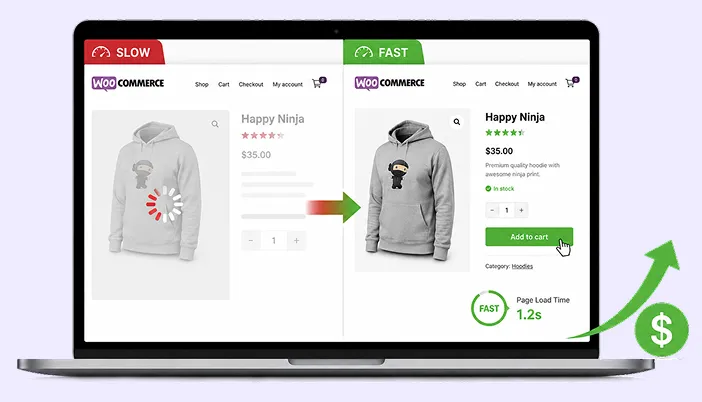
Here’s a stat that makes the case better than any explanation could: 71% of the world’s top websites already use a CDN, and on average, doing so cuts load time by around 52% and delivers content close to 3.8 times faster. That’s not a small edge. That’s the difference between a page that feels instant and one that makes a visitor wait.
So let’s actually break down what a CDN is doing to earn numbers like that, and whether your site is the kind that needs one.
What a CDN actually is ?
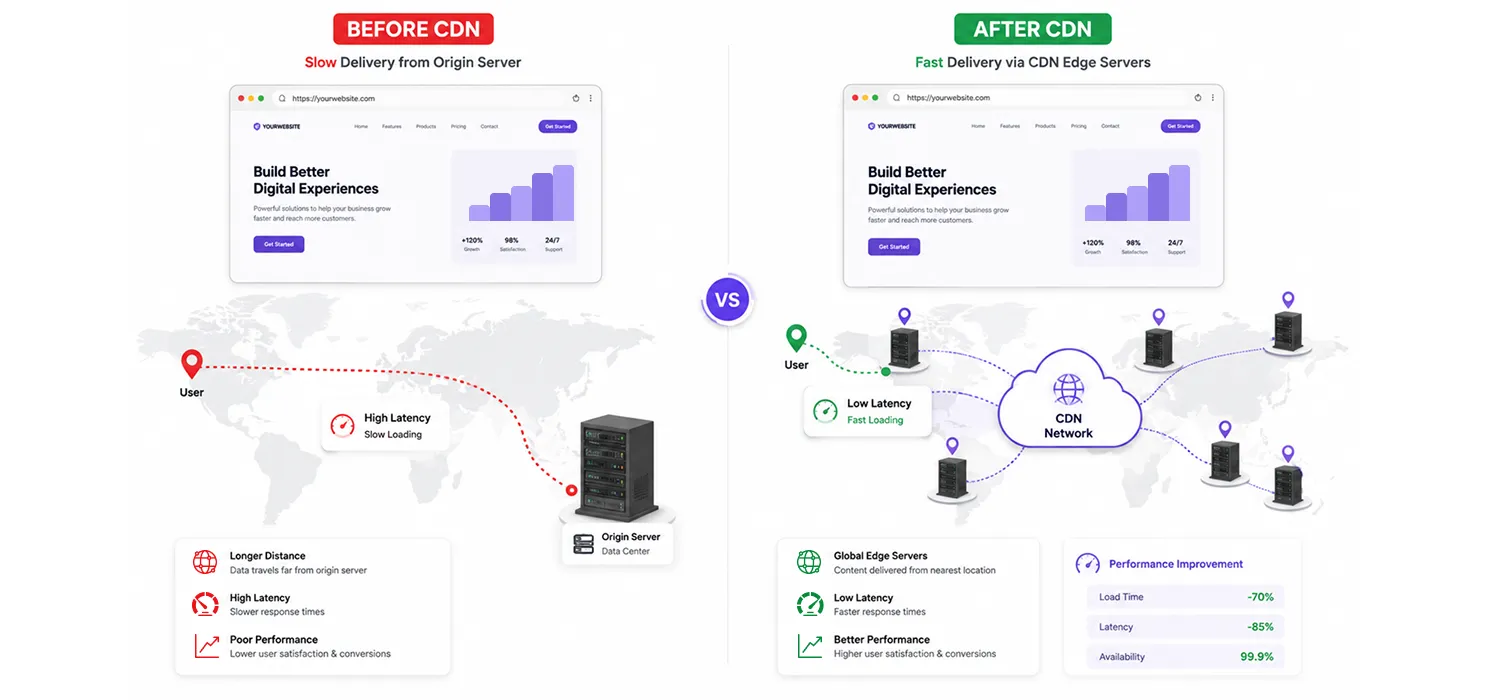
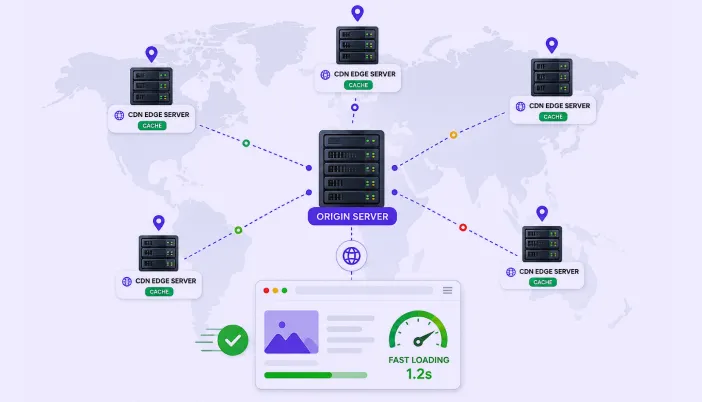
CDN stands for Content Delivery Network. In plain terms, it’s a network of servers spread out in different locations around the world, each holding a copy of your website’s files, ready to hand them to whoever is closest.
Without a CDN, every single visitor to your site, no matter where they are, has to reach your one server. If your server is in the United States and someone visits from Australia, their request has to travel that entire distance, and so does the response. That round trip takes time, and it’s pure distance, not anything you can fix with better code.
A CDN solves this by keeping cached copies of your site’s static files, like images, CSS, JavaScript, and sometimes full pages, on servers scattered across the globe. That Australian visitor gets served from a server in Sydney instead of one in Virginia, and the difference shows up immediately in how fast the page feels.
How it actually works, step by step
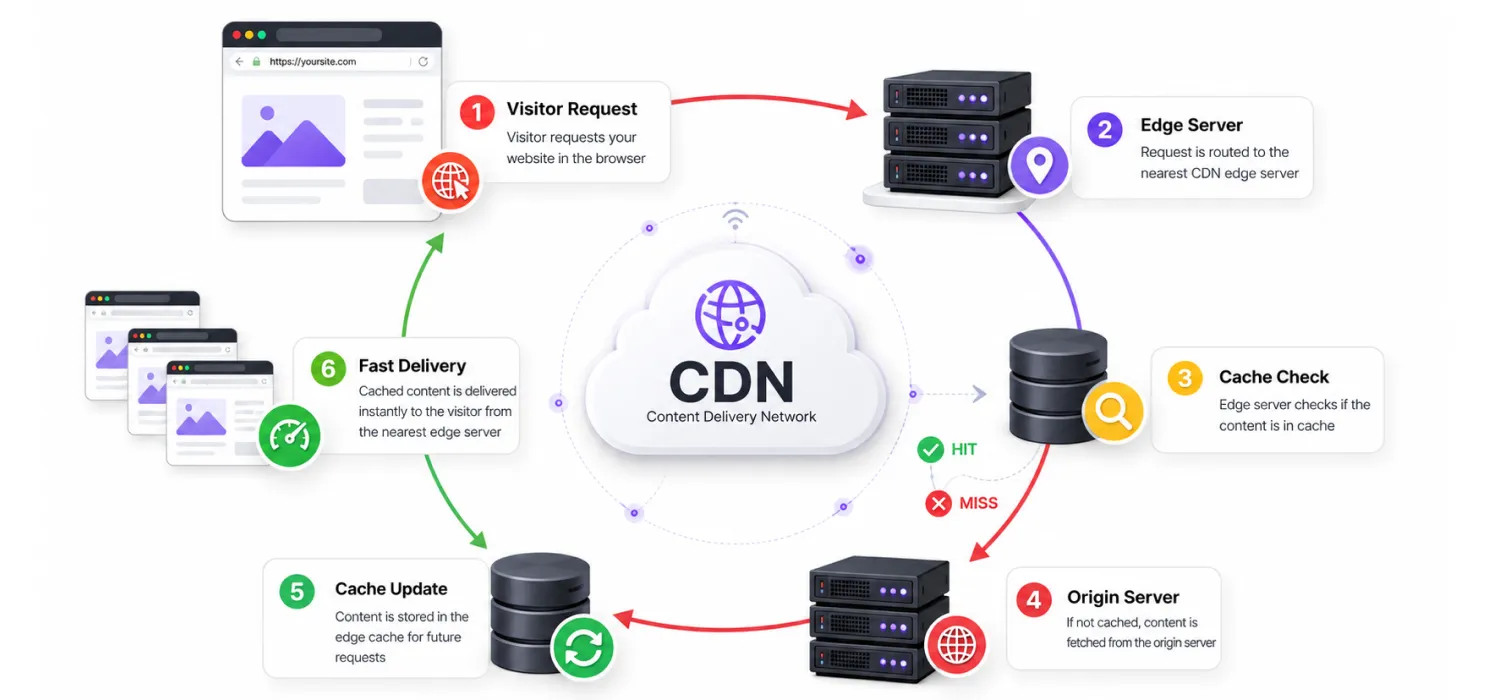
- A visitor requests your page
- Instead of going straight to your main server (called the origin server), the request goes to the nearest CDN location
- If that location already has a cached copy of what’s needed, it serves it immediately, no trip to your origin server required
- If it doesn’t have a cached copy yet, it fetches it from your origin server once, caches it, and serves it to that visitor and every visitor after them from that region
- Your origin server ends up handling far fewer requests overall, since most traffic gets served from the edge instead
| Note: A CDN doesn’t replace your hosting, it works alongside it. A CDN also works well alongside other techniques such as lazy loading, which prevents off-screen images from loading before they’re needed. Your origin server is still where your site actually lives. The CDN just reduces how often visitors have to reach it directly. |
Without a CDN vs with a CDN
| Without a CDN | With a CDN | |
| Distance to server | Every visitor reaches one location, regardless of where they are | Visitors reach a nearby edge server instead |
| Load during traffic spikes | Origin server absorbs all the traffic directly | Traffic gets distributed, reducing strain on the origin |
| Speed for distant visitors | Noticeably slower the farther someone is from the server | Fairly consistent, since content is served locally |
| Resilience during an attack | Origin server is directly exposed | CDN can absorb and filter a lot of malicious traffic before it reaches the origin |
| Typical load time impact | Baseline | Around 52% faster on average, based on industry benchmarks |
Why this actually matters for your site
Speed, for every visitor, not just the ones near your server
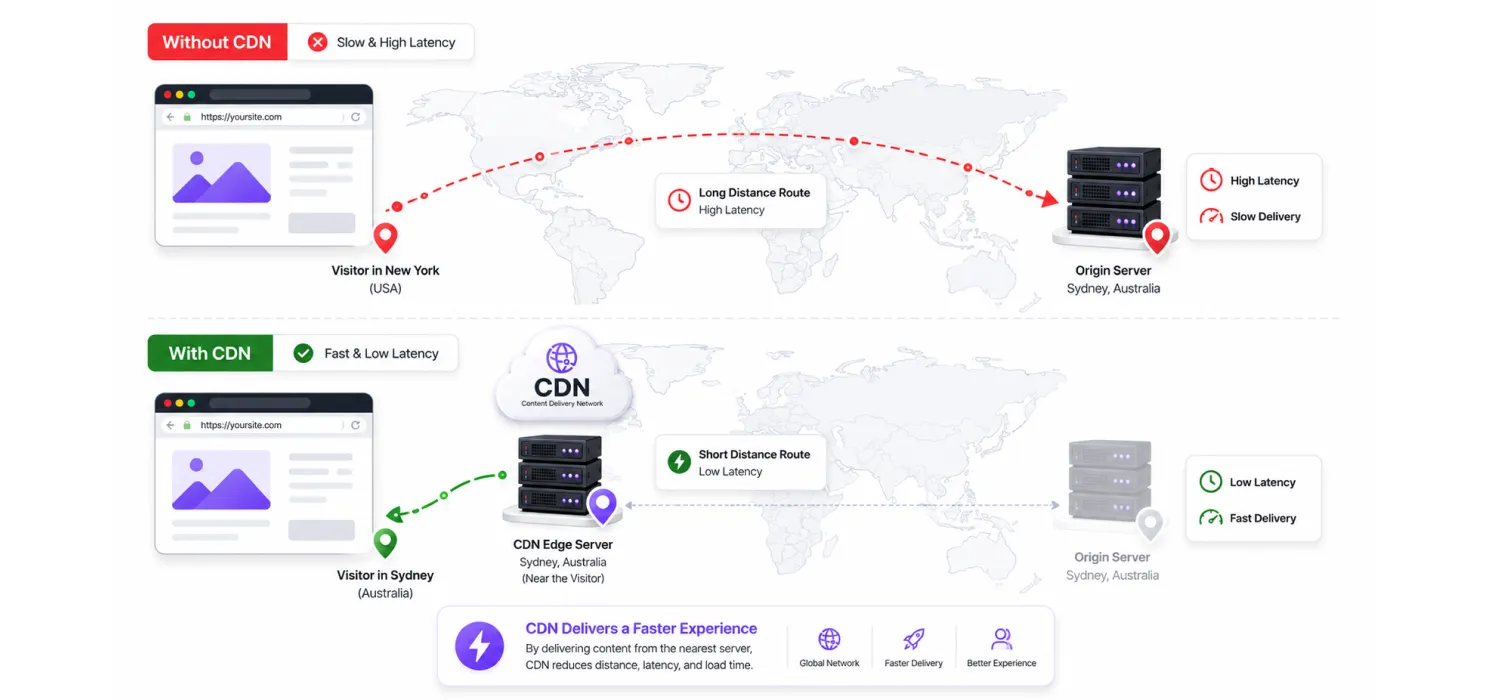
This is the most obvious impact, but it’s worth being specific about why website speed matters. Speed gains from a CDN aren’t evenly distributed. A visitor already close to your hosting server won’t notice much difference. A visitor on the other side of the world will notice a lot, since a CDN is directly solving the physical distance problem that no amount of code optimization can touch.
For image-heavy websites, using a modern format such as WebP image format can also reduce the amount of data visitors need to download.
Handling traffic spikes without falling over
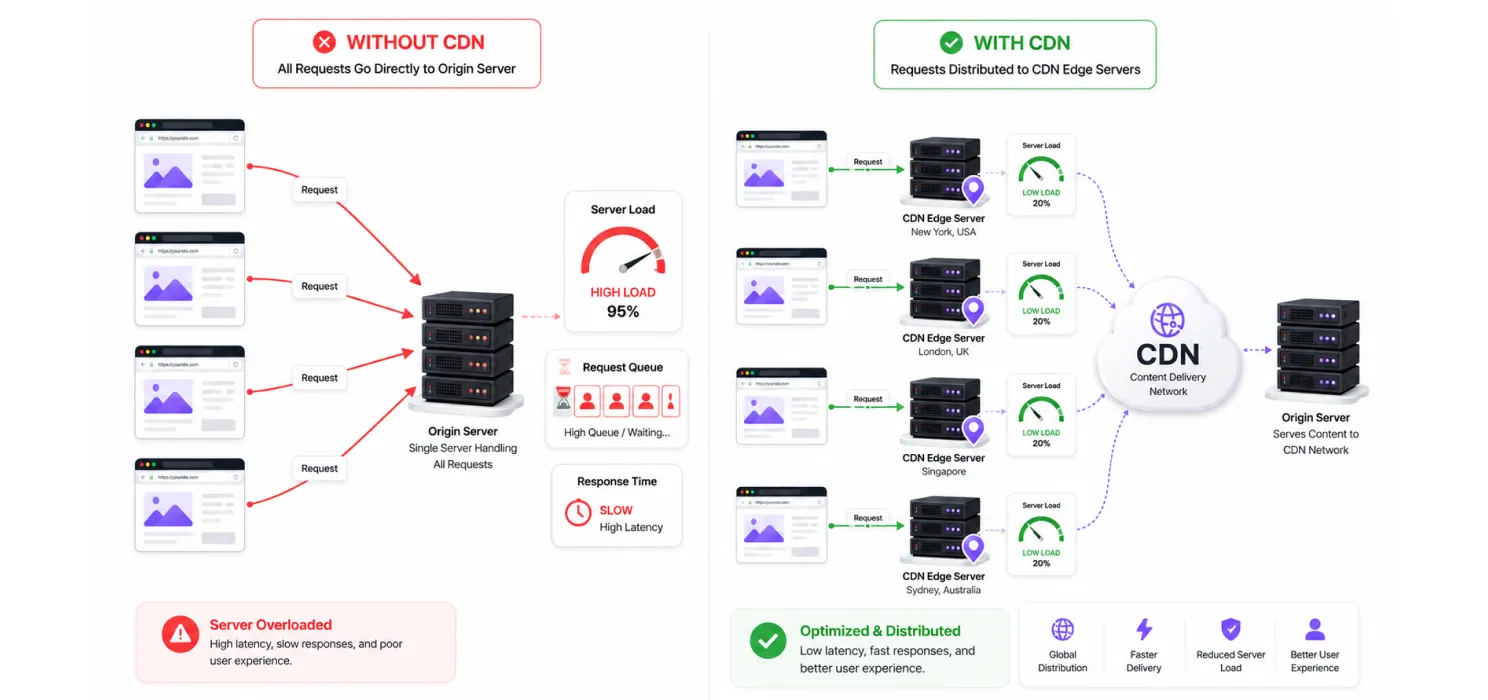
A single origin server has a ceiling on how many requests it can handle at once. A CDN spreads that load across many servers, which matters enormously the moment your traffic isn’t predictable anymore, whether that’s a viral post, a sale, or a sudden spike in interest you didn’t plan for.
Tip: If your site has ever gone down or slowed to a crawl during a traffic spike (a product launch, a press mention, a sale), that’s usually a strong sign a CDN would have meaningfully helped, even if the rest of your setup was otherwise fine.
Core Web Vitals and SEO
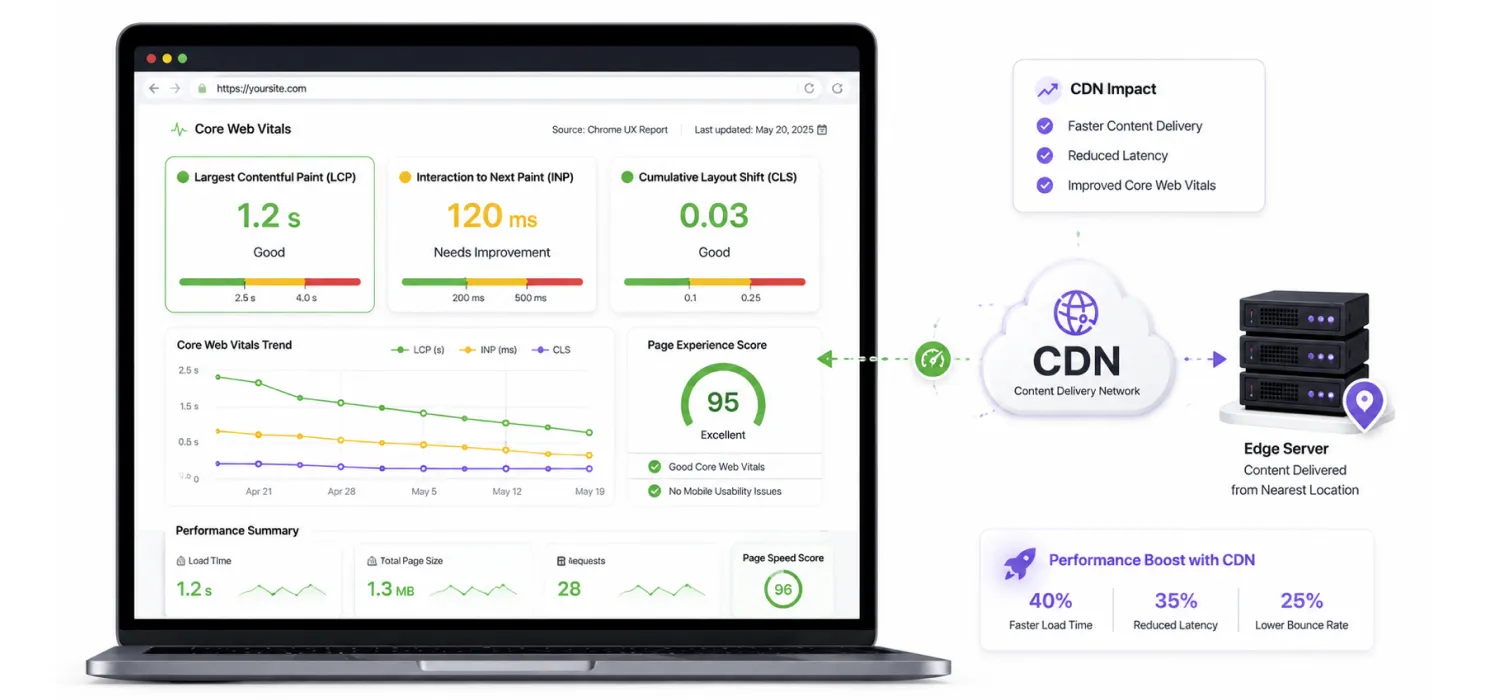
A faster TTFB and faster asset delivery both feed directly into Largest Contentful Paint, one of Google’s three Core Web Vitals. If LCP remains high after CDN setup, you may need to reduce LCP in WordPress through additional optimization. As one agency summed up the chain reaction pretty well:
“Speed improves experience, experience improves rankings, rankings improve traffic.”
That’s really the throughline. A CDN doesn’t directly boost your rankings on its own, but understanding how website speed affects SEO helps explain why these performance improvements matter.
Security, as a side benefit
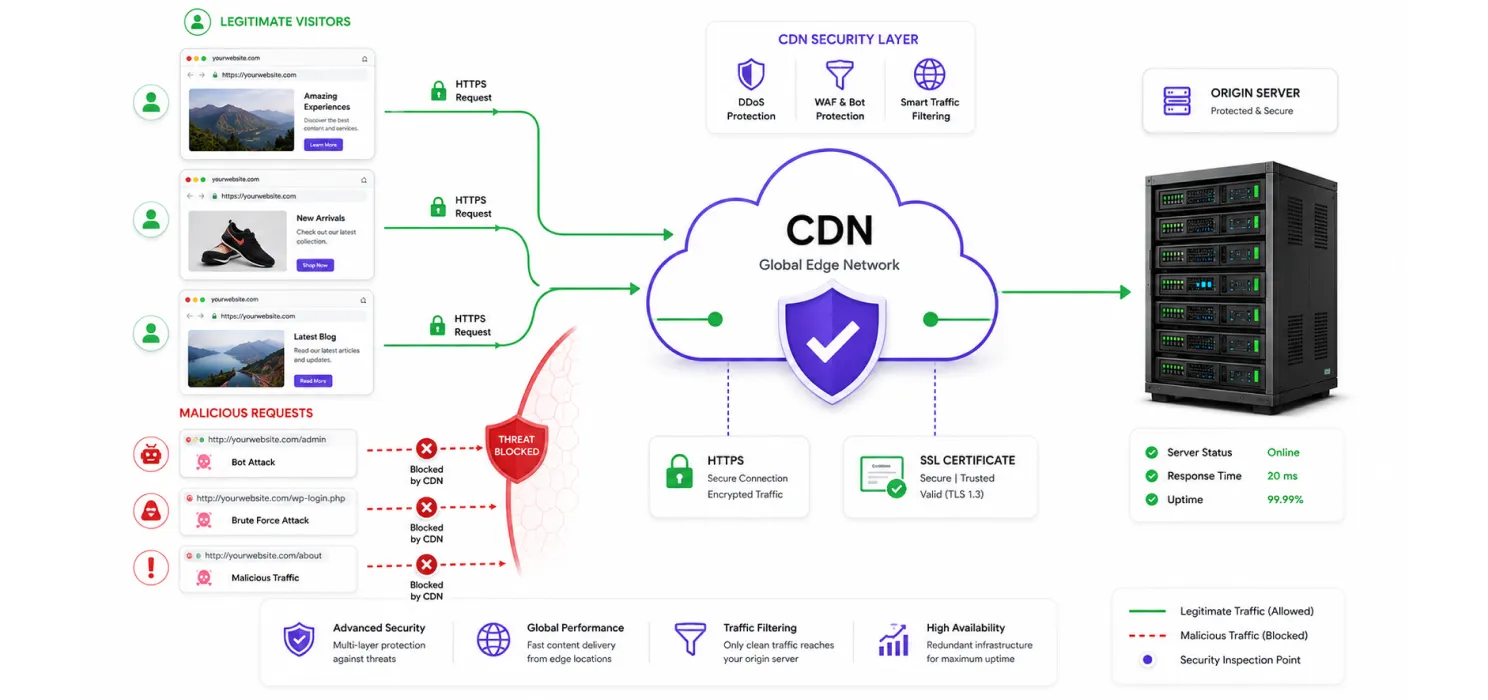
Most modern CDNs do more than just cache files. They typically include protection against DDoS attacks, filter out obviously malicious traffic before it ever reaches your server, and often bundle in a free SSL certificate as part of the setup.
Cost, on the hosting side
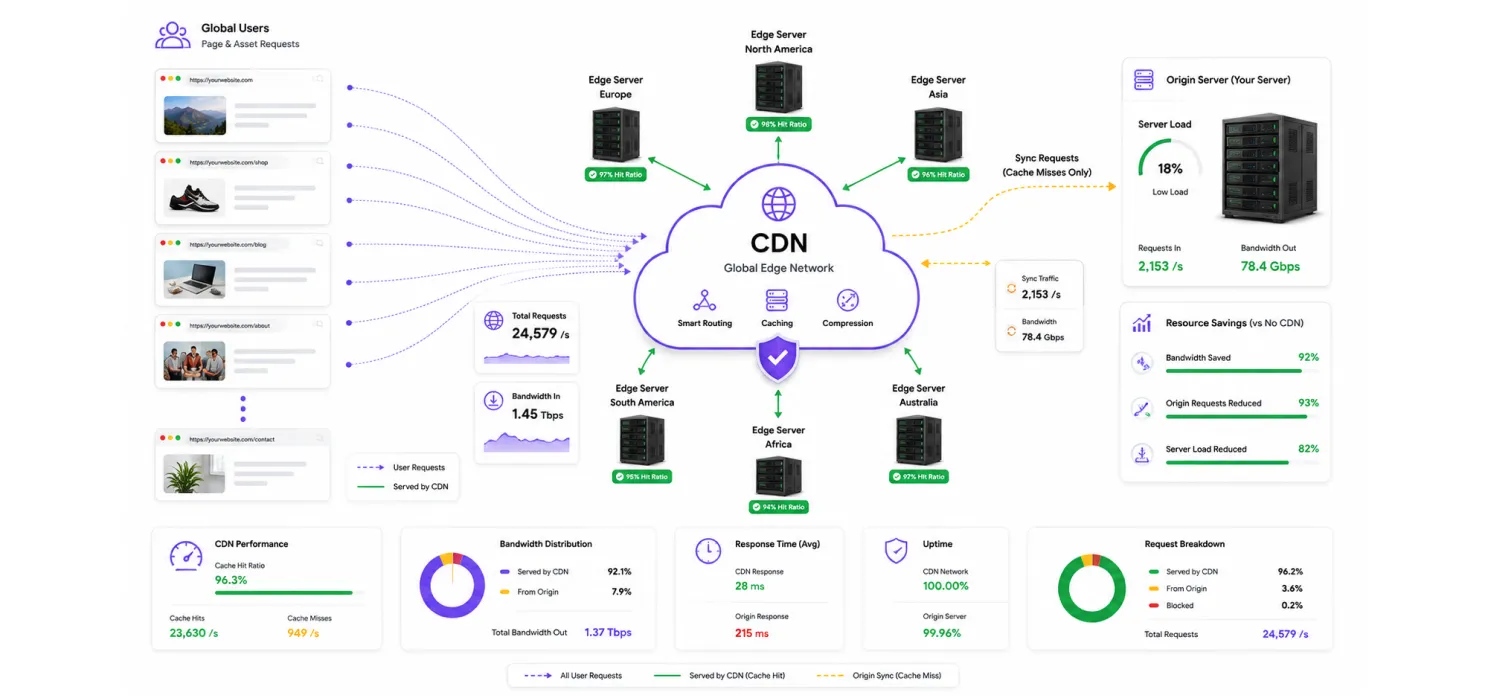
Since a CDN absorbs a large share of requests that would otherwise hit your origin server directly, it can meaningfully reduce your bandwidth usage and server load, which matters if you’re on a hosting plan with usage-based pricing or resource limits.
Do you actually need one
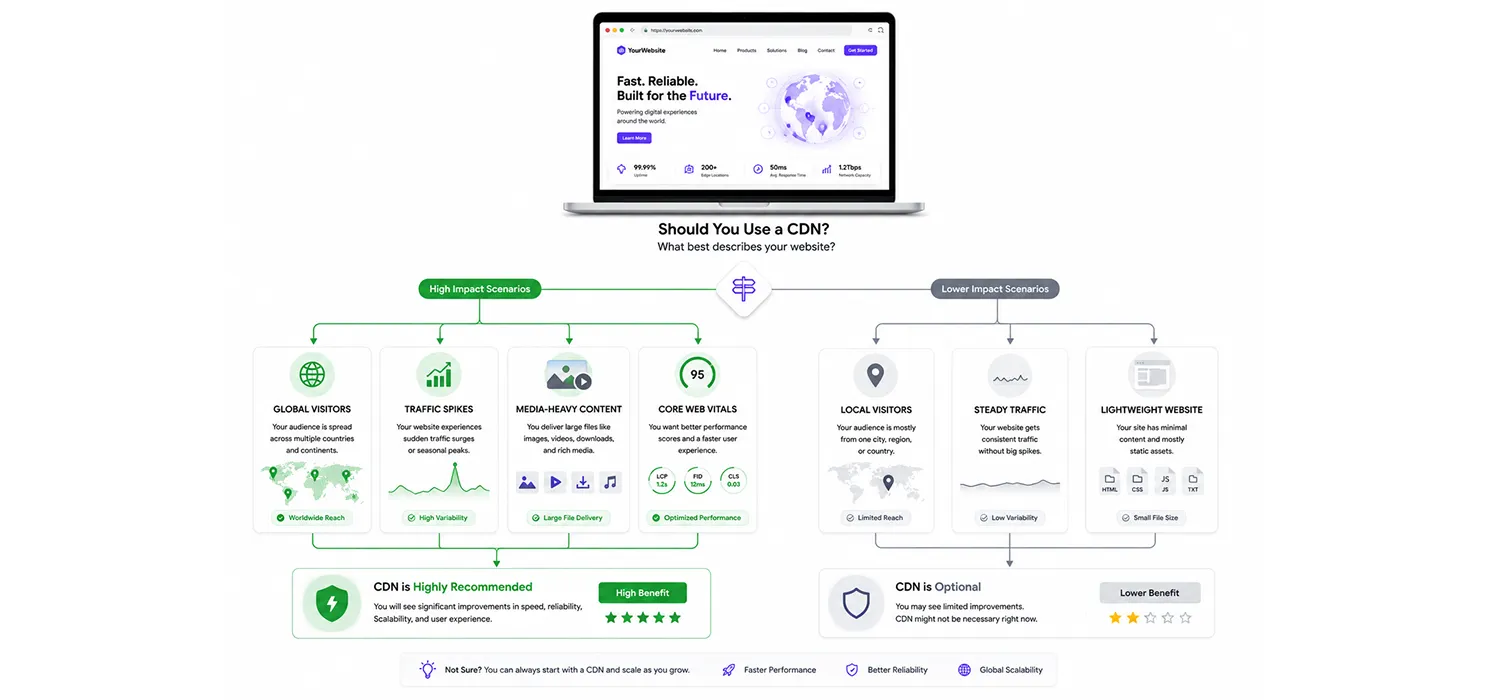
| Note: Not every site gets the same value from a CDN. A small local business site with visitors almost entirely from one region will see a smaller improvement than a site with a genuinely global or widely spread audience. |
You’re a strong candidate for a CDN if:
- Your visitors are spread across multiple countries or regions
- Your site handles unpredictable traffic spikes (sales, launches, viral content)
- You run an image-heavy or media-heavy site
- You’ve ever had downtime or slowness during a period of high traffic
- You care about Core Web Vitals scores and search rankings
You’ll see a smaller (but still real) benefit if:
- Your entire audience is local or regional, close to your hosting server
- Your traffic is small and steady, with no real spikes to worry about
- Your site is already very lightweight, with few images or static assets
If mobile visitors are still experiencing slow load times, it’s also worth investigating the reasons a website is slow on mobile, since a CDN isn’t the only factor affecting performance.
Even in the “smaller benefit” cases, most CDNs are inexpensive or free at a basic tier, so the cost of trying one is usually low compared to the potential upside.
Popular CDN options
| CDN | Known for |
| Cloudflare | The most widely used CDN overall, with a generous free tier and strong security features |
| Amazon CloudFront | Deep integration with AWS infrastructure, popular for larger, custom setups |
| Fastly | Favored for real-time content and highly configurable caching rules |
| BunnyCDN | Budget-friendly, popular specifically among WordPress site owners |
| jsDelivr | Commonly used for serving open-source libraries and static assets quickly |
Getting one set up, in general terms
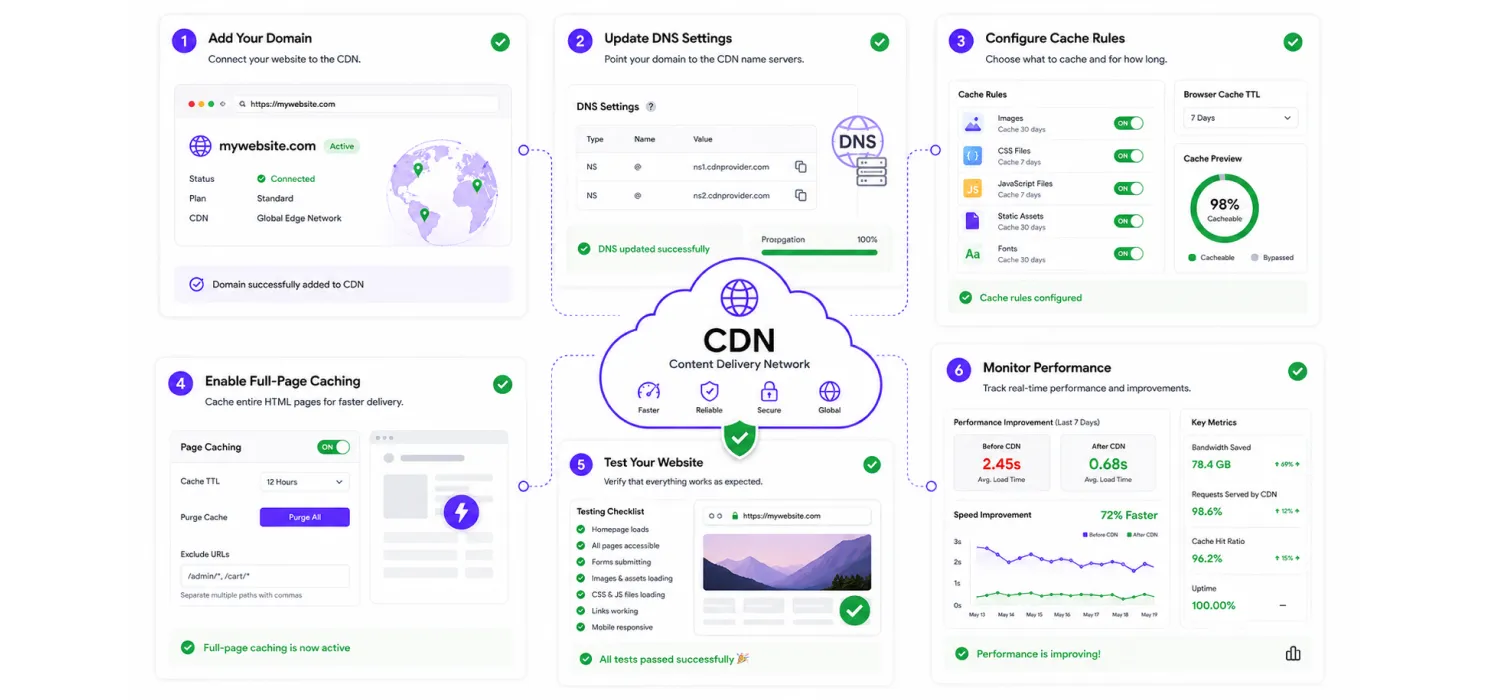
- Sign up with a CDN provider and add your domain
- Update your domain’s DNS settings to point through the CDN, most providers walk you through this step directly
- Configure caching rules for static assets like images, CSS, and JavaScript
- If your CDN supports it, enable full-page caching for logged-out visitors for an even bigger speed boost
- Test your site thoroughly after setup, checking that images, forms, and dynamic content still behave correctly
- Monitor your site’s speed before and after to confirm the improvement, rather than just assuming it worked
Wrapping up
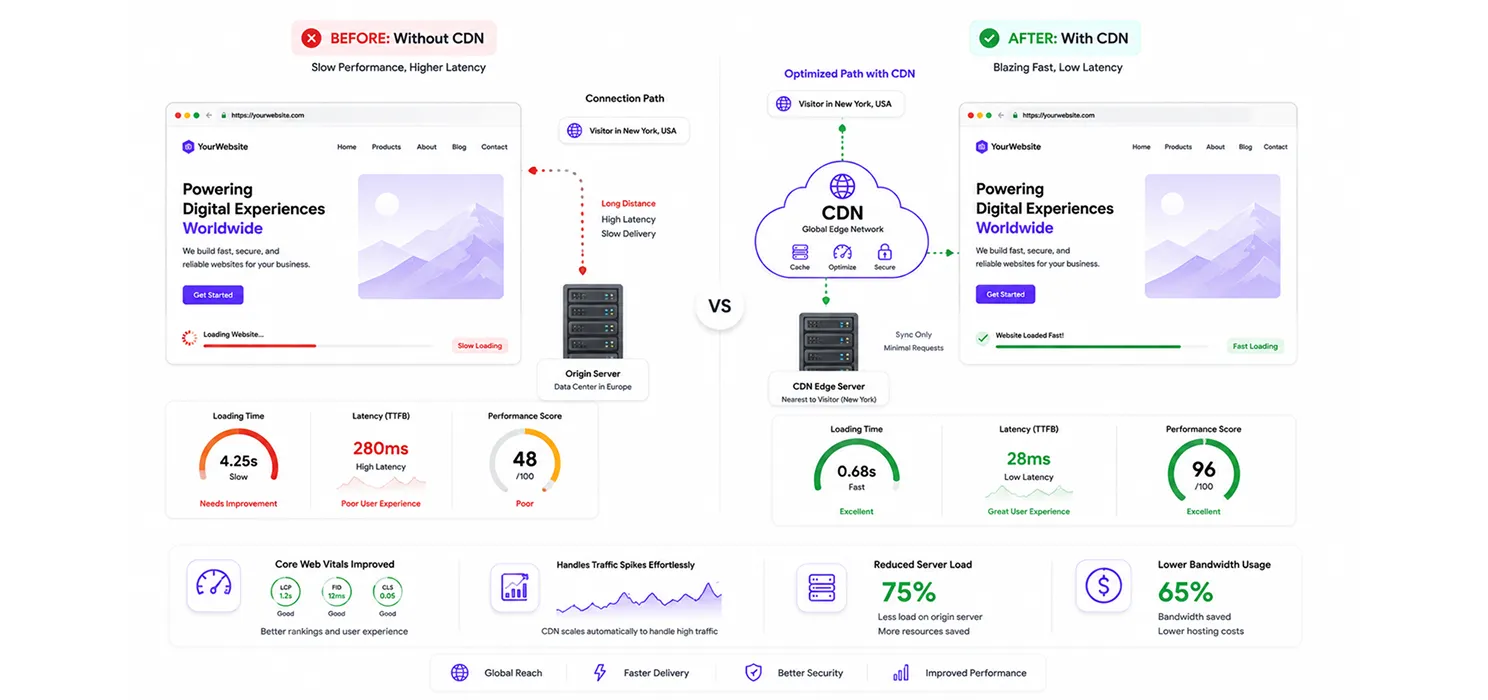
A CDN solves a problem that’s genuinely hard to solve any other way: physical distance between your server and your visitors. No amount of caching, image and code optimization, or hosting upgrades changes how far a request has to physically travel. A CDN is the tool built specifically for that gap, and the numbers behind it, faster load times, better resilience under traffic spikes, and knock-on benefits for Core Web Vitals- make it one of the more reliably worthwhile additions a website can make.
If you haven’t set one up yet, it’s usually one of the lower-effort, higher-impact changes available, especially compared to a lot of the deeper performance work a site eventually needs. If your site still needs broader optimization, there are several other ways to speed up WordPress beyond using a CDN.
Frequently Asked Questions
Is a CDN the same thing as web hosting?
No. Hosting is where your site’s files actually live. A CDN is a separate network that caches and serves copies of those files closer to your visitors. You need hosting either way, a CDN is an addition, not a replacement.
Will a CDN fix a slow website on its own?
It helps significantly with asset delivery and distance-related delays, but it won’t fix a bloated database, an unoptimized theme, or weak hosting resources. If you’re trying to speed up a slow WordPress website, a CDN is one important piece of broader WordPress speed optimization setup, not a complete fix by itself.
If you’re still dealing with performance problems after setting up a CDN, understanding the reasons your WordPress website is slow can help identify the underlying issue.
Is a free CDN good enough, or do I need a paid plan?
For most small to mid-sized sites, a free tier from a provider like Cloudflare covers the basics well. Paid plans become more relevant for larger sites needing advanced caching rules, higher traffic limits, or dedicated support.
A CDN is only one part of the setup, so you may also want to evaluate the Best WordPress Speed Optimization Plugins for additional performance improvements.
Does using a CDN mean my site's data is stored somewhere less secure?
Reputable CDN providers generally have strong security practices, often stronger than a typical single hosting server on its own, since protecting infrastructure at scale is their core business.