
Scheduled Expiration and Auto Purge are two independent mechanisms that clear stale cached pages and trigger a fresh rebuild. Together they ensure visitors never see outdated content.
Dashboard path: Cache Settings → Caching & Preloading
Section: Cache Preloading & Scheduling
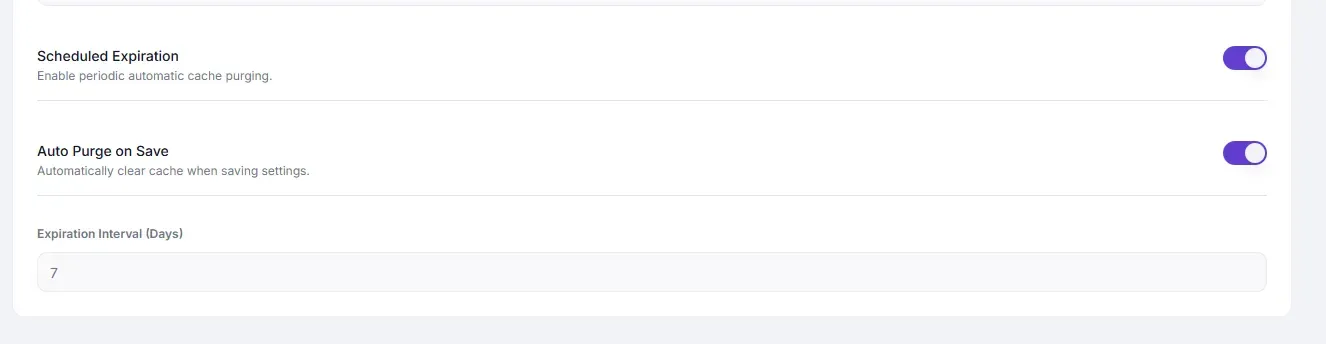
Settings #
| Setting | Type | Description |
|---|---|---|
| Scheduled Expiration | Toggle | Automatically purges all cached pages on a fixed time interval. |
| Expiration Interval (Seconds) | Number | How often the scheduled purge runs. Default: 200. |
| Auto Purge on Save | Toggle | Clears the cached version of a page or post immediately when it is saved in WordPress. |
Recommended Values #
| Setting | Recommended | Notes |
|---|---|---|
| Expiration Interval | 86400 (24 hours) | For most sites. Use 3600 (1 hour) for fast-moving news or frequently updated sites. |
| Auto Purge on Save | ON | Always enable for editorial sites — editors expect changes to appear immediately. |
How They Differ #
| Feature | What it does | Best for |
|---|---|---|
| Scheduled Expiration | Purges the entire cache on a timer regardless of content changes | Safety net — catches changes made outside WordPress (theme edits, server-side changes) |
| Auto Purge on Save | Purges only the affected page when a post/page is published or updated | Sites with active content editors |
Use both together for complete coverage.
How to Enable #
- Go to Cache Settings → Caching & Preloading.
- Under Cache Preloading & Scheduling:
- Toggle Scheduled Expiration to ON.
- Set Expiration Interval in seconds (e.g.
86400). - Toggle Auto Purge on Save to ON.
- Click Save Changes.
Troubleshooting #
| Symptom | Likely cause | Fix |
|---|---|---|
| Content changes not visible after publishing | Auto Purge on Save is OFF | Enable Auto Purge on Save |
| Old content appearing for hours | Expiration Interval too long | Lower Expiration Interval or enable Auto Purge on Save |
| Cache being rebuilt constantly | Expiration Interval too short | Increase the interval |
Tips #
Tip: Auto Purge on Save is the higher-priority setting for editorial workflows. Scheduled Expiration is a safety net — set it to
86400and forget it.
Note: Auto Purge on Save triggers per individual post/page save. Scheduled Expiration is a full-site purge. If you edit 50 pages at once, Auto Purge fires 50 times; if that is a concern, rely on Scheduled Expiration instead.


