
SpeedyGo provides four layers of JavaScript optimization: minification (smaller files), combination (fewer requests), deferral (non-blocking load), and interaction delay (maximum score boost). Each can be enabled independently.
Dashboard path: Cache Settings → Asset Optimization
Sections: Asset Optimization · CSS & JS Optimization · JS Interaction & Compression
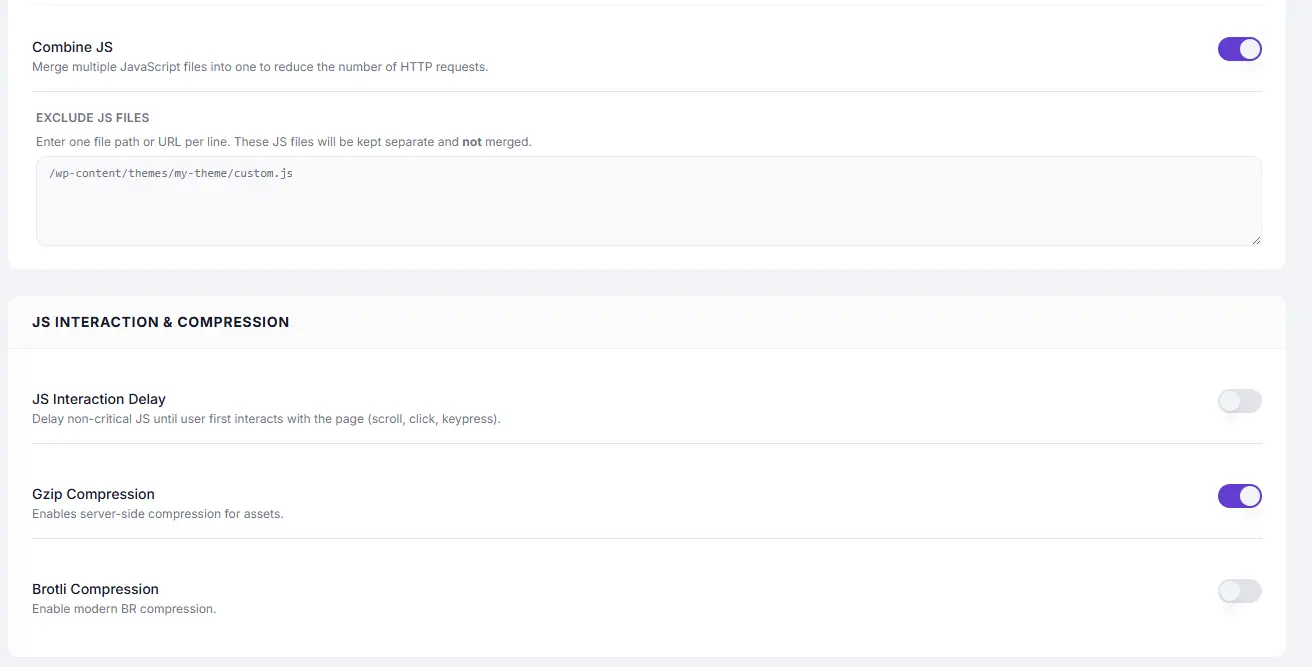
Settings Reference #
| Setting | Plan | Section | Description |
|---|---|---|---|
| JavaScript Minification | Free + Pro | Asset Optimization | Compress JS by removing whitespace, comments, and shortening variable names. |
| Combine JS | Free + Pro | CSS & JS Optimization | Merge multiple JS files into one to reduce HTTP requests. |
| Exclude JS Files (Combine) | Free + Pro | CSS & JS Optimization | Files to keep separate during combination. |
| Defer Scripts | Free + Pro | CSS & JS Optimization | Add defer to script tags — stops JS blocking page render. |
| Exclude JS Files (Defer) | Free + Pro | CSS & JS Optimization | Scripts that must execute immediately — not deferred. |
| JS Interaction Delay | Pro only | JS Interaction & Compression | Hold back all non-critical JS until user first interacts. |
| Gzip Compression | Free + Pro | JS Interaction & Compression | Server-side Gzip compression for JS and other assets. |
| Brotli Compression | Free + Pro | JS Interaction & Compression | Modern BR compression (~15–20% better than Gzip). |
JavaScript Minification #
Strips whitespace, comments, and shortens internal variable names. Safe for the vast majority of sites.
How to Enable #
- Go to Cache Settings → Asset Optimization.
- Toggle JavaScript Minification to ON.
- Save and test the site.
Combine JS #
Merges all WordPress-enqueued scripts into one file. Reduces the number of network requests, especially beneficial on HTTP/1.1.
How to Enable #
- Toggle Combine JS to ON.
- Save and thoroughly test: menus, popups, sliders, checkout, forms.
- Add problematic scripts to Exclude JS Files.
Exclude JS Files #
/wp-content/plugins/woocommerce/assets/js/frontend/
 /wp-content/themes/my-theme/critical.js
 jquery
Defer Scripts #
Adds defer to script tags so they download in parallel but execute after HTML parsing. Directly fixes the PageSpeed “eliminate render-blocking resources” warning.
See the dedicated article: Defer Scripts
JS Interaction Delay (Pro only)#
The most aggressive JavaScript optimization. All non-critical scripts are held completely until the user first interacts (scroll, click, keypress). This can dramatically improve TBT and LCP scores on the first page load.
When to Use #
| Site type | Recommendation |
|---|---|
| Blog, landing page, content site | ✅ Safe to enable |
| WooCommerce store | ⚠️ Test thoroughly — cart and checkout JS must still work |
| Site with JS-powered above-the-fold content | ⚠️ Test; may delay visible elements |
| Complex web application | ❌ Not recommended |
How to Enable (Pro) #
- Go to Cache Settings → Asset Optimization.
- Under JS Interaction & Compression, toggle JS Interaction Delay to ON.
- Save and test every interactive element on the site.
Gzip and Brotli Compression #
Server-side compression reduces the transfer size of JS (and all other) assets before they reach the browser.
| Setting | Reduction | Server requirement |
|---|---|---|
| Gzip | ~60–80% | Supported by all servers |
| Brotli | ~70–90% | Nginx 1.11.6+ or Apache with mod_brotli |
Enable both — browsers that support Brotli will use it; others fall back to Gzip automatically.
Recommended Sequence #
Enable in this order to catch issues early:
- JavaScript Minification — low risk, high reward
- Gzip Compression — universally safe
- Brotli Compression — safe if server supports it
- Combine JS — test thoroughly before and after
- Defer Scripts — test all interactive elements
- JS Interaction Delay (Pro) — test last; most aggressive
Troubleshooting #
| Symptom | Likely cause | Fix |
|---|---|---|
| Console JS errors after enabling | Combine JS or Minification conflict | Add the named script to Exclude JS Files |
| Menu / slider broken | Defer order issue | Exclude the theme’s main JS from Defer |
| Cart not updating (WooCommerce) | WooCommerce JS affected | Exclude woocommerce from Combine JS |
| Site interactive only after scroll | JS Interaction Delay holding back critical scripts | Disable JS Interaction Delay or exclude critical scripts |


