
Brotli is a modern compression algorithm developed by Google. It produces smaller compressed files than Gzip — typically 15–20% smaller for the same content — and is supported by all modern browsers. When enabled, SpeedyGo serves Brotli-compressed assets to browsers that support it, and falls back to Gzip for those that do not.
Dashboard path: Cache Settings → Asset Optimization
Section: JS Interaction & Compression
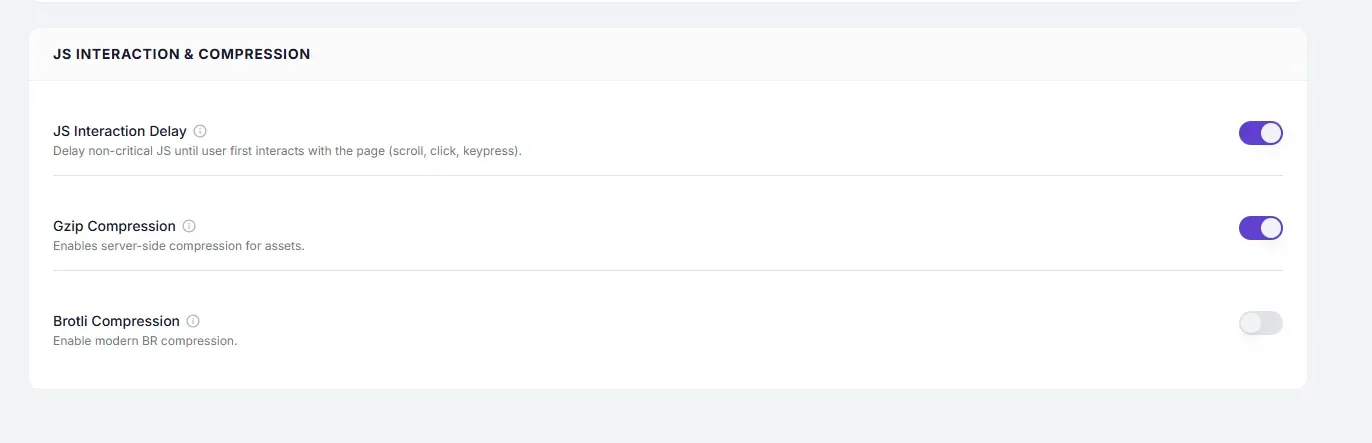
Settings #
| Setting | Type | Description |
|---|---|---|
| Brotli Compression | Toggle | Enables server-side Brotli (BR) encoding for HTML, CSS, JS, and font responses. |
Performance Impact #
| Comparison | Brotli advantage |
|---|---|
| vs uncompressed | 80–90% size reduction |
| vs Gzip | ~15–20% smaller files |
| JS files | Particularly effective — complex code compresses extremely well |
| HTML | 20–26% better than Gzip |
Browser and Server Support #
Browser Support #
| Browser | Brotli support |
|---|---|
| Chrome | ✅ Yes (since Chrome 50) |
| Firefox | ✅ Yes (since Firefox 44) |
| Safari | ✅ Yes (since Safari 11) |
| Edge | ✅ Yes |
| Internet Explorer | ❌ No — falls back to Gzip automatically |
Server Support #
| Server | Brotli requirement |
|---|---|
| Nginx | Version 1.11.6+ with ngx_brotli module |
| Apache | mod_brotli (available since Apache 2.4.26) |
| LiteSpeed | Built-in, no configuration needed |
| Cloudflare (CDN) | Built-in automatic Brotli |
Ask your host whether Brotli is enabled on your server if you are unsure. Most modern managed WordPress hosts support it.
How to Enable #
- Go to Cache Settings → Asset Optimization.
- Under JS Interaction & Compression, toggle Brotli Compression to ON.
- Click Save Changes.
- Verify: open Chrome DevTools → Network tab → click a CSS or JS file → check Response Headers for
Content-Encoding: br.
Gzip vs Brotli — Which to Enable #
Enable both. The browser sends an Accept-Encoding header listing what it supports. If the browser supports Brotli, it receives Brotli. If not, it receives Gzip. There is no conflict.
| Scenario | Result |
|---|---|
| Modern browser + Brotli ON | Receives br compressed response |
| Older browser + Brotli ON, Gzip ON | Receives gzip compressed response |
| Brotli ON, Gzip OFF, older browser | May receive uncompressed response |
Best practice: Enable both Gzip and Brotli for maximum coverage.
Troubleshooting #
| Symptom | Likely cause | Fix |
|---|---|---|
Content-Encoding: br not in response headers | Server does not have Brotli module installed | Check with your host; enable Gzip as fallback |
| Some assets use Gzip, others Brotli | Mixed server configuration | This is normal — Brotli applies where the module handles the request |
| No improvement vs Gzip | Files may already be well-compressed | Brotli’s advantage is largest on JS/HTML/CSS; binary assets (images) see minimal gain |
Tips #
Tip: Enable Brotli alongside Gzip — never as a replacement. This guarantees compression for 100% of visitors regardless of browser age.
Note: Brotli uses slightly more CPU than Gzip during compression. On very high-traffic servers, monitor CPU after enabling. On typical WordPress hosting the difference is negligible.


